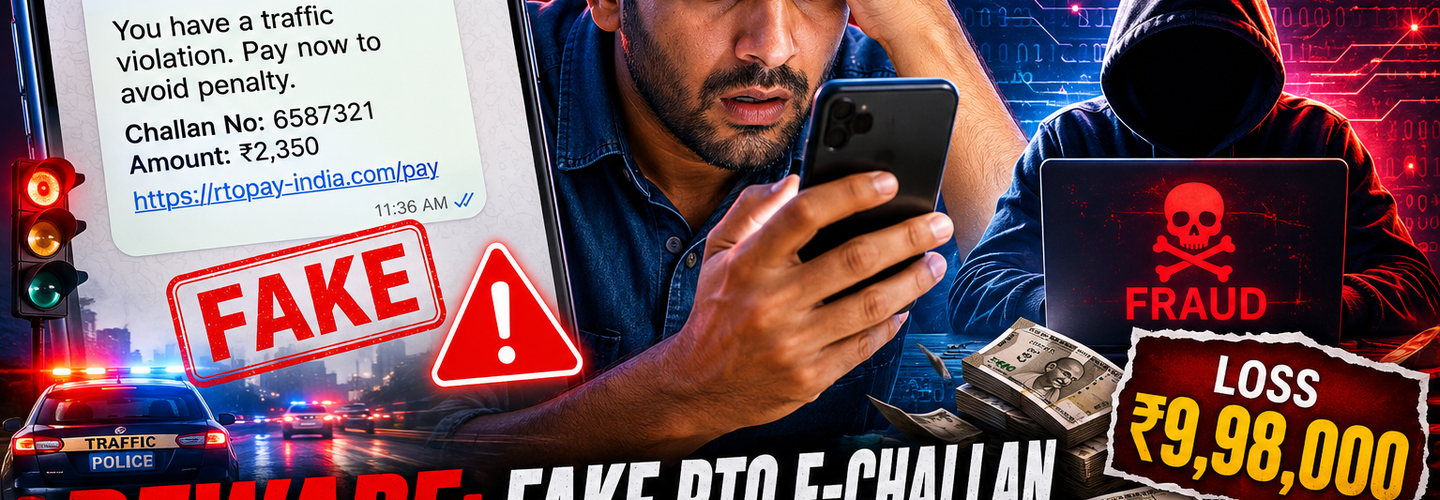
Beware: Fake RTO E-Challan Message Leads to ₹9.98 Lakh Cyber Fraud | The Complete Cybersecurity Awareness Guide
Summarize this blog post with: ChatGPT | Perplexity | Claude | Grok
Most drivers today are used to digital traffic challans and routinely receive payment notifications through SMS or government portals. What many people don't realize is that cybercriminals are exploiting that exact trust with convincing fake e-challan messages designed to drain bank accounts. In this guide, you'll learn how the ₹9.98 lakh fraud unfolded, the warning signs that expose fake RTO messages, and the precise steps you can take to protect yourself — and you can bookmark our cyber fraud prevention guide for ongoing reference.
## Key Takeaways
- ▸Fake RTO e-challan scams use fraudulent messages that impersonate transport authorities to trick victims into revealing sensitive information.
- ▸Cybercriminals commonly use phishing links, fake payment portals, and malicious APK files to steal money and credentials.
- ▸Government impersonation scams create urgency by threatening fines, license suspension, or legal action.
- ▸Official traffic challans should always be verified through authorized government portals before any payment.
- ▸Immediate action after clicking a suspicious link can significantly reduce the risk of financial loss.
- ▸Strong cybersecurity habits, including link verification and multi-factor authentication, help prevent fraud.
- ▸Fast reporting through cybercrime authorities increases the chance of limiting damage and aiding investigations.
## What Is a Fake RTO E-Challan Scam and How Does It Work?
A fake RTO e-challan scam is a phishing attack in which cybercriminals impersonate transport authorities to trick victims into making payments or revealing sensitive information. The message looks like an official traffic violation notice, but every element — the sender, the link, and the payment page — is fraudulent. The goal is simple: steal money, banking credentials, or both.
First, the attacker sends a message claiming you have an unpaid traffic fine. For example, the SMS might read "Your vehicle challan of ₹500 is pending. Pay now to avoid license suspension" with a shortened link attached. The urgency is deliberate.
Second, the scam relies on familiar branding. Fraudsters copy logos, government-style language, and even reference real services like the Parivahan portal to appear authentic. This mimicry is a classic example of SMS phishing attack examples that exploit brand recognition.
Third, cybercriminals deliver these messages across multiple channels to widen their reach. As such, victims encounter the same scam through different doorways.
- ▸SMS (smishing): Short, urgent texts with malicious links or fake sender IDs.
- ▸WhatsApp: Forwarded "challan notices" or PDF/APK attachments.
- ▸Email: Spoofed government addresses with phishing links.
Smishing attacks involve fraudulent SMS messages designed to lure users into clicking malicious links or downloading malware. That single tactic powers most of the e-challan fraud cases reported across India today.
## Why Do Fake E-Challan Scams Matter?
Fake e-challan scams matter because they cause real, large-scale financial losses and erode public trust in legitimate digital government services. A single convincing message can wipe out a victim's life savings in minutes, as the ₹9.98 lakh case demonstrates.
To put the scale in perspective, Indians reported cyber fraud losses exceeding ₹11,000 crore in the first nine months of 2024 — Source: Indian Cyber Crime Coordination Centre (I4C), 2024. Government impersonation and phishing-based frauds make up a significant share of that figure.
Moreover, these scams are rising fast. The national cybercrime helpline 1930 now handles a steady flow of complaints tied to fake government notices, and analysts tracking latest cybercrime trends in India note that impersonation fraud is among the fastest-growing categories.
In addition, the damage extends beyond money. When citizens stop trusting genuine challan notifications, they may ignore real fines or hesitate to use legitimate digital payment systems. This undermines the entire digital governance ecosystem.
## How Did a Victim Lose ₹9.98 Lakh Through a Fake E-Challan Message?
The victim lost ₹9.98 lakh because a single fraudulent e-challan message led them to install a malicious app that handed attackers full control of their banking access. The incident is a textbook case of how social engineering and malware combine into devastating financial fraud.
First, the victim received an SMS claiming a pending traffic challan with a link to "pay immediately." The message threatened penalty escalation and possible license action — pressure tactics built to short-circuit careful thinking.
Second, the victim tapped the link and was prompted to download an APK file disguised as an official RTO or challan payment app. Once installed, the malware silently requested SMS and accessibility permissions.
Third, the malicious app intercepted incoming OTPs and captured banking credentials in the background. Government impersonation fraud relies on trust and urgency to pressure victims into taking immediate action without verification.
Here is the simplified timeline of the attack:
Bait: A fake challan SMS arrives with an urgent payment threat.
Hook: The victim clicks the link and downloads a malicious APK.
Compromise: The app harvests OTPs, passwords, and banking session data.
Drain: Attackers execute multiple transactions, totaling ₹9.98 lakh.
Realization: The victim notices the unauthorized debits only after the money is gone.
By understanding this sequence, you can recognize where the chain could have been broken — and how social engineering attack techniques manipulate ordinary decisions.
## How Do Fake E-Challan Messages Actually Work?
Fake e-challan messages work by combining a believable lure with a technical payload that steals data or money. Each stage is engineered to look routine while quietly compromising the victim's device or accounts.
Fraudulent Links and Phishing Websites
Fraudulent links route victims to phishing websites that imitate official challan payment portals. For example, a fake page may copy the Parivahan design and ask for your vehicle number, card details, and OTP. Fake e-challan scams commonly combine phishing, social engineering, and malware delivery techniques to steal money and personal data. If you want to understand the mechanics, our explainer on how phishing websites steal credentials breaks down each step.
Malicious APK Downloads
Malicious APK files are fake Android apps that install spyware capable of reading SMS, OTPs, and banking activity. For example, in a similar incident, APK malware hidden in a fake wedding invite drained a Bengaluru man's bank account — the same delivery method used in challan scams. Watch for these mobile malware warning signs: unexpected permission requests, battery drain, and apps installed outside the Play Store.
Credential Theft and Banking Fraud
Credential theft happens when malware or phishing pages capture your login details and one-time passwords. For example, once attackers hold your OTP, they can authorize transfers, add beneficiaries, or empty linked accounts within minutes. Cybersecurity experts recommend never installing APK files received through unsolicited messages claiming to be government notices.
## What Are the Common Signs of a Fake E-Challan SMS?
The common signs of a fake e-challan SMS include suspicious links, urgent threats, unofficial sender IDs, and any request to install an app or share an OTP. Spotting even one of these red flags should stop you immediately.
- ▸Suspicious URLs: Shortened links, misspelled domains, or addresses that don't end in gov.in.
- ▸Urgent payment threats: Warnings about license suspension, arrest, or escalating fines.
- ▸Unofficial sender IDs: Random 10-digit numbers instead of verified government headers.
- ▸APK installation requests: Any message asking you to download an app to "view" or "pay" a challan.
- ▸Requests for OTPs or banking details: Legitimate authorities never ask for these over SMS or call.
For example, a genuine notice will direct you to echallan.parivahan.gov.in, while a fake one might use a lookalike like echallan-parivahan-pay.in. That single character difference is the scam.
## How Can You Verify Whether an E-Challan Is Genuine?
You can verify a genuine e-challan only through official government transport or traffic enforcement portals — never through the link in the message. Legitimate traffic challans can be verified only through official government transport or traffic enforcement portals.
First, open your browser and type the official address manually: echallan.parivahan.gov.in or your state traffic police portal. Never tap the link in the SMS.
Second, enter your vehicle number or challan number directly on the official site to check pending dues. This confirms whether the challan even exists.
Third, validate the payment domain before entering any details. You can inspect a suspicious domain's registration history with a WHOIS lookup and confirm its certificate using an SSL checker — fraudulent sites often have brand-new domains and weak or missing certificates.
Here's a quick genuine-versus-fake comparison:
- ▸Genuine: Official gov.in domain, no app download, payment via verified gateways, no OTP requested over message.
- ▸Fake: Lookalike or shortened URL, APK download prompt, urgent threats, requests for OTP or card PIN.
## What Should You Do Immediately After Falling for an E-Challan Scam?
If you clicked a fake e-challan link or installed a suspicious app, act within minutes — fast response is the single biggest factor in limiting financial loss. Immediate reporting of financial fraud to the cybercrime helpline and banking institution can improve the chances of limiting losses.
Disconnect the device: Turn off mobile data and Wi-Fi, then enable airplane mode to cut the malware's access.
Contact your bank immediately: Freeze accounts and cards, and dispute unauthorized transactions.
Change passwords: Update banking, email, and UPI credentials from a clean, separate device.
Uninstall the malicious app: Remove any APK you installed, then run a security scan.
Report the fraud: Call 1930 and file a complaint, following our how to report cybercrime online walkthrough.
Monitor accounts: Track statements and credit activity for weeks afterward.
For example, victims who reported transactions within the "golden hour" have, in several documented cases, had funds put on hold before attackers withdrew them.
## How Can Drivers Protect Themselves From SMS Phishing Attacks?
Drivers can protect themselves from SMS phishing by combining device security, link verification, and multi-factor authentication into daily habits. Prevention is far cheaper than recovery.
Strengthen Device and App Security
Keep your phone updated and install apps only from official stores. For example, disabling "install from unknown sources" on Android blocks most malicious APK attacks before they start.
Enable Multi-Factor Authentication
Multi-factor authentication adds a second verification layer that stops attackers even when they steal a password. For example, an app-based authenticator is harder to intercept than SMS OTPs — a core part of strong bank account security best practices.
Verify Every Link and Sender
Never tap links in unsolicited messages, and confirm sender authenticity first. For domain-level safety, our protect yourself from phishing attacks guide explains how spoofed senders are exposed, and you can test any organization's email defenses with the Email Security Checker for SPF, DKIM, and DMARC validation.
## What Tools and Reporting Channels Can Help Against E-Challan Fraud?
Several official and free tools can help you verify legitimacy and report fraud quickly. Using them turns awareness into action.
- ▸National Cyber Crime Reporting Portal: File complaints at cybercrime.gov.in.
- ▸Cybercrime helpline 1930: Report financial fraud within the golden hour.
- ▸Official transport portals: echallan.parivahan.gov.in and your state traffic police site.
- ▸ReconShield free tools: Use the WHOIS lookup, SSL checker, and vulnerability scanner to vet suspicious domains before trusting them.
- ▸Reputable mobile antivirus: Scan devices for spyware and malicious APKs.
[Insert image: Screenshot of the official Parivahan e-challan portal homepage with the verified gov.in URL highlighted | Alt text: "Verify a genuine traffic challan on the official Parivahan portal"]
[Insert image: ReconShield WHOIS lookup tool showing a newly registered suspicious domain | Alt text: "Check a suspicious e-challan domain with ReconShield WHOIS lookup"]
For broader protection, our guidance on mobile banking fraud prevention explains how mule accounts move stolen funds and how to spot the warning signs early.
## What's Next: Protecting Yourself Against Future Government Impersonation Scams
The next step is turning one-time caution into a permanent security routine, because government impersonation scams constantly evolve. Attackers will keep changing the brand they imitate — RTO today, electricity board or income tax tomorrow.
First, stay vigilant with every unsolicited message, even ones that look official. By treating urgency as a red flag rather than a reason to act, you can defuse most social engineering attempts.
Second, build security awareness habits like manual URL entry, app-store-only installs, and regular permission reviews. For ongoing learning, our cybersecurity awareness tips keep you ahead of new tactics.
Third, monitor your financial accounts regularly so you catch anomalies early. Government impersonation fraud relies on trust and urgency — consistent monitoring removes that advantage.
## Conclusion
The ₹9.98 lakh fake RTO e-challan fraud is a stark reminder that a single tap can cost a lifetime of savings. The key lesson is simple: verify before you click, and never install an app or share an OTP based on an unsolicited message. By confirming challans only through official gov.in portals, enabling multi-factor authentication, and reporting fraud to 1930 within the golden hour, you can defeat these scams before they cause damage.
By staying informed and sharing this awareness with family and colleagues, you help build a safer digital community. Bookmark ReconShield, verify suspicious domains with our free tools, and make scam-spotting a daily habit — because in cybersecurity, a moment of verification is worth far more than ₹9.98 lakh.
Written by the ReconShield Editorial Team — a cybersecurity publication covering cyber threats, data breaches, vulnerabilities, malware, threat intelligence, and online privacy, delivering practical insights to help readers stay informed and secure.
Reviewed by Surendra Reddy, Founder & Principal Security Engineer at ReconShield — a veteran cybersecurity researcher specializing in vulnerability management, network diagnostics, and attack surface analytics.
## Analyst Commentary & Implementation Blueprint
Security advisory
Continuous security exposure assessment is critical to identifying public vulnerabilities before they are exploited. Organizations should maintain a passive inventory of all web servers, TLS configs, and open ports, ensuring that default configurations are eliminated and security advisories are actively implemented.
Hardened Security Configuration Blueprint
# General Security Hardening Directive
ServerTokens ProductOnly
ServerSignature Off
FileETag None
Actionable Mitigation Checklist
- ✔Perform passive asset inventories weekly.
- ✔Restrict administrative ports using local firewall controls.
- ✔Monitor active CVE alerts for exposed software.
Common Inquiries & FAQs
Why is passive scanning preferred for continuous auditing?
Passive audits do not cause operational impact or trigger firewall blocks, making them ideal for constant surveillance of internet-facing assets.
What should I do if a vulnerability is flagged?
Apply the latest vendor patches, restrict access to the resource via firewalls, or verify configuration flags to mitigate risks.
Surendra Reddy
Surendra Reddy is a cybersecurity researcher and founder of ReconShield, specializing in OSINT and defensive infrastructure analysis.
Connect on LinkedIn ↗// AUDIT BRIEFING DISCUSSION (2 COMMENTS)
Great breakdown of the passive infrastructure vectors. We recently audited our external DNS zones and found multiple dangling staging environments. Implementing wildcard certificates reduced our CT log leaks significantly.
Is there any automated tooling you recommend for daily crt.sh scraping? Manually checking CT logs is becoming unsustainable for our domain portfolio.
// MORE ARTICLES
Security Researchers Warn Critical n8n Flaws May Expose Automation Platforms to RCE
Researchers have disclosed critical vulnerabilities in n8n that could expose automation workflows and connected enterprise systems to remote code execution risks, prompting urgent patch recommendations for users and administrators.

How Agentic AI Is Changing Software Engineering and Expanding Mobile Attack Surfaces
Agentic AI is rapidly transforming software engineering workflows through automation and intelligent coding assistance, while cybersecurity experts warn of expanding mobile attack surfaces and emerging application security risks.

SplitVPN Hacked: Data Breach Exposes 865,000 User Records and 58 Million Hidden Connection Logs (July 2026)
SplitVPN hacked: 865,336 user records and 58 million connection logs exposed, directly contradicting the VPN's "no-logs" promise. What was leaked and what to do now.