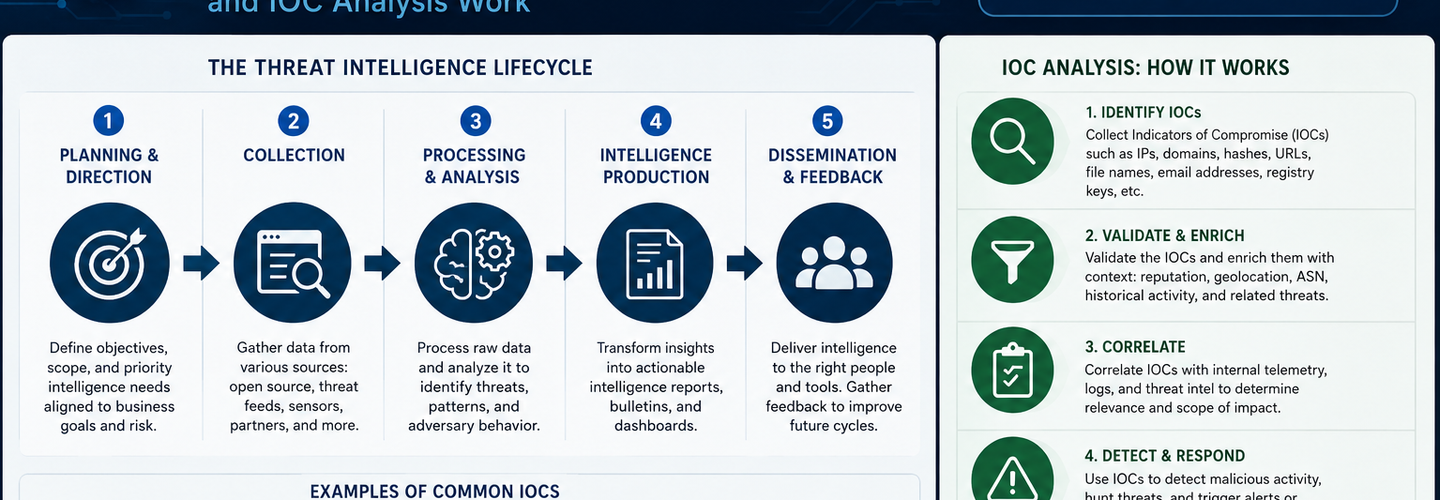
Beginner's Guide to Threat Intelligence: How Cyber Threat Intelligence and IOC Analysis Work
Summarize this blog post with: ChatGPT | Perplexity | Claude | Grok
You probably already know that cyberattacks like ransomware, phishing, and malware are growing more sophisticated every year. What many beginners miss is how security teams actually predict, detect, and analyze these threats before major damage occurs. In this guide, you'll learn the fundamentals of threat intelligence, how IOC analysis works, and how cybersecurity professionals use threat data to defend modern systems.
## Key Takeaways
- ▸Threat intelligence transforms raw security data into actionable insights that help organizations detect and prevent cyberattacks before damage occurs.
- ▸Cyber threat intelligence includes four distinct types — strategic, tactical, operational, and technical — each serving a different audience within a security team.
- ▸Indicators of Compromise (IOCs) are forensic artifacts such as malicious IP addresses, file hashes, suspicious domains, and registry changes that signal potential attacks.
- ▸IOC analysis helps security analysts identify, validate, and correlate malicious activity across networks and endpoints to detect active or historical threats.
- ▸Open-source platforms like VirusTotal, AbuseIPDB, and AlienVault OTX provide beginner-friendly environments to start practicing IOC investigation immediately.
- ▸Effective threat intelligence programs rely on a continuous lifecycle of data collection, analysis, dissemination, and feedback improvement.
- ▸Beginners can start learning threat intelligence through hands-on IOC analysis, free threat feeds, and frameworks like MITRE ATT&CK.
## What Is Threat Intelligence in Cybersecurity?
Threat intelligence is the process of collecting, analyzing, and contextualizing security data to identify and prevent cyber threats before they cause harm. It transforms raw, unstructured security events into organized, actionable knowledge that security teams can act on. Without threat intelligence, defenders are essentially reacting to attacks blind — with no advance warning and no structured understanding of attacker behavior.
Cyber threat intelligence specifically focuses on threats originating from human adversaries — nation-state groups, criminal organizations, hacktivists, and insider threats. It answers the critical questions every security team needs answered: Who is targeting us? What tactics are they using? What systems are at risk? When are they likely to strike? The difference between raw threat data and actionable intelligence is context. A raw log entry showing a connection from an IP address is data. Knowing that IP is associated with a specific ransomware group targeting healthcare organizations is intelligence.
The Four Types of Threat Intelligence
Threat intelligence is divided into four types — strategic, tactical, operational, and technical — each designed for a different audience and decision-making level within an organization.
Strategic threat intelligence focuses on high-level trends, geopolitical risk, and long-term threat patterns. It is typically consumed by executives and board members to inform cybersecurity investment decisions. For example, a strategic intelligence report might highlight that ransomware attacks against financial institutions increased 42% in the past year — Source: IBM X-Force Threat Intelligence Index, 2024.
Tactical threat intelligence covers attacker Tactics, Techniques, and Procedures (TTPs) — the specific methods threat actors use to infiltrate systems. Security architects and senior analysts use tactical intelligence to improve detection rules and defensive architecture. The MITRE ATT&CK framework is the most widely used structured taxonomy for documenting and sharing tactical threat intelligence.
Operational threat intelligence provides context about specific, active attack campaigns — who is behind them, what infrastructure they're using, and which organizations are being targeted right now. SOC teams and incident responders rely on operational intelligence to prioritize their responses during active security events.
Technical threat intelligence consists of machine-readable, actionable indicators — malicious IP addresses, file hashes, domains, and email artifacts — that can be fed directly into security tools to trigger automated detections. This is the type of intelligence most relevant to beginner analysts, and it's the foundation of IOC analysis.
## Why Is Cyber Threat Intelligence Important for Organizations?
Cyber threat intelligence is important because it shifts cybersecurity from a reactive posture to a proactive one, enabling organizations to detect attacks earlier, respond faster, and prevent incidents that would otherwise cause significant damage. Without intelligence, security teams spend their time responding to alerts after the damage is already done. With it, they can identify threats at the earliest stages of an attack.
The statistics here are sobering. The average time to identify a data breach in 2023 was 204 days, with another 73 days to contain it — Source: IBM Cost of a Data Breach Report, 2023. Threat intelligence directly attacks that 204-day window. Organizations with mature threat intelligence programs detect breaches significantly faster because they're actively hunting for known attacker infrastructure and behaviors rather than waiting for damage-triggered alerts.
Threat Intelligence and SOC Operations
Threat intelligence is the operational backbone of a Security Operations Center (SOC), providing analysts with the context needed to distinguish genuine threats from the thousands of false-positive alerts generated daily. A typical enterprise SOC processes tens of thousands of security events per day. Without intelligence to prioritize and contextualize those events, analysts suffer from alert fatigue — the condition where the sheer volume of alerts causes real threats to get missed.
For example, an IP address triggering a firewall alert means almost nothing in isolation. But when a threat intelligence feed flags that same IP as a known command-and-control server used in active ransomware campaigns, the alert immediately becomes a high-priority incident. This is the practical value threat intelligence delivers to SOC teams every single day. Understanding how these attacks arrive is equally critical — the Microsoft Teams helpdesk impersonation attack analysis on ReconShield is a real-world example of exactly the kind of tactical intelligence SOC teams use to build detection rules.
Preventing Ransomware and Phishing Attacks
Threat intelligence dramatically improves an organization's ability to prevent ransomware and phishing attacks by providing advance warning of attacker infrastructure, phishing domains, and malicious payloads before they reach end users. Ransomware operators typically conduct extensive reconnaissance and infrastructure setup days or weeks before launching an attack. Intelligence about their staging domains and command-and-control IPs can be used to proactively block those resources before the attack begins.
Phishing campaigns similarly leave observable traces — newly registered lookalike domains, suspicious MX record configurations, and SSL certificates created hours before a campaign launches. Monitoring these signals through DNS security analysis and threat feeds gives defenders a critical early warning advantage. According to Verizon's DBIR, phishing was involved in 36% of all data breaches in 2023 — Source: Verizon Data Breach Investigations Report, 2023.
## How Does the Threat Intelligence Lifecycle Work?
The threat intelligence lifecycle is a continuous, six-phase process consisting of planning, collection, processing, analysis, dissemination, and feedback — each phase feeding into the next to create a self-improving intelligence capability. Understanding this lifecycle is essential because it explains why effective threat intelligence is never a one-time activity. It's an ongoing operational discipline.
[Insert image: Circular diagram showing the six phases of the threat intelligence lifecycle with arrows connecting each phase | Alt text: "Threat intelligence lifecycle phases diagram for SOC analysts"]
Phase 1: Planning and Direction
Planning defines what intelligence your organization actually needs — which threats are most relevant, which assets require the most protection, and what questions the intelligence program must answer. Without clear direction, intelligence teams collect massive amounts of data that nobody acts on. For example, a healthcare organization's planning phase might prioritize intelligence about ransomware groups known to target hospitals and medical record systems.
Phase 2: Data Collection
Data collection involves gathering raw threat data from multiple sources — internal network logs, open-source intelligence feeds, commercial threat subscriptions, government advisories, and community-sharing platforms like ISACs. The quality of intelligence output directly depends on the breadth and reliability of collection sources. Effective collection combines internal telemetry (your own logs and alerts) with external context (what threats exist in the broader landscape).
ReconShield's live IP threat intelligence feed continuously surfaces real-time indicators from 50+ threat databases, providing exactly the kind of external collection layer that complements internal SIEM telemetry. Open-source intelligence gathering — explored in depth in the DNS Intelligence guide for cybersecurity researchers — is a critical collection technique every beginner should master.
Phase 3: Processing and Analysis
Processing converts raw collected data into structured, contextualized intelligence by normalizing formats, removing duplicates, correlating related indicators, and applying analytical frameworks to identify patterns and attacker intent. This is where a list of suspicious IP addresses becomes an understanding of a specific threat actor's infrastructure and targeting patterns.
Analysis answers the "so what" question. A file hash from a malware sample is data. Knowing that hash belongs to the LockBit ransomware family, which specifically targets manufacturing companies using unpatched VPN appliances, is intelligence. Understanding how vulnerabilities like the Palo Alto PAN-OS authentication bypass get incorporated into active attack campaigns is exactly the analytical context that elevates raw data into usable intelligence.
Phases 4–6: Dissemination, Feedback, and Continuous Improvement
Dissemination delivers finished intelligence to the right consumers in the right format — technical indicators go to SIEM platforms and firewalls, tactical reports go to security architects, and strategic summaries go to executives. The final phase, feedback, closes the loop: consumers tell the intelligence team whether the intelligence was accurate, actionable, and timely — driving continuous improvement of the entire program.
## What Are Indicators of Compromise (IOCs)?
Indicators of Compromise (IOCs) are forensic artifacts — specific, observable pieces of evidence — that indicate a system has been compromised or is communicating with malicious infrastructure. IOCs are the concrete, technical building blocks of threat intelligence analysis. They are what analysts actually hunt for when investigating a potential incident.
IOC analysis involves collecting, validating, and correlating indicators to detect active or historical cyberattacks. A single IOC rarely tells a complete story. But when multiple IOCs from the same threat actor are observed together — a malicious domain, a command-and-control IP, and a known malware hash all appearing in the same investigation — the evidence becomes highly compelling.
Common Examples of Threat Intelligence Indicators
The most common IOC categories include network-based indicators, host-based indicators, and behavioral indicators — each providing a different lens through which to view potential malicious activity.
Network-based IOCs are the most immediately actionable for most analysts:
- ▸Malicious IP addresses — IP addresses known to host command-and-control servers, send spam, or conduct scanning campaigns. You can cross-reference suspicious IPs against 50+ threat databases instantly using ReconShield's IP Lookup Tool.
- ▸Suspicious domains — Lookalike domains, newly registered phishing sites, or domains associated with known malware families. ReconShield's WHOIS Lookup Tool reveals registration age, registrant patterns, and infrastructure details that reveal malicious intent.
- ▸Anomalous DNS queries — Devices making DNS requests to known malicious domains or using domain generation algorithms (DGAs) to locate C2 servers. The DNS Lookup Tool lets analysts audit DNS configurations and detect spoofing-prone misconfigurations.
Host-based IOCs live on the affected system itself:
- ▸File hashes (MD5, SHA-1, SHA-256) — Cryptographic fingerprints of malicious files. A hash uniquely identifies a malware sample regardless of its filename, making it one of the most reliable IOC types.
- ▸Registry changes — Malware frequently modifies Windows registry keys to establish persistence. Unexpected registry entries in known persistence locations (like HKEY_CURRENT_USER\Software\Microsoft\Windows\CurrentVersion\Run) are strong indicators.
- ▸Anomalous processes — Unexpected processes running on a host, particularly those spawned by common applications like Word or Excel, are classic indicators of fileless malware or macro-based attacks.
Email-based IOCs are critical for phishing investigation:
- ▸Sender email addresses spoofing trusted domains
- ▸Malicious attachment hashes
- ▸Suspicious redirect URLs embedded in email bodies
- ▸Email header anomalies revealing source IP mismatches
Supply chain attacks — like the GlassWorm npm malware campaign analyzed on ReconShield — generate a distinct IOC profile including malicious package names, developer account artifacts, and post-compromise C2 domains that analysts learn to recognize across campaigns.
## What Are the Best Threat Intelligence Sources for Beginners?
Threat intelligence sources fall into five categories: open-source intelligence (OSINT), commercial threat feeds, internal telemetry, government advisories, and community-sharing platforms — each offering different coverage, depth, and cost tradeoffs. Beginners should start with free OSINT sources before investing in commercial subscriptions.
Open-source intelligence (OSINT) is freely available intelligence derived from public sources — security blogs, threat reports, public vulnerability databases, and open threat-sharing platforms. OSINT is the ideal starting point for beginners because it's accessible, free, and teaches foundational research skills. The OSINT and analysis category on the ReconShield blog publishes hands-on guides for applying OSINT methodologies to real investigations.
Commercial threat feeds aggregate intelligence from private honeypot networks, dark web monitoring, and proprietary telemetry. They offer higher fidelity and faster indicator updates than free sources, but cost is a factor. Major providers include Recorded Future, Mandiant Advantage, and CrowdStrike Falcon Intelligence.
Government advisories from agencies like CISA (Cybersecurity and Infrastructure Security Agency), FBI Flash reports, and NCSC (National Cyber Security Centre) advisories provide high-confidence intelligence about specific campaigns, particularly those attributed to nation-state actors. These advisories are free and carry significant institutional credibility.
Community-sharing platforms like ISACs (Information Sharing and Analysis Centers) enable organizations within the same industry sector to share threat intelligence confidentially. The financial sector's FS-ISAC and the healthcare sector's H-ISAC are well-established examples.
According to SANS Institute, 78% of security teams cite a shortage of skilled threat intelligence analysts as their primary workforce challenge — Source: SANS Cyber Threat Intelligence Survey, 2023. Building foundational skills now directly addresses a significant market need.
## How Can Beginners Start Analyzing IOCs Step by Step?
Beginners can start analyzing IOCs through a five-step workflow: collect suspicious indicators, verify them against threat databases, correlate related indicators, identify false positives, and document findings for team sharing. This workflow mirrors what professional SOC analysts follow, just at a smaller scale and with free tools.
[Insert image: Step-by-step IOC analysis workflow diagram showing five stages from collection to documentation | Alt text: "Beginner IOC analysis workflow for cybersecurity students"]
Step 1: Collect the Suspicious Indicator
The first step is identifying what you're investigating — an IP address from a firewall log, a domain from a phishing email, a file hash from endpoint detection, or a URL from a suspicious email link. Write it down exactly. Even a single character difference in an IP address or hash will produce incorrect results when querying threat databases.
Step 2: Verify Against Threat Intelligence Databases
Verification means querying the indicator against established threat intelligence platforms to determine whether it has a known malicious reputation. For beginners, three free platforms cover most investigative needs:
- ▸VirusTotal — Aggregates results from 70+ antivirus engines. Paste a file hash, URL, IP, or domain to get an immediate reputation score. If 10+ engines flag an artifact as malicious, treat it as a confirmed IOC.
- ▸AbuseIPDB — Specializes in IP reputation with community-reported abuse data. Particularly useful for identifying scanning IPs, spam senders, and brute-force sources.
- ▸AlienVault OTX (Open Threat Exchange) — A community-driven platform containing millions of IOC "pulses" linked to specific threat actor campaigns. Searching a domain or IP often reveals which malware families and APT groups have used that infrastructure.
For network-layer verification, ReconShield's IP Lookup Tool cross-references an IP against 50+ threat databases simultaneously — giving you the aggregated verdict in seconds rather than querying each database individually. Similarly, WHOIS Lookup reveals domain registration age, registrar details, and infrastructure patterns that contextualize whether a domain is likely malicious.
[Insert image: ReconShield IP Lookup Tool showing threat database cross-reference results for a suspicious IP | Alt text: "Verify malicious IP address using ReconShield IP Lookup threat intelligence tool"]
Step 3: Correlate Related Indicators
Correlation means finding the connections between individual IOCs — discovering that the suspicious IP also hosts three other domains, that those domains share SSL certificate patterns, or that the file hash is associated with a specific ransomware family targeting your industry. Correlation transforms isolated indicators into a threat actor profile.
For example, a phishing domain investigation might start with a single suspicious URL. WHOIS analysis reveals it was registered two days ago using a privacy service. DNS lookup shows it points to an IP that AbuseIPDB has flagged for phishing activity in the past week. That IP also has an open port 443 with an SSL certificate containing a pattern matching three other known phishing domains. That chain of correlated indicators is a threat intelligence finding — not just a single IOC. The SSL/TLS Checker helps verify certificate patterns that reveal shared infrastructure across malicious domains.
Step 4: Identify False Positives
False positive identification is one of the most critical skills in IOC analysis — incorrectly blocking a legitimate IP or domain can cause significant operational disruption. Always verify that a flagged indicator isn't actually a legitimate shared hosting IP, a CDN node, or a Tor exit node that appears malicious due to shared use.
Context matters enormously here. An IP flagged by AbuseIPDB with a confidence score of 25% might be a shared hosting server where one of thousands of hosted sites was briefly used for spam. An IP flagged at 95% across 30+ reports is a genuine threat. Apply judgment, not just automation.
Step 5: Document and Share Findings
Documenting IOC findings creates institutional knowledge that helps your entire team respond faster to future incidents involving the same threat actor infrastructure. Share validated IOCs in standardized formats — STIX/TAXII for platform ingestion, or structured internal reports for team consumption. Contributing back to community platforms like AlienVault OTX also helps the broader security community.
## Which Tools Do SOC Analysts Use for Threat Intelligence?
SOC analysts use a layered toolset for threat intelligence work, combining SIEM platforms for log aggregation, threat intelligence platforms (TIPs) for indicator management, and specialized investigation tools for IOC analysis and threat hunting. Understanding this toolstack helps beginners build a mental model of professional SOC workflows before they enter the field.
SIEM (Security Information and Event Management) platforms are the central nervous system of SOC operations. They aggregate log data from across the environment and correlate events against threat intelligence feeds to generate alerts. Common platforms include Splunk, Microsoft Sentinel, and IBM QRadar. SIEMs become dramatically more powerful when fed with high-quality threat intelligence — turning raw log data into contextualized, prioritized alerts.
Threat Intelligence Platforms (TIPs) aggregate, normalize, and manage intelligence from multiple sources, making it searchable and actionable across the security toolstack. TIPs like ThreatConnect, Anomali, and MISP (the open-source option) allow teams to manage thousands of IOCs, track their lifecycle, and push them automatically to blocking tools.
Specialized investigation tools support individual IOC analysis and threat hunting workflows. Beyond VirusTotal and AbuseIPDB covered earlier, analysts regularly use:
- ▸Shodan — Internet-wide scanning data that reveals what services are exposed on any IP address globally. Valuable for understanding attacker-controlled infrastructure.
- ▸Censys — Similar to Shodan, with strong certificate transparency data for tracking shared malicious infrastructure.
- ▸ReconShield's Exposure Assessment Tool — For passive infrastructure analysis that reveals how your own organization appears to threat actors conducting reconnaissance.
- ▸ReconShield's Security Headers Checker — For identifying web-layer misconfigurations that phishing infrastructure exploits. Understanding HTTP security headers is a critical defensive control that threat intelligence analysts use when investigating phishing domains.
- ▸ReconShield's Port Scanner — For identifying exposed services on infrastructure under investigation.
The MITRE ATT&CK framework is not a tool in the traditional sense, but it is an indispensable reference for every threat intelligence analyst. ATT&CK provides a structured matrix of attacker tactics and techniques derived from real-world incident data. When you identify a behavioral pattern during an investigation, ATT&CK helps you map it to a specific technique, understand which threat groups use that technique, and identify detection opportunities. The ethical hacking and penetration testing guide on ReconShield demonstrates how ATT&CK-mapped techniques appear in real offensive tooling.
[Insert image: ReconShield Exposure Assessment Tool showing passive scan results for a domain | Alt text: "Analyze infrastructure exposure using ReconShield Exposure Assessment Tool for threat intelligence"]
## What Is the Difference Between Threat Intelligence and Threat Hunting?
Threat hunting is the proactive, human-led investigation of an environment to find threats that have evaded automated detection — whereas threat intelligence provides the hypothesis, indicators, and context that guide those hunts. They are complementary disciplines, not competing ones. Threat intelligence tells you what to look for and where; threat hunting is the active process of looking.
Threat intelligence without hunting can produce excellent detection rules and blocking lists, but misses the sophisticated adversaries who deliberately avoid known IOCs. Threat hunting without intelligence can be highly skilled but lacks direction — analysts may spend hours investigating dead ends when intelligence could have pointed them to the right systems immediately.
For example, if threat intelligence reports that a specific APT group is actively exploiting a vulnerability in SSL VPN appliances using a known malicious domain for C2 communication, a threat hunter can immediately query endpoint logs for connections to that domain and run process analysis on VPN-adjacent systems — dramatically narrowing the investigation scope. Understanding how AI-assisted tools are transforming this workflow is covered in ReconShield's ChatGPT vulnerability and AI security analysis.
## What Are the Biggest Challenges in Threat Intelligence Analysis?
The biggest challenges in threat intelligence analysis are indicator volume, false positive rates, data quality inconsistencies, and the speed at which threat actor infrastructure changes. Each of these challenges has practical mitigation strategies that beginners should understand from the start.
Indicator volume is the most immediately overwhelming challenge for beginners. A single commercial threat feed can push thousands of new IOCs per day. Without prioritization, analysts drown in indicators. The solution is context-based filtering: focus on IOCs relevant to your industry, your technology stack, and known threat actors that target organizations like yours.
False positive rates undermine trust in threat intelligence programs. If your team blocks legitimate services because of low-confidence IOC matches, you'll face pushback that erodes support for the entire program. Always apply confidence scoring and require corroborating evidence before acting on any single IOC.
Threat actor infrastructure changes rapidly. A C2 domain that was active yesterday may be sinkholed today, and the threat actor may have already migrated to three new domains. This is why recency matters in threat intelligence — indicators older than 30-60 days often have significantly reduced reliability. Real-time feeds and continuous monitoring, like the live threat pulse on the ReconShield homepage, help analysts stay current with rapidly evolving threat infrastructure.
## What's Next: How Can Beginners Start Learning Cyber Threat Intelligence?
Beginners can build practical threat intelligence skills through a structured learning path that combines hands-on IOC analysis practice, free tool exploration, framework study, and community engagement — all without requiring expensive enterprise tooling.
Here is a practical roadmap for getting started:
Start with hands-on IOC analysis this week:
- ▸Create free accounts on VirusTotal, AbuseIPDB, and AlienVault OTX
- ▸Collect 5–10 IOCs from a recent public threat report (CISA advisories are excellent sources)
- ▸Run each IOC through all three platforms and document what you find
- ▸Use ReconShield's IP Lookup Tool and DNS Lookup Tool to enrich network-based IOCs with additional context
- ▸Practice running domain investigations using the WHOIS Lookup Tool and the SSL/TLS Checker to trace malicious infrastructure
Build foundational knowledge through the ReconShield blog:
- ▸Study real-world attack campaigns in the Threat Intelligence category
- ▸Understand vulnerability exploitation patterns through the Vulnerability Research section
- ▸Learn how supply chain attacks like GlassWorm malware generate distinct IOC profiles
Explore the MITRE ATT&CK framework:
- ▸Visit attack.mitre.org and spend one hour exploring the technique matrix
- ▸Pick one technique (for example, T1566 — Phishing) and research which threat groups use it, what sub-techniques exist, and what detection data sources apply
- ▸Map a real-world phishing attack you've read about to the ATT&CK matrix
Pursue certifications and structured learning:
- ▸CompTIA Security+ — Foundational certification covering threat intelligence concepts
- ▸GIAC Cyber Threat Intelligence (GCTI) — The industry's most recognized threat intelligence–specific certification
- ▸Blue Team Labs Online and TryHackMe — Free and low-cost platforms with hands-on threat intelligence and SOC analyst labs
Study relevant vulnerability and attack patterns: Understanding critical vulnerabilities like 7-Zip arbitrary code execution helps you recognize the classes of weakness that threat actors actively hunt for — which directly informs the IOCs you prioritize during investigation.
The OSINT & Analysis research category on ReconShield publishes ongoing practitioner-level guides that bridge the gap between foundational learning and real investigative workflows.
## Conclusion
Threat intelligence is the discipline that separates proactive cybersecurity from perpetual firefighting. By transforming raw security data into contextualized, actionable insights, it gives defenders the advance warning they need to detect attacks earlier, respond faster, and prevent incidents that reactive tools would miss entirely.
The fundamentals are within reach for any beginner willing to put in deliberate practice. Start with IOC analysis — it's the most hands-on, immediately applicable skill in the threat intelligence discipline. Use free tools. Study real attack campaigns. Learn the MITRE ATT&CK framework. Build a habit of reading current threat intelligence reports from CISA, security vendors, and communities like the ReconShield threat intelligence blog.
The cybersecurity field needs skilled threat intelligence analysts. The demand is growing, the tools are more accessible than ever, and the path from beginner to practitioner is well-documented. Run your first IOC analysis today using ReconShield's IP Lookup Tool — and start building the skills that modern security operations depend on.
Written by Surendra Reddy Cybersecurity Researcher & Founder, ReconShield. Surendra is a cybersecurity engineer specializing in Open Source Intelligence (OSINT), exposure intelligence, and AI-driven threat analysis. He built ReconShield to democratize access to enterprise-grade infrastructure visibility tools and secure the digital internet-facing assets.
Reviewed by ReconShield Editorial Team — Fact-checked and peer-reviewed in alignment with ReconShield's Editorial Policy.
## Analyst Commentary & Implementation Blueprint
Security advisory
Continuous security exposure assessment is critical to identifying public vulnerabilities before they are exploited. Organizations should maintain a passive inventory of all web servers, TLS configs, and open ports, ensuring that default configurations are eliminated and security advisories are actively implemented.
Hardened Security Configuration Blueprint
# General Security Hardening Directive
ServerTokens ProductOnly
ServerSignature Off
FileETag None
Actionable Mitigation Checklist
- ✔Perform passive asset inventories weekly.
- ✔Restrict administrative ports using local firewall controls.
- ✔Monitor active CVE alerts for exposed software.
Common Inquiries & FAQs
Why is passive scanning preferred for continuous auditing?
Passive audits do not cause operational impact or trigger firewall blocks, making them ideal for constant surveillance of internet-facing assets.
What should I do if a vulnerability is flagged?
Apply the latest vendor patches, restrict access to the resource via firewalls, or verify configuration flags to mitigate risks.
Surendra Reddy
Surendra Reddy is a cybersecurity researcher and founder of ReconShield, specializing in OSINT and defensive infrastructure analysis.
Connect on LinkedIn ↗// AUDIT BRIEFING DISCUSSION (2 COMMENTS)
Great breakdown of the passive infrastructure vectors. We recently audited our external DNS zones and found multiple dangling staging environments. Implementing wildcard certificates reduced our CT log leaks significantly.
Is there any automated tooling you recommend for daily crt.sh scraping? Manually checking CT logs is becoming unsustainable for our domain portfolio.
// MORE ARTICLES
Security Researchers Warn Critical n8n Flaws May Expose Automation Platforms to RCE
Researchers have disclosed critical vulnerabilities in n8n that could expose automation workflows and connected enterprise systems to remote code execution risks, prompting urgent patch recommendations for users and administrators.
How Agentic AI Is Changing Software Engineering and Expanding Mobile Attack Surfaces
Agentic AI is rapidly transforming software engineering workflows through automation and intelligent coding assistance, while cybersecurity experts warn of expanding mobile attack surfaces and emerging application security risks.

SplitVPN Hacked: Data Breach Exposes 865,000 User Records and 58 Million Hidden Connection Logs (July 2026)
SplitVPN hacked: 865,336 user records and 58 million connection logs exposed, directly contradicting the VPN's "no-logs" promise. What was leaked and what to do now.