HTTP Security Headers Explained: The Ultimate Guide to CSP, HSTS, and Browser-Level Protection
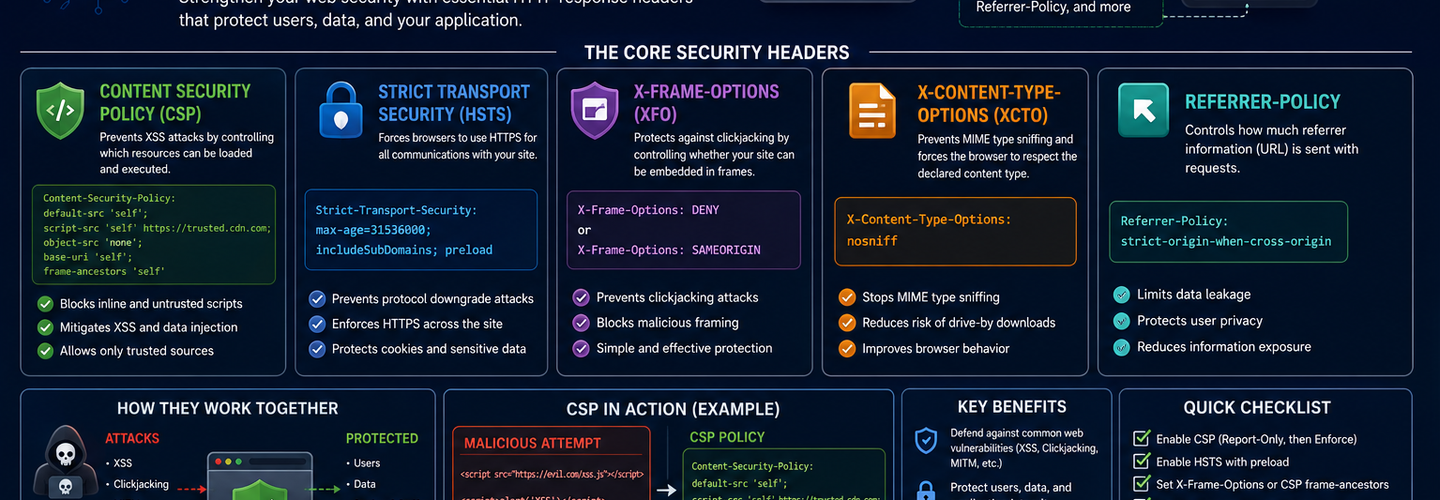
Most website owners focus on firewalls, SSL certificates, and vulnerability patches to stay secure. What many don't realize is that browsers can block entire categories of attacks before they even reach your application—if the right security headers are configured. In this guide, you'll learn exactly how HTTP security headers work, how CSP and HSTS protect your site, and how to implement them correctly on any platform.
## Key Takeaways
- ▸Security headers are HTTP response directives that instruct browsers to enforce security controls before rendering website content.
- ▸Content Security Policy (CSP) reduces cross-site scripting risks by restricting which resources a browser is allowed to load from which origins.
- ▸HTTP Strict Transport Security (HSTS) forces browsers to use HTTPS connections and prevents downgrade attacks that intercept traffic in transit.
- ▸X-Frame-Options, Referrer-Policy, and X-Content-Type-Options provide additional protection against clickjacking, data leakage, and MIME-sniffing attacks.
- ▸Properly configured HTTP security headers improve website security without requiring major application code changes.
- ▸Security header testing tools such as SecurityHeaders.com and Mozilla Observatory can quickly identify missing or misconfigured protections.
- ▸Continuous monitoring and periodic policy reviews are necessary to maintain effective browser security controls as your site evolves.
## What Are HTTP Security Headers and How Do They Work?
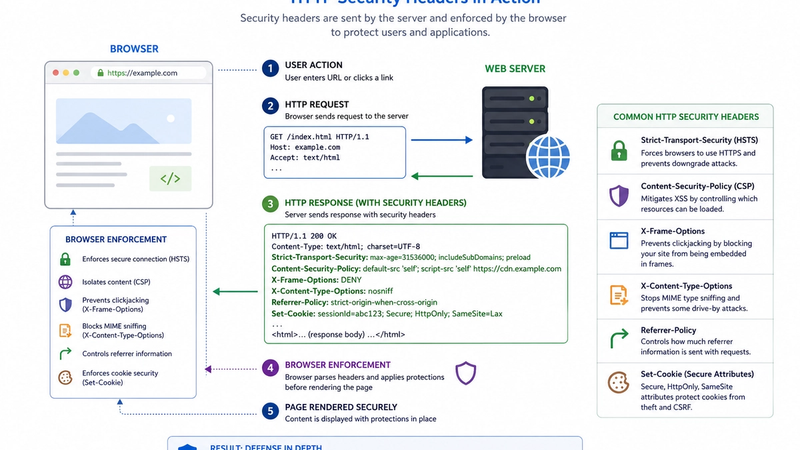
HTTP security headers are response headers sent by a web server that instruct the browser to enforce specific security policies before rendering a webpage. They sit inside the HTTP response — the message your server sends back every time someone visits a page — and give the browser a precise set of rules to follow. These rules can block unauthorized scripts, refuse insecure connections, prevent page embedding, and restrict what data flows back to third parties.
To understand them properly, it helps to know how the client-server exchange works. When a user visits https://example.com, the browser sends an HTTP request. The server replies with an HTTP response containing the page content and a set of response headers. Most headers handle basic logistics — content type, caching, encoding. Security headers are the subset of response headers that communicate browser-level security instructions. They don't change your HTML or JavaScript; they change how the browser treats them.
Before security headers existed, browsers made very few security decisions independently. Developers had to sanitize inputs, escape outputs, and hope nothing slipped through. Today, browsers enforce policies that catch attacks at the rendering layer — a second line of defense even when application-level protections fail. You can use the ReconShield Security Headers Audit tool to instantly check whether your site sends the right headers, before attackers find the gaps first.
The Difference Between HTTP Headers and Security Headers
HTTP headers are metadata fields attached to every request and response; security headers are a specialized category within response headers that control browser security behavior. Standard HTTP headers include Content-Type, Cache-Control, and Transfer-Encoding — functional instructions for the browser. Security headers like Content-Security-Policy, Strict-Transport-Security, and X-Frame-Options carry no display function. Their sole job is to restrict what the browser is permitted to do with the page's content.
This distinction matters because misconfiguring a regular header might break caching or encoding. Misconfiguring — or simply missing — a security header leaves your users exposed to attacks the browser could have blocked entirely. For example, running a quick passive exposure assessment on ReconShield will flag missing security headers as configuration risks alongside open ports and weak TLS settings.
## Why Are Security Headers Important for Website Security?
Security headers are important because they enable browsers to enforce protections that application code alone cannot guarantee, blocking attacks like XSS, clickjacking, and HTTPS downgrade at the browser rendering layer. According to Verizon's 2024 Data Breach Investigations Report, web application attacks represent the most common attack vector for data breaches — Source: Verizon DBIR, 2024. A significant portion of these attacks target weaknesses that browser-enforced security policies would prevent.
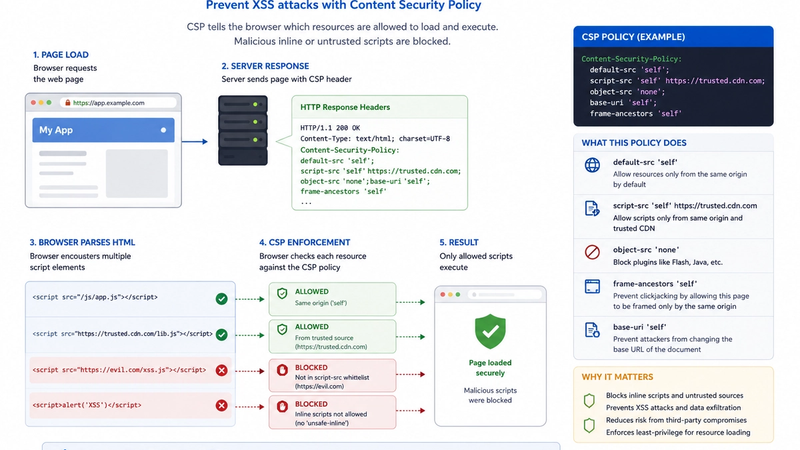
Consider cross-site scripting (XSS). Even with input validation on your server, a single missed injection point allows an attacker to execute arbitrary JavaScript in a user's browser. A properly configured CSP policy can block malicious script execution even when an attacker discovers an injection point. The browser simply refuses to run scripts that don't match the policy — not because your code caught the attack, but because the browser's enforcement layer stopped it.
Clickjacking is another threat security headers address directly. Attackers embed your legitimate site inside an invisible iframe on a malicious page and trick users into clicking buttons they can't see. X-Frame-Options prevents clickjacking attacks by controlling whether a webpage can be embedded inside an iframe. Without this header, any attacker can silently overlay your banking portal, social login button, or checkout form.
Security Headers, Compliance, and SEO
Security headers play a direct role in satisfying security compliance frameworks, including PCI-DSS, HIPAA, and GDPR, which require organizations to demonstrate active measures against data interception and code injection. Security audits routinely check for headers like HSTS and CSP as baseline hardening requirements. Failing to implement them can result in failing a penetration test finding, or receiving non-compliance findings during formal audits.
There is also a measurable SEO and trust signal benefit. Google's Safe Browsing infrastructure monitors sites for user-targeting attacks. Sites flagged for hosting XSS vectors or enabling clickjacking can receive ranking penalties or browser warning overlays. Secure HTTPS enforcement through HSTS aligns with Google's long-standing preference for encrypted connections — Source: Google Security Blog, 2023. Beyond algorithms, users confronted with browser security warnings abandon sites immediately, driving up bounce rates and destroying conversion.
## What Is Content Security Policy (CSP) and How Does It Prevent XSS?
Content Security Policy (CSP) is a browser security mechanism that restricts which resources a web page is allowed to load, helping prevent cross-site scripting attacks by defining an allowlist of trusted content sources. When a browser receives a CSP header, it compares every resource the page tries to load — scripts, stylesheets, images, fonts, API connections — against the policy. Resources that don't match the allowlist are blocked before execution.
XSS works by injecting malicious <script> tags or event handlers into your page's HTML output. Without CSP, the browser treats injected scripts with the same trust as your own code. With a strict CSP in place, that injected script references an origin not on your allowlist, and the browser refuses to execute it. According to Google's web security research team, CSP is one of the most effective defenses against reflected and stored XSS attacks — Source: Google Web Fundamentals, 2023. Understanding the broader threat of cross-site scripting attack prevention alongside transport security gives you a layered view of web application hardening.
Key CSP Directives You Need to Know
CSP directives are the individual policy rules that specify which sources are trusted for each type of content. The most important ones for most websites are:
- ▸default-src — the fallback rule for any content type not explicitly listed. Setting default-src 'self' blocks all external resources unless you add specific exceptions.
- ▸script-src — controls which JavaScript sources are allowed. This is the most security-critical directive; it determines whether inline scripts, eval, and third-party JS libraries can execute.
- ▸style-src — governs stylesheet loading. Inline styles are blocked by default when style-src is set to 'self'.
- ▸img-src — restricts image sources. Useful for preventing data exfiltration through image beacons to attacker-controlled domains.
- ▸connect-src — controls which URLs the browser can call via fetch(), XMLHttpRequest, or WebSocket — critical for API-heavy single-page applications.
- ▸frame-ancestors — specifies which origins are allowed to embed the page in an iframe, superseding X-Frame-Options in modern browsers.
CSP Configuration Examples
A basic, restrictive starting policy for a site that only uses its own assets looks like this:
Content-Security-Policy: default-src 'self'; script-src 'self'; style-src 'self'; img-src 'self' data:; font-src 'self'; connect-src 'self'; frame-ancestors 'none';
A more realistic policy for a site using Google Analytics, a CDN for fonts, and a third-party chat widget might look like:
Content-Security-Policy: default-src 'self'; script-src 'self' https://www.googletagmanager.com https://cdn.example-chat.com; style-src 'self' https://fonts.googleapis.com; font-src 'self' https://fonts.gstatic.com; img-src 'self' data: https:; connect-src 'self' https://www.google-analytics.com; frame-ancestors 'none';
Using CSP Report-Only Mode to Test Without Breaking Things
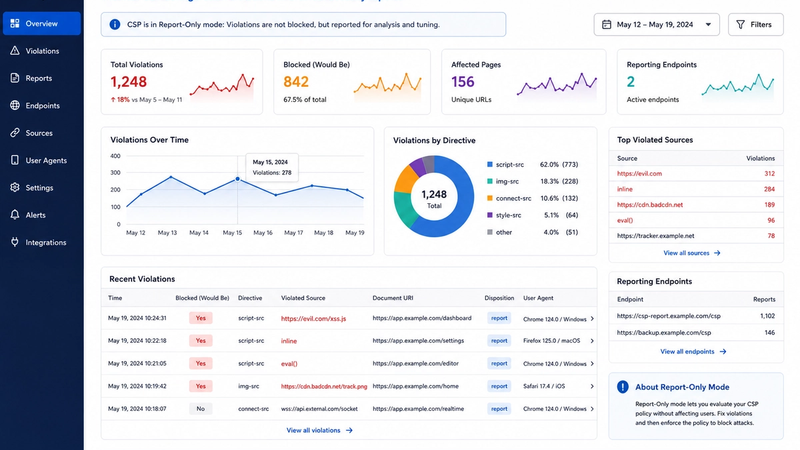
CSP Report-Only mode allows you to test a content security policy without enforcing it, collecting violation reports so you can fix policy gaps before going live. Instead of Content-Security-Policy, you send the header as Content-Security-Policy-Report-Only. The browser logs violations to your reporting endpoint but does not block resources.
Content-Security-Policy-Report-Only: default-src 'self'; report-uri https://yoursite.com/csp-report;
This approach is critical because deploying a strict CSP to production without testing almost always breaks legitimate functionality. Inline scripts used by analytics tags, chat widgets, and A/B testing tools will all generate violations. Report-Only mode lets you observe real-world usage before committing to enforcement.
Common CSP Mistakes to Avoid
The most dangerous CSP mistake is using unsafe-inline or unsafe-eval in script-src, as these directives effectively disable XSS protection by allowing inline scripts and eval() calls — exactly the vectors CSP is designed to stop. Other frequent errors include:
- ▸Using * (wildcard) as the script-src source — this allows any external JavaScript to load, providing no XSS protection
- ▸Setting a very permissive default-src without restricting script-src explicitly
- ▸Forgetting to include all CDN and third-party domains your site actually uses, causing legitimate resources to fail
- ▸Not deploying a reporting endpoint, meaning you have no visibility into policy violations in production
## How Does HTTP Strict Transport Security (HSTS) Protect Websites?
HTTP Strict Transport Security (HSTS) is a response header that forces browsers to access a website exclusively through HTTPS connections, preventing attackers from downgrading the connection to unencrypted HTTP. Once a browser receives an HSTS header from your site, it stores a record that all future requests to that domain — for the duration specified in the header — must use HTTPS, even if the user types http:// or clicks an unencrypted link.
Without HSTS, a man-in-the-middle attacker positioned on the same network can intercept the initial HTTP request before the server redirects to HTTPS. This is called an HTTPS downgrade attack or SSL stripping. HSTS prevents HTTPS downgrade attacks by instructing browsers to automatically upgrade future HTTP requests to HTTPS, eliminating the unencrypted window of vulnerability entirely. Combine this with a solid SSL/TLS configuration and you close the transport layer almost completely.
Understanding HSTS Directives
The HSTS header uses three primary directives to control enforcement scope and duration.
A complete HSTS header looks like this:
Strict-Transport-Security: max-age=31536000; includeSubDomains; preload
- ▸max-age — specifies how long, in seconds, the browser should enforce HTTPS-only connections. 31536000 equals one year. Start with a shorter value like 86400 (one day) during initial rollout, then increase it once you've confirmed no HTTP-only subdomains exist.
- ▸includeSubDomains — extends the HSTS policy to all subdomains of your domain. Only add this directive if every subdomain (including staging, API, and mail subdomains) is reachable over HTTPS. A single HTTP-only subdomain will become inaccessible.
- ▸preload — signals your intent to be added to browser HSTS preload lists. Browsers ship with a hardcoded list of HSTS domains, meaning your site enforces HTTPS from the very first visit — before any header has even been sent. You can submit your domain at hstspreload.org.
HSTS Implementation on Apache and Nginx
On Apache, add the following to your virtual host configuration or .htaccess file (requires mod_headers):
apache
<IfModule mod_headers.c> Header always set Strict-Transport-Security "max-age=31536000; includeSubDomains; preload" </IfModule>
On Nginx, add this inside your server block:
nginx
add_header Strict-Transport-Security "max-age=31536000; includeSubDomains; preload" always;
Common HSTS Pitfalls to Avoid
The most serious HSTS mistake is setting a long max-age before confirming that all subdomains support HTTPS. Once a browser caches an HSTS policy for your domain, subdomains that don't have valid HTTPS will become completely inaccessible to that browser for the full max-age duration. There is no easy override — the user would need to manually clear the HSTS cache. Additional pitfalls include:
- ▸Submitting to the HSTS preload list before your HTTPS infrastructure is fully stable — preload inclusion is difficult to reverse and takes months
- ▸Setting HSTS on HTTP responses — the header is only valid on HTTPS responses; browsers ignore HSTS headers received over HTTP
- ▸Forgetting to renew your SSL certificate — HSTS + an expired certificate creates a hard failure that users cannot bypass
Check your current SSL and HSTS configuration with the ReconShield SSL Checker to verify your TLS setup supports HSTS enforcement reliably.
## What Are the Most Important Security Headers Every Website Should Use?
The most important security headers every modern website should implement are CSP, HSTS, X-Frame-Options, X-Content-Type-Options, Referrer-Policy, and Permissions-Policy, each targeting a different attack surface at the browser level. Together, these headers address the primary browser-based attack vectors identified by OWASP's security recommendations.
X-Frame-Options
X-Frame-Options is a response header that prevents a webpage from being embedded in an iframe on external domains, blocking clickjacking attacks. It has three values:
- ▸DENY — prevents all iframe embedding, on any domain including your own
- ▸SAMEORIGIN — allows embedding only from pages on your own domain
- ▸ALLOW-FROM uri — deprecated and unsupported in most modern browsers; use CSP frame-ancestors instead
For most sites, X-Frame-Options: SAMEORIGIN is the right choice. If your site has no legitimate iframe use case (dashboards, embedded widgets), DENY is safer. Note that frame-ancestors in your CSP policy provides the same protection with more granular control and is the modern standard — Source: OWASP Secure Headers Project, 2024.
X-Content-Type-Options
X-Content-Type-Options is a security header that prevents browsers from MIME-sniffing a response away from the declared content type, blocking a class of attacks that exploit browser content-type guessing. The only valid value is nosniff:
X-Content-Type-Options: nosniff
Without this header, a browser might interpret a server response claiming to be text/plain as JavaScript if it detects script-like content — allowing an attacker to upload a disguised script file and execute it in the browser context.
Referrer-Policy
Referrer-Policy controls how much referrer information the browser includes in HTTP requests when navigating from your site to another. The referrer header can inadvertently expose sensitive URL paths, query parameters, or user session identifiers to third-party sites. Recommended values:
- ▸strict-origin-when-cross-origin — sends the full URL for same-origin requests but only the origin (without path) for cross-origin requests
- ▸no-referrer — sends no referrer information at all (most private, may break some analytics)
- ▸same-origin — sends referrer data only for same-origin navigations
Referrer-Policy: strict-origin-when-cross-origin
Permissions-Policy
Permissions-Policy (formerly Feature-Policy) restricts which browser features and APIs a page and any embedded iframes are allowed to access, such as camera, microphone, geolocation, and payment. This limits the attack surface if your site loads third-party scripts that might try to access device capabilities without permission.
Permissions-Policy: camera=(), microphone=(), geolocation=(), payment=()
The empty parentheses () disable the feature entirely — for all origins including your own.
Cross-Origin Resource Policy (CORP) and Cross-Origin Opener Policy (COOP)
Cross-Origin Resource Policy (CORP) prevents other origins from loading your resources, blocking side-channel attacks like Spectre that exploit shared memory between cross-origin contexts. Cross-Origin Opener Policy (COOP) isolates your browsing context from other windows, preventing malicious pop-ups or tabs from accessing your page's JavaScript context. These headers became critical after CPU-level speculative execution vulnerabilities were disclosed — Source: Mozilla Developer Network, 2024.
Cross-Origin-Resource-Policy: same-origin Cross-Origin-Opener-Policy: same-origin
## How Do You Implement Security Headers in Apache, Nginx, Node.js, and Cloudflare?
Security header implementation requires adding directives to your web server configuration, application code, or CDN rules, depending on your infrastructure stack. The method varies by platform but the headers themselves are identical regardless of where they're added.
Apache Configuration
On Apache, security headers are set using mod_headers. Add these directives to your virtual host configuration (httpd.conf or .conf file in sites-enabled):
apache
<IfModule mod_headers.c> Header always set Content-Security-Policy "default-src 'self'; script-src 'self'; style-src 'self'; img-src 'self' data:; font-src 'self'; connect-src 'self'; frame-ancestors 'none';" Header always set Strict-Transport-Security "max-age=31536000; includeSubDomains; preload" Header always set X-Frame-Options "SAMEORIGIN" Header always set X-Content-Type-Options "nosniff" Header always set Referrer-Policy "strict-origin-when-cross-origin" Header always set Permissions-Policy "camera=(), microphone=(), geolocation=()" Header always set Cross-Origin-Resource-Policy "same-origin" Header always set Cross-Origin-Opener-Policy "same-origin" </IfModule>
After making changes, test your Apache configuration with apachectl configtest and reload with systemctl reload apache2. You can use the ReconShield Exposure Assessment Tool to verify the headers are being served correctly after deployment.
Nginx Configuration
On Nginx, add these directives inside your server block:
nginx
add_header Content-Security-Policy "default-src 'self'; script-src 'self'; style-src 'self'; img-src 'self' data:; font-src 'self'; connect-src 'self'; frame-ancestors 'none';" always; add_header Strict-Transport-Security "max-age=31536000; includeSubDomains; preload" always; add_header X-Frame-Options "SAMEORIGIN" always; add_header X-Content-Type-Options "nosniff" always; add_header Referrer-Policy "strict-origin-when-cross-origin" always; add_header Permissions-Policy "camera=(), microphone=(), geolocation=()" always; add_header Cross-Origin-Resource-Policy "same-origin" always; add_header Cross-Origin-Opener-Policy "same-origin" always;
The always parameter ensures headers are sent on all response codes, including error pages. Reload with nginx -t && systemctl reload nginx.
Node.js / Express Implementation
In Node.js, the most reliable way to set security headers is through the Helmet middleware package, which sets sensible defaults for all major security headers:
javascript
const express = require('express'); const helmet = require('helmet'); const app = express(); app.use(helmet({ contentSecurityPolicy: { directives: { defaultSrc: ["'self'"], scriptSrc: ["'self'"], styleSrc: ["'self'"], imgSrc: ["'self'", "data:"], connectSrc: ["'self'"], frameAncestors: ["'none'"], }, }, hsts: { maxAge: 31536000, includeSubDomains: true, preload: true, }, }));
Helmet is actively maintained and updated as browser security specifications evolve, making it the recommended approach for Node.js applications rather than setting headers manually.
Cloudflare Implementation
If you use Cloudflare as your CDN or reverse proxy, you can add security headers through Cloudflare Transform Rules (available on all plans including free):
Navigate to your Cloudflare dashboard → Rules → Transform Rules → Modify Response Header. Add each header as a new rule with the Set action and the appropriate value. Cloudflare applies these rules before responses reach the user, overriding or supplementing headers set by your origin server.
For teams already using Cloudflare's WAF, combining web application firewall rules with correctly configured security headers creates a layered defense that's difficult to bypass.
## How Can You Test Whether Security Headers Are Configured Correctly?
Security header testing requires both automated scanning tools and manual browser inspection to verify that headers are present, correctly valued, and consistently applied across all pages and response codes. According to a 2024 survey by Security Headers Ltd., over 70% of the top one million websites score D or below on security header implementation — Source: SecurityHeaders.com Annual Report, 2024. Testing is therefore the critical gap between deployment and assurance.
SecurityHeaders.com
SecurityHeaders.com is the industry-standard free tool for scanning any public URL and returning a graded report on which headers are present, which are missing, and which are misconfigured. It assigns letter grades from A+ to F. Submitting your site immediately after implementation gives you objective before-and-after evidence for security audits.
[Insert image: SecurityHeaders.com scan results showing an A+ grade | Alt text: "Security headers scan showing A+ grade on SecurityHeaders.com"]
Mozilla Observatory
Mozilla Observatory provides a comprehensive web security assessment covering security headers, TLS configuration, cookie security, and subresource integrity. It grades your site and provides remediation guidance for each failing check. The observatory score is frequently cited in penetration testing reports and compliance documentation.
ReconShield Security Headers Audit Tool
The ReconShield Security Headers tool performs a passive, real-time header audit against any domain and returns a structured breakdown of present and missing headers. Unlike browser-based tools, it can identify headers sent by your server that a browser might not display in developer tools by default, making it particularly useful during website penetration testing checklists where infrastructure-level visibility matters.
Browser Developer Tools
For inspecting headers on any page, open your browser's developer tools (F12), navigate to the Network tab, reload the page, click the document request (usually the first entry), and open the Response Headers section. Every header your server sent is visible here. This is the fastest way to verify a single page without external tools.
Google CSP Evaluator
Google's free CSP Evaluator (csp-evaluator.withgoogle.com) analyzes your CSP policy string for weaknesses without requiring a live server. Paste any CSP header value and receive a breakdown of which directives are too permissive, which are missing, and which known bypasses your policy might be vulnerable to.
[Insert image: Google CSP Evaluator showing policy analysis with vulnerability warnings | Alt text: "CSP evaluator analyzing content security policy for XSS vulnerabilities"]
## What Should You Do Next After Implementing Security Headers?
After deploying security headers, the next steps are to run automated scans to verify correct implementation, monitor CSP violation reports in production, and schedule regular policy reviews as your site's content and third-party integrations evolve. Security headers are not a one-time fix — they require maintenance as your application grows.
Run Automated Verification Scans
Immediately after deployment, run your domain through the ReconShield passive exposure assessment, SecurityHeaders.com, and Mozilla Observatory. Compare results against your intended configuration. Pay special attention to headers on error pages (404, 500) — many implementations apply headers only to successful responses, leaving error pages unprotected.
Integrating header scanning into your CI/CD pipeline adds a permanent regression check. Tools like curl -I https://yourdomain.com combined with grep checks can be added as build steps to fail deployments that omit required headers. This turns security header compliance into an automated gate rather than a periodic audit task.
Monitor CSP Violation Reports
If you deployed CSP with a report-uri or report-to directive, your reporting endpoint will receive violation alerts whenever a resource fails the policy. Review these reports regularly — they reveal:
- ▸Legitimate resources you forgot to allowlist (fix the policy to include them)
- ▸Actual XSS attempts targeting real users (investigate and remediate the injection point)
- ▸Third-party scripts added by marketing or analytics teams without security review
Services like Report URI and Sentry can aggregate CSP reports into dashboards, making it easier to distinguish noise from genuine threats. For full infrastructure visibility beyond headers alone, running a regular DNS security analysis alongside CSP monitoring creates a comprehensive security picture.
Review Policies Periodically
Security headers must be reviewed whenever your site's content, third-party integrations, or infrastructure changes. Adding a new analytics vendor requires updating script-src. Migrating to a new CDN requires reviewing connect-src and image domains. Moving a subdomain to a new server requires rechecking HSTS includeSubDomains compatibility.
Schedule a quarterly header review as part of your broader cybersecurity hardening checklist. Treat your security headers as living policy documents, not static configuration — because the web services your site depends on change continuously, and so does your threat surface.
Integrate into the Attack Surface Management Workflow
Security header implementation is one component of a broader attack surface management strategy that includes monitoring open ports, SSL/TLS health, DNS configurations, and email security. Each layer reinforces the others. You can use ReconShield's full tool suite to assess all of these layers from a single platform — checking open ports and exposed services, SSL certificate validity, DNS and email security records, and security headers in coordinated scans rather than as isolated checks.
## Conclusion
Security header implementation provides browser-level protection against entire classes of attacks without requiring application code changes. HTTP security headers are response headers that instruct browsers to enforce security policies before rendering website content — and for most websites, configuring them correctly is one of the highest-leverage security improvements available.
Start with the essentials: HSTS to enforce encrypted connections, CSP to restrict unauthorized scripts, X-Frame-Options to block clickjacking, X-Content-Type-Options to prevent MIME-sniffing, and Referrer-Policy to limit data leakage. Use CSP Report-Only mode to test before enforcing. Gradually tighten your policies as you build confidence in your configuration.
Run your site through the ReconShield Security Headers Audit tool right now to see exactly which headers you're missing. Security hardening is an ongoing process — but browser-level protection starts with a single HTTP response.
## Frequently Asked Questions (FAQ)
What are HTTP security headers?
HTTP security headers are response headers that instruct browsers to enforce security controls before rendering website content. These headers help prevent attacks such as cross-site scripting (XSS), clickjacking, MIME-sniffing, and HTTPS downgrade attacks.
Does Content Security Policy (CSP) stop all XSS attacks?
Content Security Policy (CSP) significantly reduces XSS risks by restricting which scripts browsers are allowed to execute. However, improperly configured CSP policies or the use of unsafe directives like 'unsafe-inline' can weaken protection.
What is the difference between CSP and X-Frame-Options?
Content Security Policy (CSP) controls which resources browsers can load, while X-Frame-Options specifically prevents iframe-based clickjacking attacks. Modern websites often use CSP frame-ancestors alongside X-Frame-Options for layered browser security.
Can security headers improve SEO?
Security headers indirectly improve SEO by increasing user trust, strengthening HTTPS enforcement, and reducing browser security warnings. Secure browsing experiences can improve engagement metrics and reduce bounce rates.
Which security headers are recommended by OWASP?
OWASP recommends implementing Content-Security-Policy, Strict-Transport-Security, X-Content-Type-Options, Referrer-Policy, and Permissions-Policy as part of a layered browser security strategy.
Written by Surendra Reddy Cybersecurity Researcher & Founder, ReconShield. Surendra is a cybersecurity engineer specializing in Open Source Intelligence (OSINT), exposure intelligence, and AI-driven threat analysis. He built ReconShield to democratize access to enterprise-grade infrastructure visibility tools and secure the digital internet-facing assets.
Reviewed by the ReconShield Editorial Team All technical content is reviewed for accuracy by practicing cybersecurity professionals and verified against current OWASP guidelines and browser security specifications.
## Analyst Commentary & Implementation Blueprint
Security advisory
Continuous security exposure assessment is critical to identifying public vulnerabilities before they are exploited. Organizations should maintain a passive inventory of all web servers, TLS configs, and open ports, ensuring that default configurations are eliminated and security advisories are actively implemented.
Hardened Security Configuration Blueprint
# General Security Hardening Directive
ServerTokens ProductOnly
ServerSignature Off
FileETag None
Actionable Mitigation Checklist
- ✔Perform passive asset inventories weekly.
- ✔Restrict administrative ports using local firewall controls.
- ✔Monitor active CVE alerts for exposed software.
Common Inquiries & FAQs
Why is passive scanning preferred for continuous auditing?
Passive audits do not cause operational impact or trigger firewall blocks, making them ideal for constant surveillance of internet-facing assets.
What should I do if a vulnerability is flagged?
Apply the latest vendor patches, restrict access to the resource via firewalls, or verify configuration flags to mitigate risks.
Surendra Reddy
Surendra Reddy is a cybersecurity researcher and founder of ReconShield, specializing in OSINT and defensive infrastructure analysis.
Connect on LinkedIn ↗// AUDIT BRIEFING DISCUSSION (2 COMMENTS)
Great breakdown of the passive infrastructure vectors. We recently audited our external DNS zones and found multiple dangling staging environments. Implementing wildcard certificates reduced our CT log leaks significantly.
Is there any automated tooling you recommend for daily crt.sh scraping? Manually checking CT logs is becoming unsustainable for our domain portfolio.
// MORE ARTICLES

SplitVPN Hacked: Data Breach Exposes 865,000 User Records and 58 Million Hidden Connection Logs (July 2026)
SplitVPN hacked: 865,336 user records and 58 million connection logs exposed, directly contradicting the VPN's "no-logs" promise. What was leaked and what to do now.

Critical WordPress wp2shell RCE Vulnerability Puts Millions of Sites at Risk—Patch Now
wp2shell is a pre-auth RCE in WordPress Core affecting 500M+ sites. Public exploits exist—patch to 7.0.2 or 6.9.5 immediately.

New Windows RDP Flaws Could Lead to Data Theft — Everything You Need to Know
Microsoft patched a dozen Windows RDP flaws in July 2026 that could leak memory data. See affected versions, KB numbers, and how to patch.