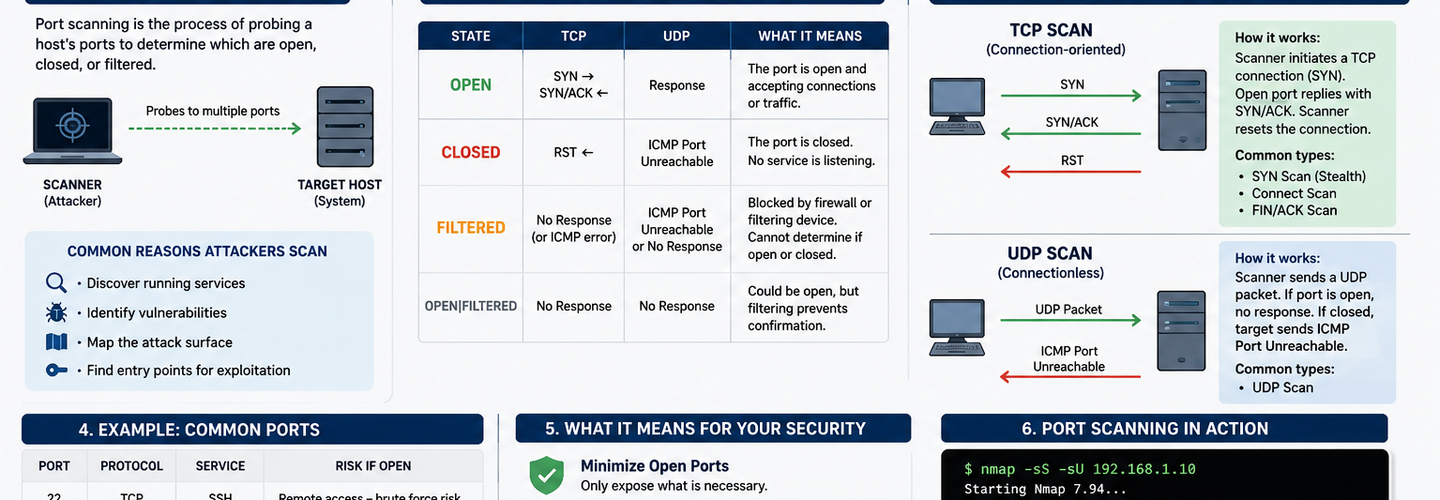
How Port Scanning Works: Open Ports, TCP vs UDP, and What It Means for Your Security
Before an attacker exploits a system — or before a security professional defends one — they need to answer a simple but powerful question: What doors are open?
Port scanning is the technique used to answer that question. It maps out which network ports on a target system are open, closed, or filtered, giving a clear picture of the services running and the potential attack surface available. Whether you are a penetration tester, a network administrator, or a curious learner, understanding how port scanning works is foundational knowledge in cybersecurity.
In this guide, we will walk through exactly how port scanning works, what open ports reveal, the critical differences between TCP and UDP ports, and how tools like ReconShield's Port Scanner and Vulnerability Scanner can help you audit your infrastructure before attackers do.
## What Is a Port? A Quick Primer
Think of a server as a large apartment building. The IP address is the building's street address — it tells you where the building is. Ports are the individual apartment doors. Each service running on a server listens on a specific door, waiting for the right visitor.
Ports are numbered from 0 to 65,535, and they fall into three official ranges:
- ▸Well-Known Ports (0–1023): Reserved for common services. Port 80 is HTTP, port 443 is HTTPS, port 22 is SSH, and port 21 is FTP.
- ▸Registered Ports (1024–49151): Used by specific applications and services that register with IANA — for example, port 3306 for MySQL and port 5432 for PostgreSQL.
- ▸Dynamic/Private Ports (49152–65535): Often used for ephemeral or temporary connections initiated by client applications.
When a port is "open," it means a process is actively listening on it and is ready to accept incoming connections. When a port is "closed," no service is listening. When it is "filtered," a firewall or packet-filtering device is blocking access to it.
## How Port Scanning Works: The Core Mechanics
At its most fundamental level, a port scanner sends network packets to a target IP address on specific ports and then analyzes the responses — or the absence of them — to determine the port's state.
The process follows these broad steps:
Step 1: Target Selection and Scope Definition
The scanner is pointed at one or more IP addresses, a subnet range, or a hostname. The operator defines which ports to scan — a common approach is to scan the top 1,000 most commonly used ports before expanding to all 65,535 if needed.
Step 2: Packet Crafting and Transmission
The scanner constructs packets according to the protocol being tested (TCP or UDP) and sends them out. The type of packet sent defines the scanning technique — more on this shortly.
Step 3: Response Analysis
The scanner listens for responses. Based on what comes back (or does not come back), each port is classified as:
Response ReceivedPort StateSYN-ACK (TCP)OpenRST (Reset)ClosedNo response / ICMP unreachableFilteredACK without prior SYNFiltered / Stateful firewall
Step 4: Service and Version Detection
Advanced scanners go beyond port state. They send crafted probe packets to open ports to grab banners — short text strings that services often broadcast identifying themselves. A banner from port 22 might reveal OpenSSH 8.9p1 Ubuntu, which tells the scanner (and the operator) exactly which software and version is running, enabling precise vulnerability matching.
## TCP vs UDP Ports: Understanding the Difference
This is one of the most important distinctions in port scanning, and it is where many beginners get confused. TCP and UDP are the two dominant transport-layer protocols, and they behave very differently — which means scanning them requires different strategies.
TCP (Transmission Control Protocol)
TCP is a connection-oriented protocol. Before any data is transmitted, two hosts must complete a three-way handshake:
The client sends a SYN (synchronize) packet.
The server responds with a SYN-ACK (synchronize-acknowledge) packet if the port is open.
The client completes with an ACK (acknowledge).
This handshake makes TCP reliable — both sides confirm they are ready to communicate. It also makes TCP ports relatively easy to scan, because the handshake produces clear, unambiguous responses.
Common TCP Port Examples:
- ▸Port 80 — HTTP (web traffic)
- ▸Port 443 — HTTPS (encrypted web)
- ▸Port 22 — SSH (remote access)
- ▸Port 25 — SMTP (email)
- ▸Port 3389 — RDP (Windows Remote Desktop)
UDP (User Datagram Protocol)
UDP is connectionless. There is no handshake. A client simply sends a packet and hopes the server receives it. UDP is faster than TCP and is preferred for real-time applications like video streaming, VoIP, and DNS lookups — where speed matters more than reliability.
For scanners, UDP is far more challenging. Because there is no handshake, an open UDP port may simply not respond at all. The scanner often has to wait for a timeout period before concluding a port is open or filtered. Closed UDP ports typically respond with an ICMP Port Unreachable message, which is the main signal scanners look for.
Common UDP Port Examples:
- ▸Port 53 — DNS (domain name resolution)
- ▸Port 67/68 — DHCP (IP address assignment)
- ▸Port 161 — SNMP (network device management)
- ▸Port 123 — NTP (network time protocol)
- ▸Port 500 — IKE (IPSec VPN)
Key Takeaway: TCP scanning is faster and more reliable. UDP scanning is slower, less definitive, and often overlooked — which is exactly why attackers love targeting UDP services that defenders assume are safe.
## Types of Port Scanning Techniques
Not all port scans work the same way. Different techniques balance speed, stealth, and accuracy differently. Here are the most important ones:
1. TCP Connect Scan (Full Open Scan)
This is the most straightforward method. The scanner completes the full three-way TCP handshake. If the handshake succeeds, the port is open. This technique requires no special privileges but is easily logged by the target system since a full connection is established.
Best for: Unprivileged users; when accuracy is the top priority.
2. SYN Scan (Half-Open / Stealth Scan)
The scanner sends a SYN packet. If it receives a SYN-ACK, the port is open — but instead of completing the handshake with an ACK, it sends an RST to tear down the connection immediately. Because the full handshake never completes, many older logging systems do not record it, making this a "stealthy" technique.
Best for: Speed and reduced logging; requires root/administrator privileges.
3. FIN, NULL, and Xmas Scans
These send TCP packets with unusual flag combinations. Closed ports typically respond with RST, while open ports on some systems simply drop the packet and say nothing. These techniques can bypass certain firewall rules.
Best for: Firewall evasion; limited effectiveness on Windows systems.
4. UDP Scan
As covered above, UDP scanning sends UDP packets and waits for ICMP unreachable responses to identify closed ports. Open ports usually give no response, making this method slow.
Best for: Discovering overlooked UDP services; requires patience.
5. Version Detection and Script Scanning
Beyond basic port state, modern scanners use service probes and scripting engines to identify service versions, enumerate users, detect vulnerabilities, and even run exploit checks — all from a single scan.
## What Open Ports Reveal About a Target
Open ports are a window into a system's soul. Each open port is a service, and each service carries implications:
- ▸Port 22 open → SSH server running. Could be vulnerable to brute-force attacks or outdated cipher suites.
- ▸Port 3306 open → MySQL database exposed. If not firewalled, attackers may attempt direct database access.
- ▸Port 445 open → SMB (Windows file sharing) active. A classic target for ransomware and lateral movement.
- ▸Port 8080 or 8443 open → A secondary web server or admin panel may be running, often with weaker security than the primary.
- ▸Port 23 open → Telnet. Unencrypted legacy access — a serious red flag in any modern network.
The combination of open ports paints a detailed picture of the operating system, software stack, and potential misconfigurations — all before any actual exploitation attempt is made. This is why attackers rely on port scanning as the cornerstone of their reconnaissance phase, and why defenders must run regular scans on their own infrastructure to spot exposure before attackers do.
## The Difference Between Active and Passive Scanning
Port scanning is an active reconnaissance technique — it sends packets to the target and observes the responses. This means the target can detect the activity if they are monitoring their logs.
Passive scanning, by contrast, involves monitoring network traffic that already exists (using tools like packet sniffers) without sending any new probes. Passive methods are completely invisible to the target but require access to network traffic flows.
For authorized security assessments and penetration tests, active port scanning with tools backed by ReconShield's Port Scanner delivers the fastest, most comprehensive results. For stealth assessments or continuous monitoring, combining active scanning with passive detection gives the best coverage.
## Legal and Ethical Considerations
This cannot be stressed enough: port scanning systems you do not own or have explicit written permission to scan is illegal in most jurisdictions and can result in serious criminal and civil penalties.
Port scanning is a neutral, powerful technique. In the right hands — penetration testers, security engineers, system administrators — it is an invaluable defensive tool. In the wrong hands, it is the first step toward unauthorized access.
Always follow these principles:
Scan only what you own or are authorized to test.
Document your scope and authorization in writing before any engagement.
Use scan data responsibly — vulnerability findings must be remediated, not exploited.
Follow responsible disclosure practices if you discover vulnerabilities in third-party systems.
ReconShield's tools are built for authorized security professionals and organizations securing their own infrastructure. Use them ethically.
## How ReconShield Simplifies Port Scanning
Manual port scanning with command-line tools can be powerful but time-consuming, noisy, and difficult to interpret. ReconShield's Port Scanner automates the process with a clean, intuitive interface that:
- ▸Scans TCP and UDP ports across customizable ranges simultaneously.
- ▸Detects service banners and versions to identify exactly what is running on each open port.
- ▸Classifies ports into open, closed, and filtered states with detailed reasoning.
- ▸Integrates with the Vulnerability Scanner to cross-reference discovered services against known CVEs and common misconfigurations — turning raw port data into actionable security intelligence.
- ▸Generates exportable reports ready for audit documentation, compliance reviews, or client deliverables.
Whether you are conducting a quick spot-check on a single server or performing a comprehensive network audit across an entire subnet, ReconShield provides the speed, clarity, and depth professional security work demands.
## Best Practices for Port Scanning Your Own Infrastructure
Running port scans proactively is one of the highest-return security activities available to any organization. Here is how to do it well:
1. Scan Regularly, Not Just Once Infrastructure changes. New services appear, firewall rules drift, and misconfigurations creep in. Schedule recurring scans — at minimum monthly, and after every major deployment or infrastructure change.
2. Scan From Multiple Perspectives Scan from inside your network (internal perspective) and from an external IP (attacker's perspective). The results are often dramatically different and equally important.
3. Do Not Ignore UDP Most teams scan TCP exclusively. Attackers know this. Ensure your scanning regimen includes UDP service discovery.
4. Act on the Results A scan report is worthless without remediation. Close unnecessary ports, update exposed services, and apply firewall rules to limit access to sensitive ports.
5. Pair Port Scanning with Vulnerability Assessment Port state alone does not tell the full story. Use ReconShield's Vulnerability Scanner to go deeper — identifying which discovered services carry known exploitable weaknesses.
## Conclusion: Visibility Is the Foundation of Security
You cannot defend what you cannot see. Port scanning gives you that visibility — a precise, real-time map of your network's exposed surface. Understanding how it works, the difference between TCP and UDP port scanning, and what open ports reveal empowers you to think like both an attacker and a defender simultaneously.
The organizations that get breached are not always those with the worst security practices — they are often those who simply did not know what was exposed. Regular, thorough port scanning with the right tools eliminates that blind spot.
Start with ReconShield's Port Scanner to discover your attack surface, then feed those findings into the Vulnerability Scanner to prioritize your remediation roadmap. Knowledge is your first line of defense.
ReconShield is a professional-grade reconnaissance and vulnerability assessment platform built for security teams, penetration testers, and organizations serious about proactive defense. All tools are intended for authorized use only.
Tags: port scanning, network security, TCP ports, UDP ports, open ports, cybersecurity, penetration testing, vulnerability assessment, reconnaissance, ethical hacking
Internal Links Used:
- ▸Port Scanner — ×3 mentions
- ▸Vulnerability Scanner — ×3 mentions
## Analyst Commentary & Implementation Blueprint
Security advisory
Continuous security exposure assessment is critical to identifying public vulnerabilities before they are exploited. Organizations should maintain a passive inventory of all web servers, TLS configs, and open ports, ensuring that default configurations are eliminated and security advisories are actively implemented.
Hardened Security Configuration Blueprint
# General Security Hardening Directive
ServerTokens ProductOnly
ServerSignature Off
FileETag None
Actionable Mitigation Checklist
- ✔Perform passive asset inventories weekly.
- ✔Restrict administrative ports using local firewall controls.
- ✔Monitor active CVE alerts for exposed software.
Common Inquiries & FAQs
Why is passive scanning preferred for continuous auditing?
Passive audits do not cause operational impact or trigger firewall blocks, making them ideal for constant surveillance of internet-facing assets.
What should I do if a vulnerability is flagged?
Apply the latest vendor patches, restrict access to the resource via firewalls, or verify configuration flags to mitigate risks.
Surendra Reddy
Surendra Reddy is a cybersecurity researcher and founder of ReconShield, specializing in OSINT and defensive infrastructure analysis.
Connect on LinkedIn ↗// AUDIT BRIEFING DISCUSSION (2 COMMENTS)
Great breakdown of the passive infrastructure vectors. We recently audited our external DNS zones and found multiple dangling staging environments. Implementing wildcard certificates reduced our CT log leaks significantly.
Is there any automated tooling you recommend for daily crt.sh scraping? Manually checking CT logs is becoming unsustainable for our domain portfolio.
// MORE ARTICLES

₹250 Crore Cyber Scam Busted: Gujarat Police Arrest 19, Including MBA Student
Gujarat Police bust a ₹250 crore cyber fraud network, arresting 19 including an MBA student. Here's how the mule account scam worked.
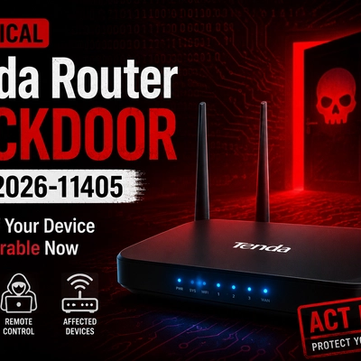
Critical Tenda Router Backdoor (CVE-2026-11405): Check If Your Device Is Vulnerable Now
CVE-2026-11405 is an unpatched Tenda router backdoor granting full admin access without a password. Check if your model is affected now.
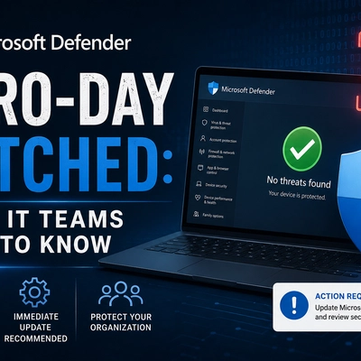
Microsoft Defender Zero-Day Patched: What IT Teams Need to Know
Microsoft patches RoguePlanet, a Defender zero-day (CVE-2026-50656) letting attackers gain SYSTEM access. Here's what IT teams need to know.