SSL vs TLS Explained: Complete HTTPS Security Guide for Modern Website Security
Summarize this blog post with: ChatGPT | Perplexity | Claude | Grok
You’ve probably seen HTTPS in your browser and heard people mention SSL certificates when discussing website security. But many website owners, developers, and even IT professionals still confuse SSL with TLS — despite SSL being obsolete for years. In this guide, you’ll learn the real difference between SSL and TLS, how HTTPS actually works, and how to properly secure modern websites in 2026.
Key Takeaways
- ▸SSL is an outdated encryption protocol, while TLS is the modern standard used to secure HTTPS connections.
- ▸HTTPS uses TLS encryption to protect data transmitted between browsers and servers.
- ▸TLS 1.3 improves security and performance through faster handshakes and stronger cryptographic algorithms.
- ▸Modern browsers no longer trust old SSL versions because they contain known security vulnerabilities.
- ▸HTTPS improves SEO rankings and user trust by encrypting sensitive information and enabling browser security indicators.
- ▸TLS configuration mistakes can expose websites to attacks, even when HTTPS is enabled.
- ▸Regular certificate renewal and TLS testing are essential for maintaining secure website communication.
What Is SSL and Why Was It Replaced?
SSL (Secure Sockets Layer) is an outdated cryptographic protocol that was originally designed to encrypt communication between web browsers and servers.
First, SSL was developed by Netscape in the 1990s to secure early internet communication. The protocol helped websites encrypt sensitive data such as passwords, payment information, and login credentials during transmission.
For example, when users entered credit card details on an eCommerce website, SSL encrypted the information before sending it across the internet. This encryption prevented attackers from reading the data if they intercepted the traffic.
At the same time, SSL introduced the concept of digital certificates and secure HTTPS communication. This innovation laid the foundation for modern internet security.
History of SSL Protocols
SSL evolved through several versions before being replaced by TLS due to major security weaknesses.
Here is a quick overview of SSL history:
SSL and TLS Protocol Versions
SSL 1.0
- ▸Release Year: Never publicly released
- ▸Status: Deprecated
- ▸Major Issues: Serious design flaws
SSL 2.0
- ▸Release Year: 1995
- ▸Status: Insecure
- ▸Major Issues: Weak encryption vulnerabilities
SSL 3.0
- ▸Release Year: 1996
- ▸Status: Deprecated
- ▸Major Issues: Vulnerable to POODLE attacks
TLS 1.0
- ▸Release Year: 1999
- ▸Status: Deprecated
- ▸Major Issues: Improved SSL successor but no longer considered secure
TLS 1.2
- ▸Release Year: 2008
- ▸Status: Supported
- ▸Major Issues: Still widely used and secure when properly configured
TLS 1.3
- ▸Release Year: 2018
- ▸Status: Recommended
- ▸Major Issues: Fastest and most secure modern TLS version
Moreover, SSL 3.0 became vulnerable to attacks like POODLE (Padding Oracle On Downgraded Legacy Encryption). Because of these weaknesses, browser vendors and security organizations gradually stopped supporting SSL entirely.
“SSL is an outdated encryption protocol that has been replaced by TLS for secure internet communication.”
Why Is SSL Considered Insecure Today?
SSL is considered insecure because it relies on outdated cryptographic methods vulnerable to modern cyberattacks.
Second, SSL lacks support for modern encryption standards and secure cipher suites. Attackers can exploit weaknesses in SSL to decrypt traffic or impersonate websites.
For example, attackers previously used downgrade attacks to force browsers into weaker SSL connections. This allowed malicious actors to intercept encrypted sessions.
According to Google Transparency Report data, over 95% of Chrome browsing traffic now uses HTTPS encryption — Source: Google Transparency Report, 2025.
In addition, organizations like the PCI Security Standards Council officially prohibited SSL and early TLS versions for payment processing systems years ago.
Modern browsers block insecure SSL versions because they contain known cryptographic vulnerabilities.
Why Does HTTPS Security Matter?
HTTPS security matters because it encrypts communication between users and websites, protecting sensitive information from interception and tampering.
First, HTTPS prevents attackers from stealing credentials, session cookies, payment data, and personal information during transmission.
For example, when users log into an online banking portal, HTTPS encrypts the communication channel so attackers on public Wi-Fi networks cannot read the data.
“HTTPS uses TLS encryption to protect sensitive information such as passwords, payment data, and login credentials.”
HTTPS Protects Against Man-in-the-Middle Attacks
HTTPS reduces the risk of man-in-the-middle attacks by encrypting traffic and authenticating servers.
Moreover, attackers often target unsecured HTTP connections because plaintext traffic is easy to intercept.
For example, a hacker operating a rogue public Wi-Fi hotspot could monitor unencrypted HTTP traffic and steal login credentials. HTTPS prevents this by encrypting the connection using TLS.
According to ENISA cybersecurity findings, encrypted internet traffic significantly reduces credential interception risks — Source: ENISA Threat Landscape Report, 2025.
Common website security vulnerabilities
HTTPS Improves SEO Rankings and User Trust
HTTPS improves SEO rankings because Google considers website security a ranking signal.
Google officially confirmed HTTPS as a lightweight ranking factor years ago, and secure websites continue receiving preferential treatment in browser interfaces.
For example, Chrome labels HTTP websites as “Not Secure,” which negatively affects user trust and conversion rates.
According to Google Search Central documentation, HTTPS remains a core website trust signal — Source: Google Search Central, 2025.
How HTTPS affects SEO rankings
Browser Security Indicators Build Trust
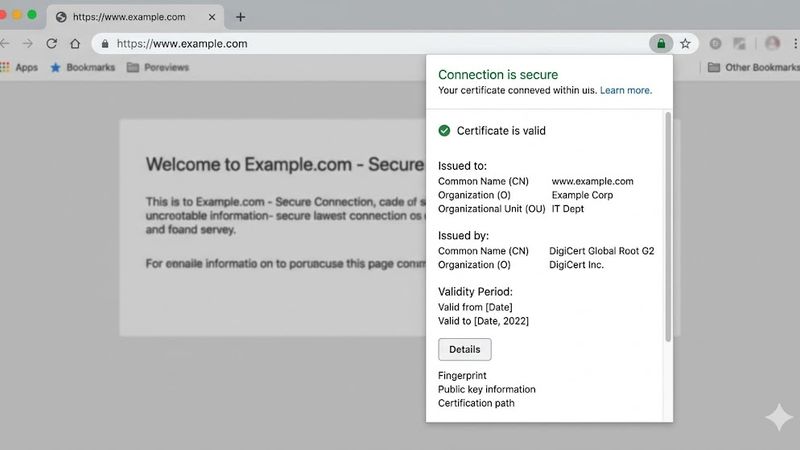
Browser trust indicators help users identify secure websites using HTTPS encryption.
At the same time, browsers display padlock icons, certificate details, and HTTPS indicators when TLS encryption is properly configured.
For example, eCommerce stores using valid HTTPS certificates often experience higher checkout completion rates because users trust the secure connection.
What Is TLS and How Does It Work?
TLS (Transport Layer Security) is a cryptographic protocol that encrypts data transmitted between web browsers and servers.
First, TLS evolved directly from SSL and became the industry standard for secure internet communication. Modern HTTPS connections rely on TLS rather than SSL.
“TLS is a cryptographic protocol that encrypts data transmitted between web browsers and servers.”
For example, when users visit a secure website, TLS creates an encrypted tunnel between the browser and server before any sensitive data is exchanged.
How TLS Encryption Works
TLS encryption works by combining asymmetric encryption, symmetric encryption, and authentication mechanisms.
Initially, TLS uses asymmetric encryption to authenticate the server and securely exchange session keys. After that, symmetric encryption handles the actual data transfer because it is much faster.
For example, RSA or ECDSA certificates authenticate the server identity, while AES encryption protects the transmitted data.
According to Cloudflare research, TLS 1.3 reduces connection latency by up to 50% compared to older versions — Source: Cloudflare, 2025.
What Happens During a TLS Handshake?
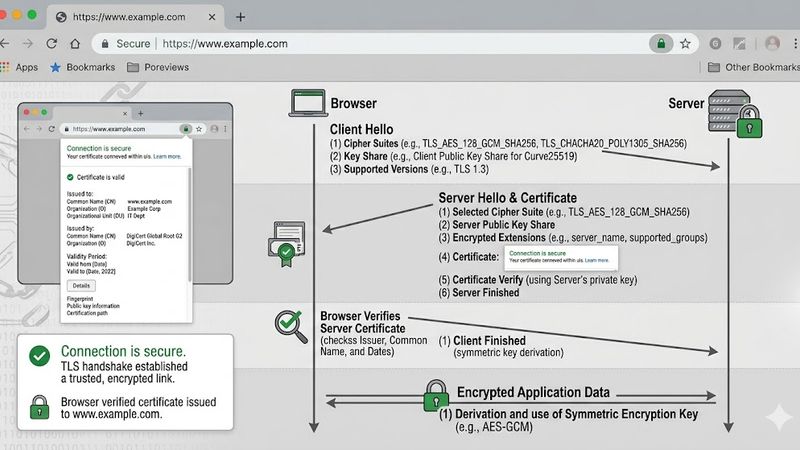
A TLS handshake is the process where a client and server authenticate each other and establish encryption settings.
“A TLS handshake involves authentication, encryption negotiation, and secure session key exchange between a client and server.”
The TLS handshake usually follows these steps:
The browser connects to the website server.
The server sends its TLS certificate.
The browser validates the certificate authority.
Both parties negotiate supported cipher suites.
Session keys are securely exchanged.
Encrypted communication begins.
For example, when you open an HTTPS website, this entire process usually completes within milliseconds.
Which TLS Version Should Websites Use in 2026?
TLS 1.3 is the recommended TLS version for websites in 2026 because it provides the best balance of security and performance.
TLS 1.3 removes outdated algorithms, shortens handshake complexity, and improves encryption efficiency.
“TLS 1.3 improves website security and performance by reducing handshake complexity and supporting stronger encryption algorithms.”
At the same time, TLS 1.2 remains widely supported for compatibility reasons, but older versions should be disabled completely.
TLS 1.3 configuration tutorial
What Is the Difference Between SSL and TLS?
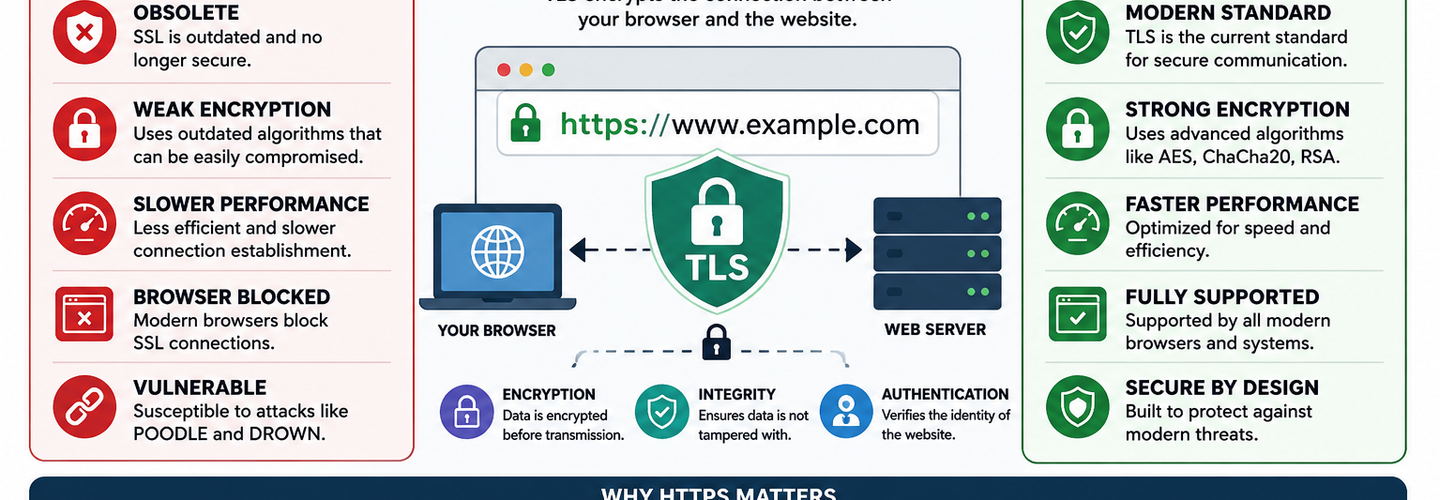
The difference between SSL and TLS is that SSL is obsolete and insecure, while TLS is the modern protocol used for encrypted internet communication.
Although people still say “SSL certificate,” modern HTTPS security actually relies on TLS technology.
SSL vs TLS Security Architecture
TLS provides stronger security architecture than SSL because it uses modern cryptographic algorithms and improved authentication methods.
For example, TLS supports stronger cipher suites like AES-GCM and ChaCha20-Poly1305, while SSL relied on weaker algorithms vulnerable to attacks.
SSL vs TLS Comparison
Security Status
- ▸SSL: Obsolete
- ▸TLS: Modern standard
Encryption Strength
- ▸SSL: Weak encryption
- ▸TLS: Strong encryption
Performance
- ▸SSL: Slower connections
- ▸TLS: Faster and optimized performance
Browser Support
- ▸SSL: Blocked by modern browsers
- ▸TLS: Fully supported
Cipher Suites
- ▸SSL: Outdated cipher suites
- ▸TLS: Modern cryptographic algorithms
Handshake Security
- ▸SSL: Vulnerable to attacks
- ▸TLS: Improved handshake security
Recommended Today
- ▸SSL: No
- ▸TLS: Yes
SSL vs TLS Performance Differences
TLS improves website performance by reducing latency and streamlining secure connections.
For example, TLS 1.3 reduces round-trip handshakes compared to TLS 1.2, helping websites load faster.
According to Akamai performance analysis, secure websites using optimized TLS configurations improve page load performance and user retention — Source: Akamai State of the Internet Report, 2025.
SSL Certificates vs TLS Certificates
SSL certificates are actually TLS certificates in modern website environments.
Despite the outdated terminology, certificate authorities still market HTTPS certificates as “SSL certificates” because the term remains widely recognized.
For example, when hosting providers advertise free SSL certificates through Let’s Encrypt, they are really deploying TLS certificates.
Best practices for website encryption
How Does HTTPS Use TLS Encryption?
HTTPS uses TLS encryption to secure communication between browsers and web servers over the HTTP protocol.
HTTPS simply combines HTTP with TLS encryption. Without TLS, HTTPS cannot function securely.
For example, when users access https://example.com, the browser initiates a TLS handshake before loading website content.
How Browsers Establish Secure Connections
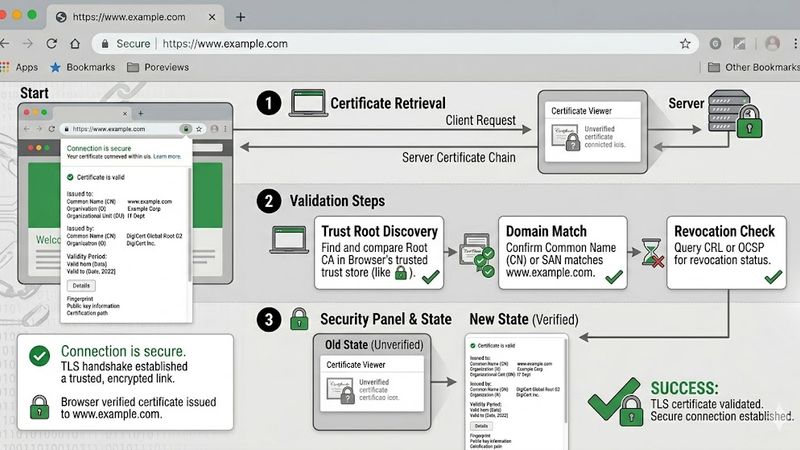
Browsers establish secure connections by validating certificates and negotiating encrypted TLS sessions.
First, the browser checks whether the certificate is trusted by a recognized Certificate Authority (CA). Then it verifies expiration dates and domain matching.
For example, expired certificates trigger browser warnings because they may indicate compromised or misconfigured servers.
How HTTPS Protects Website Data
HTTPS protects website data by encrypting information during transmission across networks.
For example, HTTPS prevents attackers from reading login forms, payment transactions, API requests, and session cookies.
According to Mozilla Web Security documentation, HTTPS encryption significantly improves web privacy and integrity — Source: Mozilla Developer Network, 2025.
What Are the Most Common HTTPS Configuration Mistakes?
HTTPS configuration mistakes weaken website security even when TLS encryption is enabled.
Many websites deploy HTTPS incorrectly, leaving vulnerabilities exposed despite having valid certificates.
Using Outdated TLS Versions
Outdated TLS versions increase the risk of cryptographic attacks and compliance failures.
For example, TLS 1.0 and TLS 1.1 no longer meet modern security standards and should be disabled immediately.
Weak Cipher Suites
Weak cipher suites reduce encryption effectiveness and expose websites to attacks.
For example, older cipher suites using RC4 or 3DES are considered insecure by modern standards.
Expired Certificates
Expired certificates trigger browser warnings and break HTTPS trust validation.
According to Sectigo certificate lifecycle data, certificate expiration remains one of the most common website security failures — Source: Sectigo, 2025.
Mixed Content Problems
Mixed content occurs when HTTPS pages load insecure HTTP resources.
For example, loading images or JavaScript files through HTTP weakens overall page security and may trigger browser warnings.
Incorrect HTTPS Redirects
Improper HTTPS redirects can create duplicate content issues and security inconsistencies.
For example, websites that fail to force HTTPS may expose users to downgrade attacks.
Website vulnerability scanning tools
How Can You Test Your Website’s TLS Security?
Website TLS security testing helps identify vulnerabilities, weak configurations, and certificate issues before attackers exploit them.
Regular testing ensures your HTTPS implementation follows modern security standards.
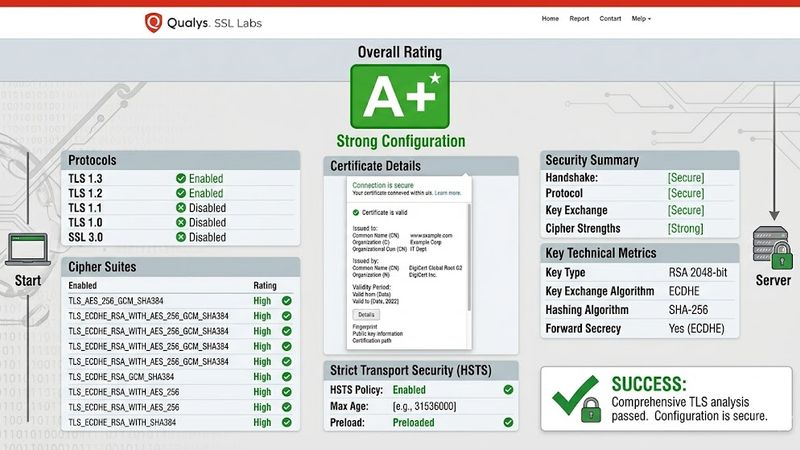
SSL Labs
SSL Labs is a free HTTPS testing platform that analyzes TLS configurations and certificate security.
The tool grades websites based on encryption quality, supported protocols, and configuration strength.
OpenSSL
OpenSSL is a command-line toolkit for testing certificates and TLS connectivity.
For example, developers can inspect certificates and test supported protocols directly from terminal environments.
Browser DevTools
Browser DevTools allow developers to inspect HTTPS requests, certificate chains, and TLS protocols.
Chrome and Firefox both include built-in HTTPS inspection panels.
SecurityHeaders
SecurityHeaders analyzes HTTP security headers and HTTPS-related configurations.
For example, the tool helps validate HSTS implementation and browser protection policies.
HTTPS Monitoring Tools
HTTPS monitoring tools continuously track certificate expiration and TLS vulnerabilities.
For example, organizations use automated monitoring systems to receive alerts before certificates expire.
Cybersecurity monitoring tools
What’s Next: How to Secure Your Website with TLS 1.3
Securing your website with TLS 1.3 requires proper HTTPS configuration, certificate management, and continuous monitoring.
Modern web security depends on proactive maintenance rather than one-time setup.
Enable HTTPS Everywhere
HTTPS should be enabled across all website pages, APIs, and subdomains.
For example, forcing HTTPS redirects prevents users from accidentally accessing insecure HTTP versions.
Upgrade to TLS 1.3
TLS 1.3 provides the strongest security and best performance for modern websites.
By upgrading server configurations, you can reduce handshake latency and improve encryption resilience.
DNS Intelligence Explained: The Ultimate Guide for Cybersecurity Researchers
Configure HSTS
HSTS (HTTP Strict Transport Security) forces browsers to use HTTPS connections only.
For example, HSTS prevents downgrade attacks where attackers attempt to force insecure HTTP connections.
Automate Certificate Renewal
Automatic certificate renewal prevents unexpected HTTPS failures caused by expired certificates.
For example, Let’s Encrypt supports automated renewal workflows through tools like Certbot.
Continuously Monitor TLS Vulnerabilities
Continuous TLS monitoring helps organizations detect emerging encryption vulnerabilities quickly.
For example, cybersecurity teams regularly audit cipher suites, certificate chains, and TLS protocol support.
How Port Scanning Works: Open Ports, TCP vs UDP, and What It Means for Your Security
Conclusion
SSL and TLS both aim to secure internet communication, but TLS is the modern protocol that powers secure HTTPS connections today.
SSL introduced encrypted web communication decades ago, but its security flaws eventually made it obsolete. TLS evolved from SSL and now protects billions of daily internet connections using stronger encryption, faster handshakes, and improved authentication mechanisms.
Most importantly, HTTPS security is no longer optional. Modern browsers expect encrypted connections, search engines prioritize HTTPS websites, and users trust secure websites more than unsecured alternatives.
By enabling HTTPS everywhere, upgrading to TLS 1.3, configuring HSTS, and monitoring certificate health, you can significantly improve your website’s security posture and user trust in 2026 and beyond.
Written by
Surendra Reddy
Cybersecurity Researcher & Founder, ReconShield
Surendra is a cybersecurity engineer specializing in Open Source Intelligence (OSINT), exposure intelligence, and AI-driven threat analysis. He built ReconShield to democratize access to enterprise-grade infrastructure visibility tools and secure internet-facing assets.
Reviewed by
ReconShield Editorial Security Team
Experts in web security, HTTPS infrastructure, and cybersecurity research.
Disclaimer: This article was initially drafted using AI assistance. However, the content has undergone thorough revisions, editing, and fact-checking by human editors and subject matter experts to ensure accuracy.
## Frequently Asked Questions About SSL and TLS
Is SSL still used today?
SSL is no longer considered secure and has been replaced by TLS for modern HTTPS encryption.
Does HTTPS use SSL or TLS?
Modern HTTPS uses TLS encryption, even though many providers still use the term “SSL certificate.”
Is TLS 1.3 better than TLS 1.2?
TLS 1.3 is faster and more secure because it removes outdated cryptographic algorithms and reduces handshake complexity.
Why do browsers block SSL websites?
Browsers block SSL because older SSL protocols contain known vulnerabilities that attackers can exploit.
Can HTTPS improve SEO rankings?
HTTPS can improve SEO because Google treats secure websites as a ranking signal.
## Analyst Commentary & Implementation Blueprint
Security advisory
Continuous security exposure assessment is critical to identifying public vulnerabilities before they are exploited. Organizations should maintain a passive inventory of all web servers, TLS configs, and open ports, ensuring that default configurations are eliminated and security advisories are actively implemented.
Hardened Security Configuration Blueprint
# General Security Hardening Directive
ServerTokens ProductOnly
ServerSignature Off
FileETag None
Actionable Mitigation Checklist
- ✔Perform passive asset inventories weekly.
- ✔Restrict administrative ports using local firewall controls.
- ✔Monitor active CVE alerts for exposed software.
Common Inquiries & FAQs
Why is passive scanning preferred for continuous auditing?
Passive audits do not cause operational impact or trigger firewall blocks, making them ideal for constant surveillance of internet-facing assets.
What should I do if a vulnerability is flagged?
Apply the latest vendor patches, restrict access to the resource via firewalls, or verify configuration flags to mitigate risks.
Surendra Reddy
Surendra Reddy is a cybersecurity researcher and founder of ReconShield, specializing in OSINT and defensive infrastructure analysis.
Connect on LinkedIn ↗// AUDIT BRIEFING DISCUSSION (2 COMMENTS)
Great breakdown of the passive infrastructure vectors. We recently audited our external DNS zones and found multiple dangling staging environments. Implementing wildcard certificates reduced our CT log leaks significantly.
Is there any automated tooling you recommend for daily crt.sh scraping? Manually checking CT logs is becoming unsustainable for our domain portfolio.
// MORE ARTICLES
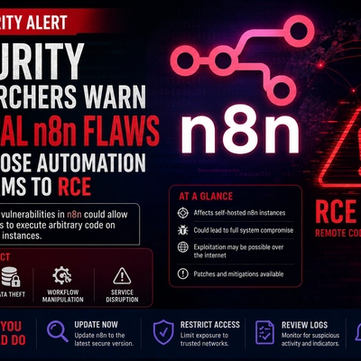
Security Researchers Warn Critical n8n Flaws May Expose Automation Platforms to RCE
Researchers have disclosed critical vulnerabilities in n8n that could expose automation workflows and connected enterprise systems to remote code execution risks, prompting urgent patch recommendations for users and administrators.

How Agentic AI Is Changing Software Engineering and Expanding Mobile Attack Surfaces
Agentic AI is rapidly transforming software engineering workflows through automation and intelligent coding assistance, while cybersecurity experts warn of expanding mobile attack surfaces and emerging application security risks.
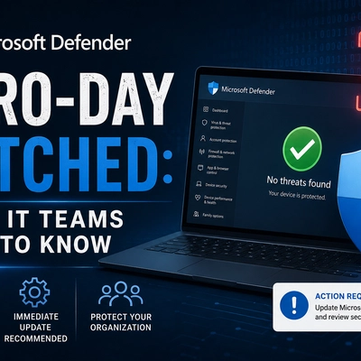
Microsoft Defender Zero-Day Patched: What IT Teams Need to Know
Microsoft patches RoguePlanet, a Defender zero-day (CVE-2026-50656) letting attackers gain SYSTEM access. Here's what IT teams need to know.