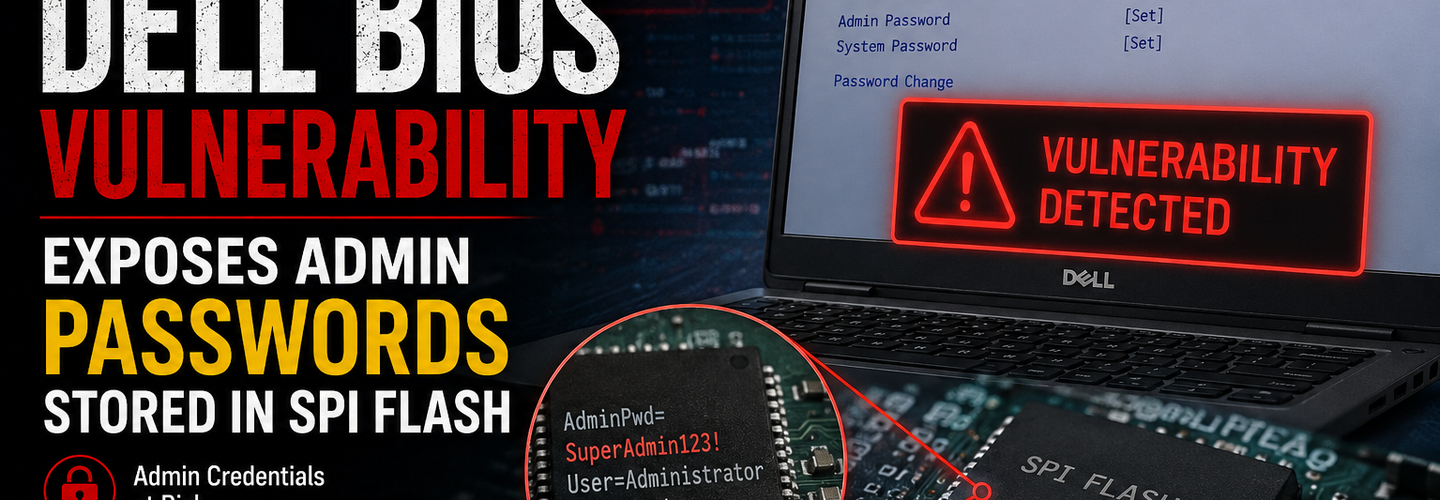
Critical Dell BIOS Vulnerability Exposes Admin Passwords Stored in SPI Flash
Summarize this blog post with:
ChatGPT | Perplexity | Claude | Grok
You've probably assumed that a BIOS administrator password is a genuine last line of defense if a company laptop is ever lost or stolen. What security researchers just proved is that on certain Dell devices, that password can be extracted from the firmware chip in milliseconds — no cracking, no guessing, no authentication required. In this guide, you'll learn exactly how this flaw works, which Dell models are affected, and what it means for your full-disk encryption if one of your devices goes missing.
Key Takeaways
- ▸CVE-2026-40639 (DSA-2026-197) lets an attacker with physical access recover Dell BIOS administrator and user passwords in plaintext, directly from a firmware flash dump.
- ▸The root cause is a broken XOR encryption scheme, not a proper cryptographic hash, used to store passwords in the BIOS's DVAR configuration region.
- ▸Passwords of 12 characters or fewer can be recovered instantly and exactly, with no brute-forcing or known plaintext required, due to how null-padding leaks the encryption key.
- ▸Four devices have been confirmed vulnerable by independent researchers — the Latitude E7250, Wyse 5070, Latitude 7490, and XPS 15 9560 — and none of them appear on Dell's initial patched-platform list.
- ▸Two of the four confirmed-vulnerable devices are end-of-life and will not receive a fix at all, leaving permanent exposure for anyone still running them.
- ▸The greatest downstream risk is a full-disk encryption bypass, since recovering the BIOS password can allow an attacker to disable Secure Boot or pre-boot DMA protections not always reflected in TPM measurements.
- ▸Dell has targeted broader remediation for the end of July 2026, but that is a stated goal rather than a shipped fix as of publication.
What Is the Dell BIOS SPI Flash Vulnerability?
The Dell BIOS SPI flash vulnerability is a flaw in how certain Dell client platforms store BIOS administrator and user passwords, allowing full plaintext recovery from a firmware dump with no authentication or brute-force effort required. Tracked as CVE-2026-40639 and addressed in Dell Security Advisory DSA-2026-197, the issue affects platforms that rely on Dell's proprietary DVAR (Dell Variable) configuration store and the SystemPwSmm SMM driver. Security researchers Craig S. Blackie of MDSec and Darren McDonald of AmberWolf privately disclosed the issue to Dell in March 2026, and Dell validated the findings before publishing the advisory on June 9, 2026.
For example, instead of storing BIOS passwords as a one-way cryptographic hash — the standard, correct approach — vulnerable Dell firmware stores them in a 32-byte field using reversible XOR encryption. Dell has already solved this correctly on newer platforms, such as the OptiPlex 3000, which uses a SHA-256-based vault called SIVB (Security Information Vault Block) instead of the older DVAR scheme. The problem is that the fixed design hasn't reached every device still being sold and deployed.
Why Does This Vulnerability Matter?
This vulnerability matters because a BIOS password is often treated as a foundational security control, gating boot order, Secure Boot configuration, and pre-boot DMA protection settings that many organizations assume are effectively unrecoverable if forgotten — or unbreakable if an attacker doesn't know them. Recovering a supposedly secret BIOS password in milliseconds fundamentally undermines that assumption, particularly for devices that leave organizational control through loss, theft, or resale.
At the same time, the real danger extends well beyond simply changing a boot order. Security researchers found that recovering the BIOS password can allow an attacker to disable Secure Boot or pre-boot DMA protection settings that aren't always reflected in TPM PCR measurements, potentially opening a path to bypassing full-disk encryption entirely — Source: CyberPress, 2026. Given that many organizations reuse BIOS passwords across an entire device estate for manageability, a single successful extraction can extend the blast radius across every device sharing that same password, and historical passwords on resold or donated hardware can remain exploitable long after a device has left the original owner's hands.
Technical Breakdown: How the XOR Flaw Works
The root cause of CVE-2026-40639 is that vulnerable Dell firmware stores BIOS passwords using a repeating-key XOR cipher rather than a proper cryptographic hash function. XOR encryption is reversible by design — useful for many legitimate purposes, but fundamentally unsuited to password storage, where a one-way hash should make recovering the original value computationally infeasible even with full access to the stored value.
How the Key Leaks Through Padding
For example, Dell's DVAR region stores each password in a 32-byte record, encrypted using a 20-byte repeating XOR key. The first character of the password is written to the flash chip completely unencrypted, and any unused space beyond the actual password length gets padded with null bytes before encryption is applied. This padding is the flaw's fatal weakness: XORing a null byte with any key byte simply outputs that key byte unchanged, meaning the padding directly leaks raw fragments of the encryption key into the stored record. For any password of 12 characters or fewer, this leaks the entire 20-byte key, enabling instant, exact password recovery with no brute force and no known plaintext required.
Longer Passwords Aren't Meaningfully Safer
Passwords longer than 12 characters leave a smaller gap of unleaked key material, but researchers found a separate path around even that protection. Dell's key derivation reportedly relies only on a fixed per-device seed, a device GUID, and the single unencrypted first character of the password — none of which are secret from an attacker who already has flash access, meaning the practical security benefit of a longer password is minimal against this specific attack.
What Access an Attacker Actually Needs
Exploiting this flaw requires physical access to the device's SPI flash chip, either by connecting a low-cost flash clip and programmer directly to the chip, or by booting the device into an attacker-controlled operating system that can read the flash contents. No authentication, user interaction, or brute-forcing is required once flash access is obtained — recovery is fully deterministic. This is also why Dell and the researchers disagree on severity: Dell rates the flaw's Attack Complexity as High and assigns a CVSS score of 5.7, while the researchers argue Attack Complexity should be rated Low, since recovery is instant and certain once flash access is obtained, and score it 6.1.
Which Dell Devices Are Affected?
Independent research confirmed four specific Dell models as vulnerable, and notably, none of them currently appear on Dell's list of patched platforms.
- ▸Dell Wyse 5070 — a current, actively supported thin client that still ships with the vulnerable DVAR/XOR scheme today.
- ▸Dell Latitude 7490 — a business laptop model confirmed vulnerable by researchers.
- ▸Dell Latitude E7250 — end-of-life and will not receive a security fix at all.
- ▸Dell XPS 15 9560 — also end-of-life and will not receive a security fix.
Dell's initial DSA-2026-197 patch batch instead covers a different set of platforms — the Edge Gateway 3000 and 5000, Embedded PC 3000 and 5000, Precision 3630 Tower and 3930 Rack, and a range of Rugged Latitude devices. The confirmed-vulnerable consumer and business models are conspicuously absent from that list, and Dell has told researchers the remaining affected platforms are targeted for remediation by the end of July 2026 — a stated goal rather than a currently shipped fix.
What Does an Attack Scenario Look Like?
Understanding the realistic attack path helps clarify who should be most concerned about this flaw.
A device is lost, stolen, or improperly disposed of without having its BIOS password reset or its storage securely wiped.
An attacker gains physical possession of the device, whether briefly (an unattended laptop) or permanently (a stolen or improperly resold unit).
The attacker connects a flash clip and inexpensive SPI programmer to the chip, or boots the device into a controlled operating system capable of reading the flash contents.
The BIOS password is recovered in plaintext within milliseconds, requiring no cracking or guessing.
The attacker uses the recovered password to alter boot settings, disable Secure Boot, or disable pre-boot DMA protection, potentially opening a path to bypass full-disk encryption on the device.
How Should Enterprises Respond?
Organizations should treat existing BIOS passwords on affected Dell platforms as recoverable rather than secret, and adjust their security posture accordingly until patches are confirmed applied.
- ▸Inventory your Dell device fleet to identify any of the confirmed-vulnerable models, particularly the Wyse 5070, which remains a current, supported product still shipping the vulnerable design.
- ▸Apply Dell firmware updates as they become available, and track DSA-2026-197 directly for updates on the broader remediation timeline expected by the end of July 2026.
- ▸Retire or isolate end-of-life vulnerable devices, since the Latitude E7250 and XPS 15 9560 will not receive fixes and remain permanently exposed as long as they're deployed.
- ▸Avoid reusing BIOS passwords across your device estate, since a single successful extraction otherwise extends the blast radius across every device sharing that password.
- ▸Reset BIOS passwords and securely wipe storage before any device disposal or resale, given that historical passwords can remain recoverable from flash long after a device leaves your organization's control.
Security teams managing broader firmware and endpoint exposure can pair this response with a website vulnerability scanner to confirm no other outdated firmware or software versions are exposing similar risk across your infrastructure.
[Insert image: Diagram of the XOR key-leak mechanism in Dell's DVAR password storage | Alt text: "Dell BIOS SPI flash password recovery vulnerability diagram"]
Practical Security Best Practices
- ▸Rely on layered controls rather than a BIOS password alone, including Secure Boot, TPM-measured boot, and correctly configured full-disk encryption that doesn't depend solely on unmeasured BIOS settings.
- ▸Enforce physical device protections, such as cable locks and controlled storage, particularly for devices carrying sensitive data outside secured facilities.
- ▸Follow secure asset-disposal practices that include a full cryptographic wipe rather than relying on a BIOS password reset alone before hardware leaves your organization.
- ▸Verify TPM policies actually measure the security-relevant settings this flaw could disable, since some configurations don't reflect pre-boot DMA protection changes in TPM PCRs.
- ▸Track Dell's security advisories directly rather than relying solely on secondhand reporting for confirmation that your specific models have received a fix.
What's Next? Tracking Dell's Remediation Timeline
Dell's broader fix is still pending for the confirmed-vulnerable consumer and business platforms, and researchers continue pressing for full coverage.
- ▸Watch for an updated DSA-2026-197 revision that adds the Wyse 5070, Latitude 7490, and other affected platforms to the confirmed patch list.
- ▸Confirm whether Dell issues any guidance for end-of-life devices like the Latitude E7250 and XPS 15 9560, which currently face permanent exposure without a fix.
- ▸Review our related coverage of the Microsoft Defender RoguePlanet zero-day for another recent example of a foundational security control becoming the point of failure.
- ▸Bookmark our cybersecurity news hub for updates as Dell's remediation timeline develops.
Conclusion
This Dell BIOS vulnerability is a sharp reminder that a password's storage mechanism matters just as much as the password itself — a supposedly secret BIOS password protected by broken XOR encryption isn't meaningfully secret at all against anyone with brief physical access. With confirmed-vulnerable devices absent from Dell's initial patch list, and two of them permanently unpatched due to end-of-life status, organizations need to inventory their fleet now rather than wait for a complete fix. Treat existing BIOS passwords on affected models as recoverable, lean on layered controls like Secure Boot and properly configured full-disk encryption, and follow secure disposal practices for any device leaving your organization. Stay subscribed to trusted vulnerability intelligence sources so Dell's remaining patches reach your fleet as soon as they ship.
Written by ReconShield Editorial Team — a cybersecurity publication covering cyber threats, data breaches, vulnerabilities, malware, threat intelligence, and online privacy, providing practical insights to help readers stay informed and secure.
Reviewed by Surendra Reddy, Founder & Principal Security Engineer, ReconShield — a cybersecurity researcher specializing in OSINT, infrastructure exposure intelligence, and passive diagnostic tooling.
Read More:
AI Bug Hunting: How Security Researchers Use AI to Find Vulnerabilities in
CVE-2026-46331: New Linux pedit COW Exploit Enables Root Access by Poisoning Cached Binaries
Update Chrome Now: 382 Security Vulnerabilities Patched, Including 15 Critical Bugs
Security Alert: Multiple FatFs Vulnerabilities Impact Embedded Devices Worldwide
Top 15 Critical CVE-2026 Vulnerabilities Every IT Team Should Know
Breaking: Hackers Claim Massive Accenture Data Breach, 35GB of Source Code Allegedly Stolen
## Analyst Commentary & Implementation Blueprint
Security advisory
Continuous security exposure assessment is critical to identifying public vulnerabilities before they are exploited. Organizations should maintain a passive inventory of all web servers, TLS configs, and open ports, ensuring that default configurations are eliminated and security advisories are actively implemented.
Hardened Security Configuration Blueprint
# General Security Hardening Directive
ServerTokens ProductOnly
ServerSignature Off
FileETag None
Actionable Mitigation Checklist
- ✔Perform passive asset inventories weekly.
- ✔Restrict administrative ports using local firewall controls.
- ✔Monitor active CVE alerts for exposed software.
Common Inquiries & FAQs
Why is passive scanning preferred for continuous auditing?
Passive audits do not cause operational impact or trigger firewall blocks, making them ideal for constant surveillance of internet-facing assets.
What should I do if a vulnerability is flagged?
Apply the latest vendor patches, restrict access to the resource via firewalls, or verify configuration flags to mitigate risks.
Surendra Reddy
Surendra Reddy is a cybersecurity researcher and founder of ReconShield, specializing in OSINT and defensive infrastructure analysis.
Connect on LinkedIn ↗// AUDIT BRIEFING DISCUSSION (2 COMMENTS)
Great breakdown of the passive infrastructure vectors. We recently audited our external DNS zones and found multiple dangling staging environments. Implementing wildcard certificates reduced our CT log leaks significantly.
Is there any automated tooling you recommend for daily crt.sh scraping? Manually checking CT logs is becoming unsustainable for our domain portfolio.
// MORE ARTICLES

SplitVPN Hacked: Data Breach Exposes 865,000 User Records and 58 Million Hidden Connection Logs (July 2026)
SplitVPN hacked: 865,336 user records and 58 million connection logs exposed, directly contradicting the VPN's "no-logs" promise. What was leaked and what to do now.

Critical WordPress wp2shell RCE Vulnerability Puts Millions of Sites at Risk—Patch Now
wp2shell is a pre-auth RCE in WordPress Core affecting 500M+ sites. Public exploits exist—patch to 7.0.2 or 6.9.5 immediately.
New Windows RDP Flaws Could Lead to Data Theft — Everything You Need to Know
Microsoft patched a dozen Windows RDP flaws in July 2026 that could leak memory data. See affected versions, KB numbers, and how to patch.