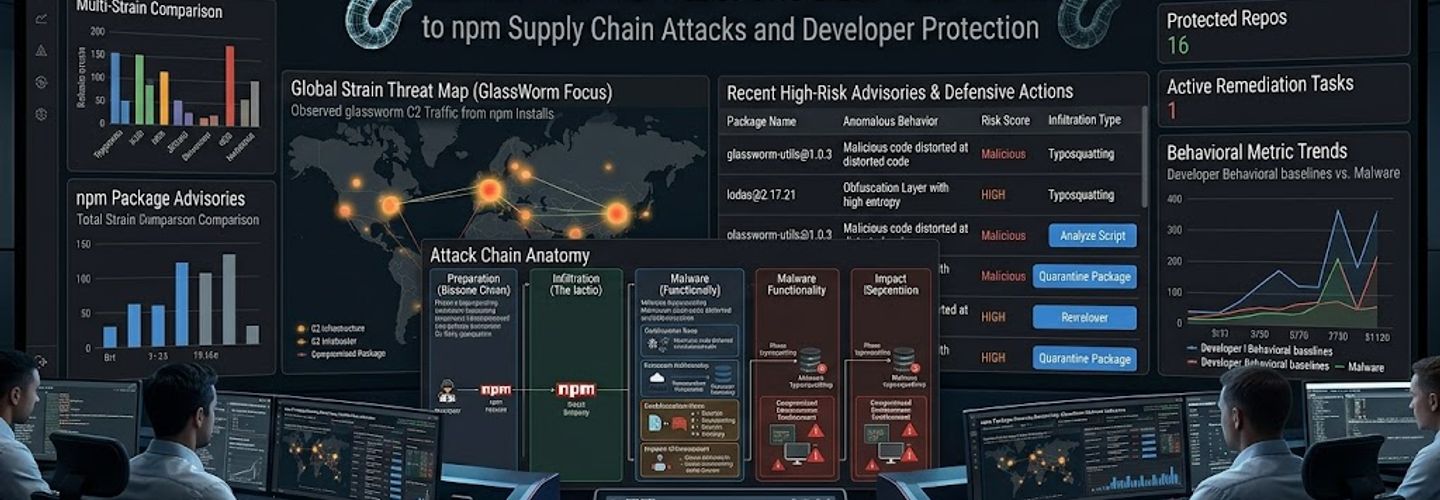
GlassWorm Malware: The Definitive Guide to npm Supply Chain Attacks and Developer Protection
Summarize this blog post with: ChatGPT | Perplexity | Claude | Grok
Developers rely on npm packages every day to speed up application development and reduce engineering effort. However, many teams underestimate how dangerous malicious dependencies can become when attackers exploit trusted open-source ecosystems. In this guide, you’ll learn what GlassWorm malware is, how it spreads through malicious npm packages, and the practical security measures that help protect development environments and CI/CD pipelines.
Key Takeaways
- ▸GlassWorm malware is a developer-targeting threat that spreads through malicious npm packages in software supply chain attacks.
- ▸Malicious npm packages can compromise developer systems, steal credentials, and introduce unauthorized code into applications.
- ▸Software supply chain attacks exploit trust in open-source ecosystems and third-party dependencies to distribute malicious code.
- ▸Dependency auditing tools help identify suspicious or vulnerable npm packages before deployment into production environments.
- ▸Secure CI/CD pipelines reduce the likelihood of malware propagation across development and deployment workflows.
- ▸Continuous dependency monitoring improves early detection of malicious package activity and unauthorized changes.
- ▸Developer security awareness is essential for preventing npm ecosystem compromises and credential theft attacks.
What Is GlassWorm Malware and How Does It Work?
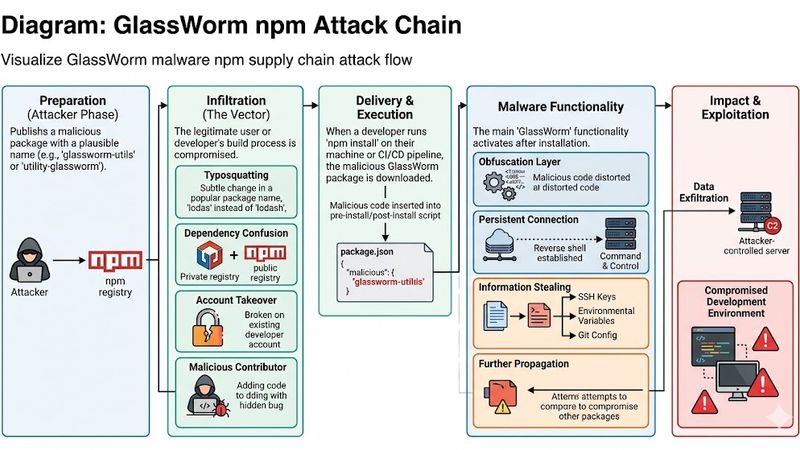
GlassWorm malware is a developer-targeting threat that spreads through malicious npm packages in software supply chain attacks. Attackers use compromised or fake JavaScript packages to infect developer systems, steal credentials, and establish persistence within software development environments.
First, GlassWorm malware typically abuses the npm ecosystem, which is one of the largest open-source package repositories used in Node.js development. Because developers frequently install third-party packages without deep inspection, attackers exploit this trust to distribute malicious code at scale.
Moreover, software supply chain attacks have become increasingly common in modern development ecosystems. According to Sonatype’s State of the Software Supply Chain Report, open-source malware packages increased significantly over recent years — Source: Sonatype.
For example, attackers may upload a package that appears legitimate but secretly executes credential-stealing scripts after installation. Once executed, the malware can exfiltrate API keys, environment variables, authentication tokens, SSH keys, and cloud credentials.
Software supply chain attacks exploit trusted third-party dependencies to distribute malicious code. This makes GlassWorm particularly dangerous for organizations that heavily rely on automated dependency management.
SSL vs TLS Explained: Complete HTTPS Security Guide for Modern Website Security
How Was GlassWorm Malware Discovered?
GlassWorm malware was identified through threat intelligence investigations involving suspicious npm package behavior and malicious dependency analysis. Security researchers discovered unusual outbound connections, unauthorized scripts, and obfuscated JavaScript execution patterns tied to malicious packages.
Additionally, modern malware campaigns increasingly target developers because development environments often contain privileged access credentials. For example, compromised developer machines may provide access to:
- ▸GitHub repositories
- ▸CI/CD pipelines
- ▸Cloud infrastructure
- ▸Internal APIs
- ▸Production deployment systems
At the same time, attackers understand that compromising a single developer workstation can impact thousands of downstream users.
“Malicious npm packages can execute unauthorized scripts, steal credentials, and compromise development environments.”
Why Is GlassWorm Malware Dangerous for Developers?
GlassWorm malware matters because it targets trusted software dependencies and developer workflows rather than traditional end-user systems. This approach allows attackers to compromise organizations indirectly through software supply chains.
First, npm ecosystems contain millions of packages and dependencies. According to npm statistics, the npm registry hosts more than 2 million packages and billions of weekly downloads — Source: npm Inc., 2025.
Because developers frequently install packages automatically, attackers can weaponize trust relationships within open-source ecosystems.
Why npm Ecosystems Are Frequent Attack Targets
npm ecosystems are common attack targets because developers prioritize speed, automation, and dependency reuse. Attackers exploit these operational realities to distribute malicious packages that appear legitimate.
For example, threat actors commonly use:
Common npm Supply Chain Attack Techniques
Typosquatting
Attackers create package names that closely resemble legitimate npm packages. Developers may accidentally install these fake packages because of spelling mistakes or visually similar names.
Risk Level: High
Dependency Confusion
Attackers exploit package resolution behavior between public and private registries. A malicious public package may be installed instead of an intended internal dependency.
Risk Level: Critical
Account Compromise
Threat actors hijack maintainer accounts to publish malicious updates through trusted npm packages.
Risk Level: Critical
Malicious Updates
Attackers inject harmful code into existing packages during version updates, affecting developers who automatically update dependencies.
Risk Level: High
Fake Developer Utilities
Cybercriminals publish deceptive npm tools that appear useful but secretly contain malware or credential-stealing functionality.
Risk Level: Medium
According to GitHub’s security research, dependency confusion attacks remain one of the fastest-growing software supply chain risks — Source: GitHub Security Lab, 2025.
Why Open-Source Dependencies Create Security Risks
Open-source dependencies create security risks because organizations often inherit third-party code without comprehensive verification. Even trusted packages may become malicious after compromise or maintainer takeover.
For example, developers may unknowingly install hundreds of indirect dependencies through a single package installation. This dependency sprawl dramatically increases the attack surface.
Additionally, many organizations lack visibility into:
- ▸Transitive dependencies
- ▸Package maintainer reputation
- ▸Post-install scripts
- ▸Registry integrity
- ▸Runtime package behavior
How Do Attackers Use Malicious npm Packages to Spread Malware?
Attackers spread GlassWorm malware by publishing or compromising npm packages that execute malicious code during installation or runtime. These packages often appear harmless until installation triggers hidden payloads.
Malicious npm Package Distribution Methods
Malicious npm package distribution relies heavily on social engineering and package impersonation tactics. Attackers intentionally create deceptive package names that resemble trusted libraries.
For example, attackers may replace one character in a popular package name:
- ▸express → expres
- ▸react-dom → reactd0m
- ▸lodash → lodas
This tactic is known as typosquatting.
Moreover, attackers may abuse trending frameworks or developer tools to maximize download counts. According to Checkmarx research, typosquatting remains a dominant npm malware technique — Source: Checkmarx, 2025.
Payload Execution Process
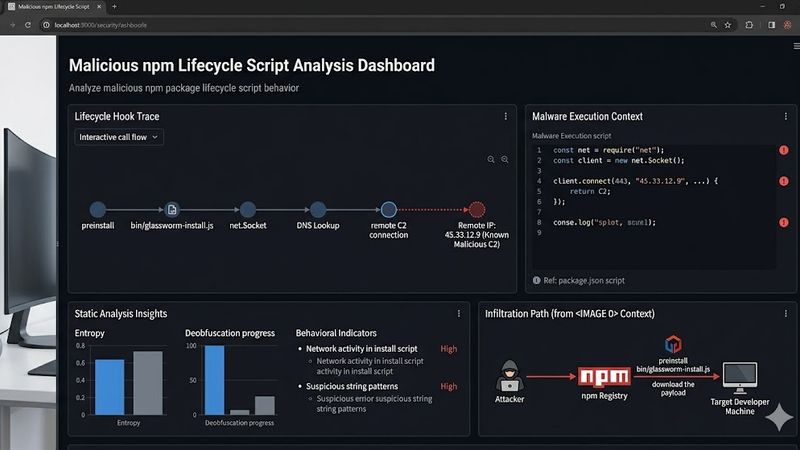
GlassWorm malware commonly executes payloads through npm lifecycle scripts such as postinstall or preinstall hooks. These scripts automatically run when developers install packages.
For example, malicious scripts may:
Download secondary payloads
Steal environment variables
Access browser cookies
Enumerate system information
Establish persistence mechanisms
Additionally, attackers frequently obfuscate JavaScript payloads to evade static analysis tools.
“npm ecosystem attacks frequently use typosquatting and dependency confusion techniques to trick developers into installing malicious packages.”
How malicious packages spread malware
Credential Theft and Persistence Techniques
Credential theft is one of the primary objectives of developer-targeting malware campaigns. Attackers prioritize secrets that provide infrastructure access.
For example, GlassWorm-like malware may target:
- ▸AWS credentials
- ▸GitHub access tokens
- ▸Docker registry credentials
- ▸SSH keys
- ▸CI/CD secrets
Furthermore, attackers may create scheduled tasks or persistence scripts to maintain long-term access after initial infection.
What Is a Software Supply Chain Attack in the npm Ecosystem?
A software supply chain attack compromises software through trusted dependencies, development tools, or build pipelines instead of directly targeting the final application. In npm ecosystems, attackers abuse third-party packages to distribute malware at scale.
First, modern applications rely heavily on open-source dependencies. According to Synopsys research, over 96% of commercial applications contain open-source components — Source: Synopsys Open Source Security Report, 2025.
Because dependency chains are deeply interconnected, a single compromised package can impact thousands of applications.
Dependency Confusion Attacks
Dependency confusion attacks exploit package resolution behavior between internal and public registries. Attackers upload public packages using the same names as internal private packages.
For example, if a build system mistakenly prioritizes public registries, the malicious package becomes installed automatically.
This attack technique gained widespread attention after multiple enterprise organizations were successfully targeted through public package registry abuse.
Open-Source Trust Exploitation
Open-source trust exploitation occurs when attackers abuse the credibility of popular ecosystems to distribute malicious code. Developers naturally trust well-known repositories such as npm and GitHub.
However, attackers exploit this trust by:
- ▸Hijacking maintainer accounts
- ▸Publishing fake updates
- ▸Purchasing abandoned packages
- ▸Injecting malicious dependencies
What Are the Indicators of Compromise for GlassWorm Malware?
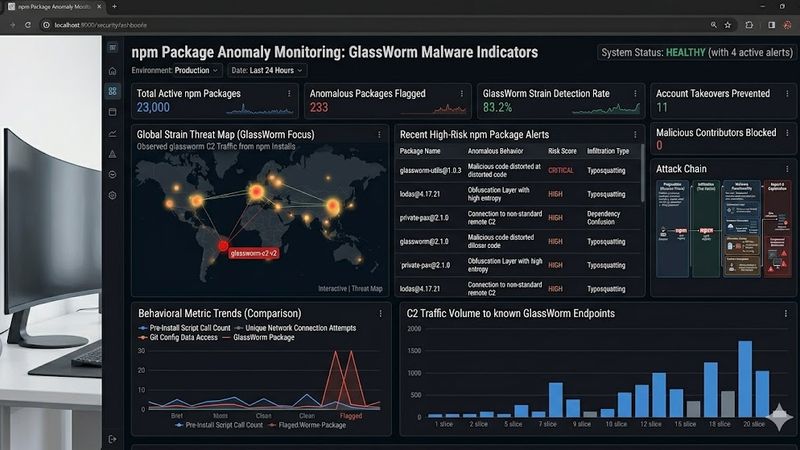
Indicators of compromise for GlassWorm malware may include suspicious package behavior, unauthorized outbound connections, and unexpected Node.js processes. Early IOC detection reduces the likelihood of widespread compromise.
Suspicious npm Package Indicators
Malicious npm packages often display behavioral anomalies that differ from legitimate development utilities. Security teams should investigate unusual package behavior immediately.
Common indicators include:
- ▸Obfuscated JavaScript code
- ▸Unexpected network requests
- ▸Hidden postinstall scripts
- ▸Cryptocurrency wallet references
- ▸Encoded payloads
- ▸Unauthorized file modifications
For example, a package claiming to provide UI functionality should not establish outbound connections to unknown domains.
System-Level Indicators of Compromise
System-level indicators help identify compromised development environments after malware execution. SOC analysts should monitor unusual Node.js activity.
Potential indicators include:
## Common Indicators of Compromise (IOCs)
Process Activity
Example Behavior: Unknown Node.js child processes
Network Traffic
Example Behavior: Outbound requests to suspicious domains
File Activity
Example Behavior: Unauthorized .npmrc modifications
Authentication
Example Behavior: Unexpected GitHub token usage
Persistence
Example Behavior: Newly created scheduled tasks or cron jobs
“Indicators of compromise for GlassWorm malware may include suspicious package behavior, unauthorized outbound connections, and unexpected Node.js processes.”
Indicators of Compromise explained
Threat Hunting Recommendations
Threat hunting improves early detection of software supply chain attacks across development environments. Organizations should continuously monitor dependency changes and registry activity.
For example, security teams can monitor:
- ▸New dependency additions
- ▸Unexpected lockfile changes
- ▸Suspicious CI/CD executions
- ▸Unauthorized npm publishing activity
How Can Developers Detect Malicious npm Packages?
Developers can detect malicious npm packages through static analysis, behavioral monitoring, dependency auditing, and package verification techniques. Multiple security layers improve detection accuracy.
Static Analysis Methods
Static analysis examines package contents without executing the code. This helps identify suspicious patterns safely.
For example, analysts should inspect:
- ▸Obfuscated scripts
- ▸Encoded payloads
- ▸Hidden lifecycle hooks
- ▸Unauthorized API requests
- ▸Embedded shell commands
Additionally, automated scanners can identify known malicious signatures before installation.
Dependency Auditing Tools
Dependency auditing involves scanning software packages for vulnerabilities, malicious behavior, and suspicious activity. Automated tools help developers identify dangerous dependencies quickly.
Popular auditing methods include:
- ▸Vulnerability scanning
- ▸Package reputation analysis
- ▸Dependency graph analysis
- ▸Integrity verification
- ▸Signature validation
Behavioral Monitoring Techniques
Behavioral monitoring identifies malicious activity during package execution. Runtime monitoring helps detect attacks missed during static analysis.
For example, organizations can monitor:
- ▸Outbound network traffic
- ▸Process spawning behavior
- ▸File system modifications
- ▸Credential access attempts
This layered approach improves detection coverage significantly.
Which npm Security Tools Help Prevent Supply Chain Attacks?
npm security tools help organizations identify malicious dependencies, vulnerable packages, and suspicious package behavior before deployment. Effective tooling reduces software supply chain risk exposure.
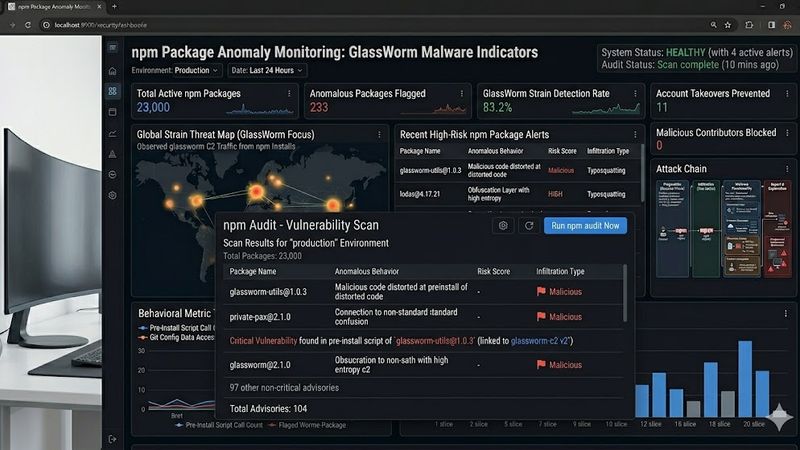
npm Audit
npm audit is a built-in security scanner that identifies known package vulnerabilities within Node.js projects. Developers can use it directly through the npm CLI.
Example command:
npm audit
This command scans installed packages against known vulnerability databases.
Socket.dev
Socket.dev is a dependency security platform focused on identifying risky package behaviors rather than only known vulnerabilities. It analyzes package permissions, install scripts, and suspicious behavior patterns.
For example, Socket.dev can detect:
- ▸Network access behavior
- ▸Shell execution attempts
- ▸File system modifications
- ▸Obfuscated code
Snyk and Dependabot
Snyk and Dependabot automate dependency scanning and vulnerability remediation across development workflows. These tools integrate directly into GitHub and CI/CD pipelines.
According to GitHub research, automated dependency updates significantly reduce exploit exposure windows — Source: GitHub Security, 2025.
OSS Index and Semgrep
OSS Index and Semgrep improve visibility into open-source risks and insecure coding practices. Security teams often combine these tools for layered protection.
npm Security Tools for Supply Chain Protection
npm audit
Primary Use Case: Vulnerability scanning
npm audit is a built-in npm security feature that scans installed packages for known vulnerabilities and dependency risks.
Free Tier: Yes
Socket.dev
Primary Use Case: Behavior analysis
Socket.dev analyzes package behavior to detect suspicious actions such as network access, shell execution, and obfuscated scripts.
Free Tier: Yes
Snyk
Primary Use Case: Dependency security
Snyk helps developers identify vulnerable dependencies and automate remediation recommendations across projects and CI/CD pipelines.
Free Tier: Yes
Dependabot
Primary Use Case: Automated dependency updates
Dependabot automatically monitors dependencies and creates update pull requests when security vulnerabilities are detected.
Free Tier: Yes
OSS Index
Primary Use Case: Open-source risk analysis
OSS Index provides vulnerability intelligence for open-source packages and helps organizations evaluate dependency risks.
Free Tier: Yes
Semgrep
Primary Use Case: Static code analysis
Semgrep scans source code for insecure patterns, vulnerable functions, and suspicious coding practices in development environments.
Free Tier: Yes
Cybersecurity tools for developers
What Best Practices Reduce the Risk of npm Package Compromise?
npm security best practices reduce the risk of malware infections by improving dependency hygiene, package verification, and CI/CD security controls. Organizations should combine multiple defensive layers.
Minimal Dependency Policies
Minimal dependency policies reduce attack surface by limiting unnecessary packages. Smaller dependency trees decrease exposure to malicious code.
For example, organizations should:
- ▸Remove unused packages
- ▸Avoid abandoned libraries
- ▸Prefer mature dependencies
- ▸Review transitive dependencies
Lockfile Security and Integrity Verification
Lockfile security improves dependency consistency and prevents unauthorized package changes. Teams should protect package-lock.json and yarn.lock files from unauthorized modifications.
Additionally, integrity verification helps confirm package authenticity before installation.
Secure CI/CD Practices
Secure CI/CD practices reduce the likelihood of malware propagation across development and deployment pipelines. Pipeline security is essential for modern DevSecOps environments.
Recommended controls include:
Isolated build environments
Secret scanning
Signed package verification
Least privilege access
Runtime monitoring
“Secure CI/CD practices reduce the likelihood of malware propagation across development and deployment pipelines.”
CI/CD pipeline security checklist
Developer Security Awareness
Developer security awareness improves recognition of suspicious package behavior and phishing attempts. Human error remains a major attack vector.
For example, organizations should train developers to:
- ▸Verify package maintainers
- ▸Review install scripts
- ▸Inspect package reputation
- ▸Avoid random GitHub utilities
How Can Organizations Secure Their CI/CD Pipelines Against npm Malware?
Organizations can secure CI/CD pipelines against npm malware by implementing layered dependency controls, runtime monitoring, and automated package verification. Pipeline hardening reduces software supply chain exposure.
Dependency Scanning in CI/CD Pipelines
Continuous dependency scanning identifies malicious or vulnerable packages before deployment. Security automation improves detection consistency.
For example, organizations should integrate:
- ▸SCA scanners
- ▸SBOM generation
- ▸Signature verification
- ▸Runtime monitoring
Runtime Monitoring and Threat Intelligence
Threat intelligence monitoring improves visibility into emerging npm malware campaigns and malicious package activity. Real-time monitoring enables faster incident response.
Organizations should monitor:
- ▸npm advisories
- ▸GitHub security alerts
- ▸Threat intelligence feeds
- ▸Registry anomalies
Threat intelligence monitoring
Incident Response Preparation
Incident response planning reduces downtime and improves containment during software supply chain attacks. Organizations should establish predefined response workflows.
Recommended actions include:
- ▸Revoking exposed credentials
- ▸Isolating infected systems
- ▸Rebuilding compromised environments
- ▸Auditing dependency inventories
What Should Developers and Organizations Do Next?
Organizations should immediately review dependency inventories, audit suspicious packages, and strengthen software supply chain security controls. Proactive defense significantly reduces long-term risk exposure.
Immediate Response Checklist
Immediate response actions help contain malware infections and reduce attacker persistence opportunities.
Use this checklist:
- ▸Run dependency audits immediately
- ▸Review recently added npm packages
- ▸Rotate exposed credentials
- ▸Monitor suspicious outbound traffic
- ▸Scan CI/CD environments
- ▸Verify package integrity
- ▸Update internal security policies
Long-Term Security Improvements
Continuous dependency scanning and security governance improve resilience against future npm ecosystem attacks. Long-term visibility matters more than reactive scanning alone.
For example, organizations should:
- ▸Maintain software bills of materials (SBOMs)
- ▸Enforce package approval workflows
- ▸Monitor developer endpoints
- ▸Conduct regular threat modeling
According to IBM’s Cost of a Data Breach Report, supply chain compromises significantly increase breach containment costs — Source: IBM Security, 2025.
Conclusion
GlassWorm malware demonstrates how dangerous software supply chain attacks have become for developers and organizations using npm ecosystems. Attackers increasingly target trusted dependencies because open-source workflows prioritize automation, speed, and package reuse.
At the same time, organizations can significantly reduce risk through dependency auditing, secure CI/CD practices, runtime monitoring, and developer security awareness. By continuously reviewing third-party dependencies and implementing layered security controls, you can strengthen resilience against malicious npm packages and future supply chain threats.
Ultimately, software supply chain security is no longer optional. Proactive dependency management, threat intelligence monitoring, and secure development practices are now essential components of modern cybersecurity defense.
Written by
Surendra Reddy
Cybersecurity Researcher & Founder, ReconShield
Surendra is a cybersecurity engineer specializing in Open Source Intelligence (OSINT), exposure intelligence, and AI-driven threat analysis. He built ReconShield to democratize access to enterprise-grade infrastructure visibility tools and secure internet-facing digital assets.
## Frequently Asked Questions (FAQs)
What is GlassWorm malware?
GlassWorm malware is a developer-targeting threat that spreads through malicious npm packages in software supply chain attacks. It can steal credentials, execute unauthorized scripts, and compromise development environments.
How does GlassWorm malware spread?
GlassWorm malware spreads through malicious npm packages, typosquatting attacks, dependency confusion techniques, and compromised open-source dependencies within the Node.js ecosystem.
Why is GlassWorm malware dangerous for developers?
GlassWorm malware is dangerous because it targets trusted development workflows and can steal GitHub tokens, cloud credentials, SSH keys, and CI/CD secrets from infected systems.
What are the indicators of compromise for GlassWorm malware?
Indicators of compromise may include suspicious npm package behavior, unexpected Node.js processes, unauthorized outbound network connections, hidden install scripts, and credential theft activity.
How can developers detect malicious npm packages?
Developers can detect malicious npm packages using dependency auditing tools, static code analysis, behavioral monitoring, integrity verification, and runtime security monitoring solutions.
Which tools help prevent npm supply chain attacks?
Popular npm security tools include npm audit, Socket.dev, Snyk, Dependabot, OSS Index, and Semgrep for dependency analysis, vulnerability scanning, and malicious package detection.
Reviewed by
ReconShield Editorial Security Team
Specialists in malware analysis, software supply chain security, DevSecOps, and threat intelligence research.
Disclaimer: This article was initially drafted using AI assistance. However, the content has undergone thorough revisions, editing, and fact-checking by human editors and subject matter experts to ensure accuracy.
Read More:
Vellore Man Arrested in Cambodia Cyber Slavery Racket Linked to Online Scam Networks
Cyber Fraud in Bengaluru: Elderly Woman Loses Rs 7.69 Lakh After Clicking Fake WhatsApp Link
10,000+ Zero-Day Vulnerabilities Identified by Anthropic Claude Mythos in Glasswing Project
SSL vs TLS Explained: Complete HTTPS Security Guide for Modern Website Security
## Analyst Commentary & Implementation Blueprint
Security advisory
Continuous security exposure assessment is critical to identifying public vulnerabilities before they are exploited. Organizations should maintain a passive inventory of all web servers, TLS configs, and open ports, ensuring that default configurations are eliminated and security advisories are actively implemented.
Hardened Security Configuration Blueprint
# General Security Hardening Directive
ServerTokens ProductOnly
ServerSignature Off
FileETag None
Actionable Mitigation Checklist
- ✔Perform passive asset inventories weekly.
- ✔Restrict administrative ports using local firewall controls.
- ✔Monitor active CVE alerts for exposed software.
Common Inquiries & FAQs
Why is passive scanning preferred for continuous auditing?
Passive audits do not cause operational impact or trigger firewall blocks, making them ideal for constant surveillance of internet-facing assets.
What should I do if a vulnerability is flagged?
Apply the latest vendor patches, restrict access to the resource via firewalls, or verify configuration flags to mitigate risks.
Surendra Reddy
Surendra Reddy is a cybersecurity researcher and founder of ReconShield, specializing in OSINT and defensive infrastructure analysis.
Connect on LinkedIn ↗// AUDIT BRIEFING DISCUSSION (2 COMMENTS)
Great breakdown of the passive infrastructure vectors. We recently audited our external DNS zones and found multiple dangling staging environments. Implementing wildcard certificates reduced our CT log leaks significantly.
Is there any automated tooling you recommend for daily crt.sh scraping? Manually checking CT logs is becoming unsustainable for our domain portfolio.
// MORE ARTICLES
Security Researchers Warn Critical n8n Flaws May Expose Automation Platforms to RCE
Researchers have disclosed critical vulnerabilities in n8n that could expose automation workflows and connected enterprise systems to remote code execution risks, prompting urgent patch recommendations for users and administrators.

How Agentic AI Is Changing Software Engineering and Expanding Mobile Attack Surfaces
Agentic AI is rapidly transforming software engineering workflows through automation and intelligent coding assistance, while cybersecurity experts warn of expanding mobile attack surfaces and emerging application security risks.
SplitVPN Hacked: Data Breach Exposes 865,000 User Records and 58 Million Hidden Connection Logs (July 2026)
SplitVPN hacked: 865,336 user records and 58 million connection logs exposed, directly contradicting the VPN's "no-logs" promise. What was leaked and what to do now.