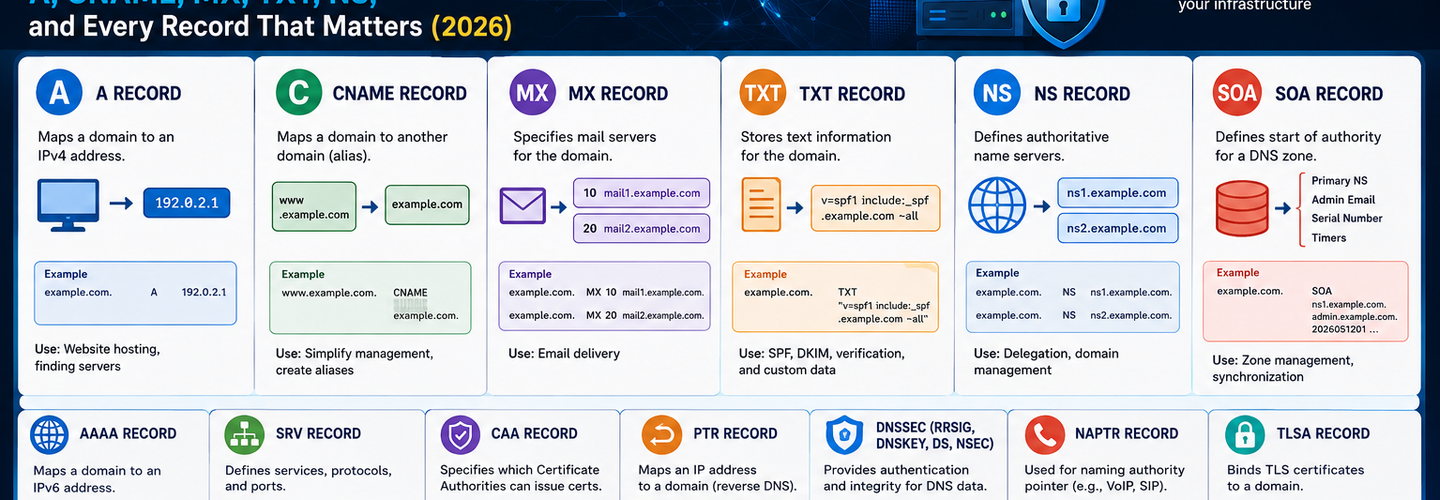
DNS Record Types Explained: The Complete Security Guide to A, CNAME, MX, TXT, NS, and Every Record That Matters (2026)
Summarize this blog post with: ChatGPT | Perplexity | Claude | Grok
You've probably queried a DNS record during a troubleshooting session or configured an MX record when setting up email — but if you only know what a record does without understanding how attackers exploit it, you're working with half the picture. DNS is the foundational routing layer of the entire internet, and every record type in your zone file is simultaneously a piece of infrastructure configuration and a potential attack vector. In this guide, you'll learn exactly what every major DNS record type does, the security risks each one introduces, and how to audit your zone file to close the gaps that threat actors exploit most.
## Key Takeaways
- ▸DNS record types are standardized resource records stored in a domain's zone file that map domain names to IP addresses, mail servers, name servers, and other infrastructure metadata.
- ▸A and AAAA records are the most fundamental DNS records, resolving domain names to IPv4 and IPv6 addresses respectively — and stale or unauthorized A record changes are among the most common signs of DNS hijacking.
- ▸MX records define which mail servers handle inbound email for a domain, and missing or misconfigured MX records are directly exploited for email spoofing and phishing campaigns.
- ▸TXT records are the primary deployment mechanism for SPF, DKIM, and DMARC email authentication — without correctly configured TXT records, your domain is vulnerable to spoofing regardless of any other email security investment.
- ▸CNAME records create domain aliases and are the most common source of subdomain takeover vulnerabilities when they point to decommissioned third-party services.
- ▸NS records define the authoritative name servers for a zone — unauthorized NS record changes are the definitive indicator of active DNS hijacking and are detectable within minutes through continuous monitoring.
- ▸CAA records restrict which Certificate Authorities are permitted to issue SSL/TLS certificates for your domain, providing a DNS-level control against unauthorized certificate issuance.
## What Are DNS Record Types and Why Do They Matter for Security?
DNS record types are standardized resource records stored within a domain's DNS zone file that instruct resolvers how to handle queries for that domain — mapping hostnames to IP addresses, directing email to the correct mail servers, delegating authority to name servers, and publishing cryptographic authentication data for email and certificate security.
The Domain Name System is not a single database — it is a globally distributed, hierarchically organized system of authoritative name servers, recursive resolvers, and caching layers that processes approximately 620 billion DNS queries per day worldwide — Source: APNIC, 2024. Every one of those queries is resolved by looking up one or more record types from a zone file. Understanding what each record type does and what happens when it is misconfigured, stale, or unauthorized is not optional for security teams — it is foundational.
DNS is also the most exploited protocol layer in enterprise attack chains. 91% of malware uses DNS for command-and-control communication — Source: Cisco Annual Internet Report, 2023. Attackers exploit DNS at three distinct levels: exploiting misconfigured records to redirect traffic, abusing missing authentication records to spoof emails, and using DNS as a covert communication channel inside networks. Each attack type targets a specific record type or the absence of one. Use the ReconShield DNS Security Analysis tool to query every major record type for your domain simultaneously — retrieving A, AAAA, MX, TXT, NS, and CNAME records alongside DNSSEC status and email authentication validation in a single passive lookup.
## What Is an A Record and How Do Attackers Target It?
An A record (Address record) is the most fundamental DNS record type, mapping a hostname to its IPv4 address and forming the basis of all web browsing, API communication, and domain-based network connectivity. When a user types example.com into a browser, the resolver queries for the A record to obtain the destination IP address. Everything else in the DNS resolution process is in service of ultimately returning an A or AAAA record.
A records have a Time-to-Live (TTL) value — measured in seconds — that instructs resolvers how long to cache the response before querying again. Short TTLs (60–300 seconds) allow rapid infrastructure changes and are common in environments using active failover or CDN routing. Long TTLs (3600–86400 seconds) reduce query load but slow propagation of legitimate changes — and, critically, extend the window during which attackers can exploit a cached, stale, or hijacked A record before resolvers re-query the authoritative source.
How DNS Hijacking Targets A Records
DNS hijacking attacks against A records work by modifying the record to point a legitimate domain to an attacker-controlled IP address — silently redirecting all web traffic, API calls, and credential submissions to malicious infrastructure while the domain name and SSL certificate in the browser address bar remain unchanged. The attack is often invisible to end users because the redirect happens at the DNS layer, below the HTTPS layer.
A record hijacking typically occurs through one of three vectors: compromise of the registrar account to modify the authoritative name servers (which then serve modified A records), compromise of the DNS hosting provider account to directly edit zone file records, or BGP route hijacking that intercepts queries before they reach the legitimate name server. For BGP-layer attacks specifically, the ReconShield BGP route leak prevention guide covers the routing-layer mechanics in detail. Detect unauthorized A record changes immediately by auditing your live DNS responses against your expected values using the ReconShield DNS Security Analysis tool.
## What Is an AAAA Record and When Does It Matter?
An AAAA record (Quad-A record) maps a hostname to its IPv6 address — the 128-bit address format that IPv6 uses, as opposed to the 32-bit format of IPv4 A records. The four A's in the name reference the fact that IPv6 addresses are four times the length of IPv4 addresses in binary representation.
IPv6 adoption reached 47% of Google users worldwide as of 2024 — Source: Google IPv6 Statistics, 2024 — making AAAA records operationally significant for any public-facing service that serves global traffic. Organizations that have deployed IPv6 but do not maintain consistent security monitoring across both A and AAAA records create a blind spot: security tools, WAFs, and rate-limiting configurations applied to IPv4 A record addresses may not apply to IPv6 AAAA record addresses, allowing attackers to bypass controls by connecting over IPv6.
From a security monitoring perspective, AAAA records require the same validation attention as A records. Unauthorized AAAA record changes redirect IPv6 traffic just as effectively as A record hijacking redirects IPv4 traffic — but they are less frequently included in DNS monitoring configurations. Ensure your DNS audit workflow queries both record types explicitly using the ReconShield DNS Lookup tool.
## What Is a CNAME Record and Why Is It the Most Common Source of Subdomain Takeover?
A CNAME record (Canonical Name record) creates an alias that maps one hostname to another hostname — instructing resolvers to follow the alias chain until they reach an A or AAAA record at the final destination. CNAME records are the primary mechanism behind CDN routing, cloud service integration, and load balancer configurations in modern infrastructure.
For example, blog.example.com might have a CNAME record pointing to example.ghost.io — a Ghost CMS hosted blog service. Every query for blog.example.com is resolved by first following the CNAME to example.ghost.io, then resolving Ghost's A record. This works correctly as long as example.ghost.io is an active, provisioned service. The problem occurs when it is not.
How CNAME Records Enable Subdomain Takeover Attacks
Subdomain takeover occurs when a CNAME record points to an external service that has been deactivated or deprovisioned, allowing an attacker to claim the unclaimed service endpoint and serve content under your organization's subdomain — complete with your organization's domain name in the URL and, in many cases, a valid TLS certificate that passes browser validation.
The attack pattern is consistent across cloud platforms: an organization provisions staging.example.com as a CNAME pointing to an AWS S3 bucket, Azure Web App, GitHub Pages site, or Heroku application. The service is later decommissioned and the cloud resource deleted — but the CNAME record in the DNS zone file is never removed. An attacker discovers the dangling CNAME through certificate transparency log monitoring or passive DNS enumeration, then claims the unclaimed bucket or app name on the same platform. The subdomain now serves the attacker's content under staging.example.com, with the organization's domain and a valid certificate.
Over 40% of organizations have at least one dangling CNAME record pointing to an unclaimed cloud resource — Source: Detectify Security Research, 2023. Audit every CNAME record in your zone file by querying the target hostname of each alias and confirming that the destination resource is actively provisioned and owned by your organization. The ReconShield Exposure Assessment Tool identifies misconfigured CNAME chains and subdomain exposure risks as part of its passive web application security audit.
## What Is an MX Record and How Do Attackers Exploit Email Infrastructure?
An MX record (Mail Exchange record) specifies which mail servers are authorized to receive inbound email for a domain — listing one or more mail server hostnames alongside numeric priority values that determine delivery order when multiple servers are available. Without MX records, a domain cannot receive email; with misconfigured MX records, email is either undeliverable or delivered to unauthorized infrastructure.
MX records contain two components: a priority value (lower numbers indicate higher priority) and a mail server hostname that must itself resolve to an A or AAAA record. For example, a domain using Google Workspace typically has MX records pointing to aspmx.l.google.com with priority 1, followed by backup mail servers with progressively higher priority numbers. A resolver attempting to deliver email first tries the lowest-priority server, then fails over to higher-priority alternatives if necessary.
How Missing MX Records Enable Email Spoofing
A domain without MX records can still be spoofed in the "From" address of phishing emails — because email spoofing operates at the SMTP envelope layer, not at the DNS MX resolution layer. Attackers do not need your MX records to send email appearing to come from your domain. What stops them is correctly configured SPF, DKIM, and DMARC TXT records — which receiving mail servers use to validate whether an incoming email claiming to be from your domain was actually authorized by you.
This is why MX records and TXT records must be audited together. An MX record audit tells you whether your inbound email routing is correct. A TXT record audit tells you whether your outbound email authentication is correctly publishing SPF, DKIM, and DMARC policies that protect against spoofing. The ReconShield DNS Lookup tool retrieves and validates both record types simultaneously, flagging missing or misconfigured email authentication alongside MX routing data. For the complete technical blueprint for deploying SPF, DKIM, and DMARC correctly, the ReconShield SPF-DKIM-DMARC Blueprint is the definitive step-by-step implementation guide.
## What Is a TXT Record and Why Does It Control Email Security?
A TXT record (Text record) is a versatile DNS record type that stores arbitrary human-readable and machine-readable text data — most importantly serving as the publication mechanism for SPF email authorization policies, DKIM public keys, DMARC enforcement policies, domain ownership verification tokens, and increasingly, zero-trust policy metadata for modern security frameworks.
TXT records were originally defined in RFC 1035 as a general-purpose record type for human-readable notes. In practice, they have become one of the most security-critical record types in any zone file because three of the most important email authentication protocols — SPF, DKIM, and DMARC — are published exclusively through TXT records. Without correctly configured TXT records, even a perfectly managed mail server is defenseless against domain spoofing.
SPF TXT Records — Authorizing Legitimate Senders
An SPF (Sender Policy Framework) TXT record is published at the root of your domain and lists every IP address and mail server authorized to send email from your domain — enabling receiving mail servers to reject or flag email arriving from unauthorized senders claiming your domain in the envelope address.
A valid SPF record begins with v=spf1, lists authorized mechanisms (IP blocks, include statements referencing third-party providers like Google or Microsoft), and ends with an all qualifier specifying how to handle unmatched senders. The -all terminator (hard fail) instructs receiving servers to reject unauthorized senders outright. The ~all terminator (soft fail) marks them as suspicious but delivers them. Using +all — which authorizes any sender — is a critical misconfiguration that renders SPF useless and is unfortunately common in misconfigured zone files.
Over 30% of domains with SPF records use ~all instead of -all, providing soft-fail marking that many mail servers treat as passing — Source: Valimail Email Fraud Landscape, 2024. Verify your current SPF configuration instantly using the ReconShield DNS Security Analysis tool, which validates your SPF mechanism syntax, checks for +all misconfigurations, and counts your DNS lookup chain against the RFC-mandated 10-lookup limit.
DKIM TXT Records — Cryptographic Email Signing
A DKIM (DomainKeys Identified Mail) TXT record publishes the public key that receiving mail servers use to verify the cryptographic signature attached to every outbound email from your domain, confirming that the message content was not modified in transit and that the signing domain matches the claimed sender.
DKIM TXT records are published at a subdomain in the format selector._domainkey.yourdomain.com, where selector is a string defined in your mail server configuration. A single domain can have multiple DKIM TXT records — one for each mail service sending on its behalf (corporate mail server, marketing email platform, CRM notifications). Each selector corresponds to a separate public/private key pair, allowing individual keys to be rotated without disrupting other services.
DMARC TXT Records — Policy Enforcement and Reporting
A DMARC (Domain-based Message Authentication, Reporting and Conformance) TXT record is published at _dmarc.yourdomain.com and specifies the policy receiving mail servers should apply to emails that fail both SPF and DKIM checks — either monitoring failures without action (p=none), quarantining failures to spam folders (p=quarantine), or rejecting failures outright before delivery (p=reject).
DMARC also enables forensic and aggregate reporting, instructing receiving servers to send structured reports to addresses you specify — providing visibility into every email claiming to be from your domain, whether legitimate or spoofed. Organizations that have deployed DMARC at p=reject enforcement block effectively 100% of direct domain spoofing attacks that pass through participating mail providers — Source: Valimail, 2024. The ReconShield SPF-DKIM-DMARC Blueprint provides the complete deployment workflow for progressing safely from p=none to p=reject without disrupting legitimate email delivery.
## What Is an NS Record and Why Is It the Highest-Value DNS Attack Target?
An NS record (Name Server record) specifies the authoritative name servers for a DNS zone — the servers that hold the definitive, writeable copy of a domain's zone file and answer all queries for that domain with authoritative responses rather than cached guesses. NS records are published at both the parent zone (in the registry's database) and the domain's own zone file, and both sets must agree for correct resolution.
NS records are the highest-value target in DNS security because controlling a domain's name servers is equivalent to controlling every other record in the zone. An attacker who can modify NS records — either at the registrar/registry level or at the DNS hosting provider level — can subsequently create, modify, or delete any A, MX, TXT, CNAME, or other record at will, with full authority. All resolver caches will eventually propagate the changes globally.
Detecting Unauthorized NS Record Changes
Unauthorized NS record modification is the definitive indicator of an active domain hijacking in progress, and it is detectable through continuous DNS monitoring that compares the currently live NS records against a known-good baseline. The detection window is narrow — attackers who change NS records typically begin redirecting traffic within minutes — making automated monitoring with immediate alerting the only reliable defense.
Verify your current NS records are pointing to your authorized DNS provider using the ReconShield DNS Lookup tool, then cross-reference against the name servers listed in your WHOIS registration record using the WHOIS Intelligence tool. Any discrepancy between live NS responses and WHOIS-listed name servers requires immediate investigation — it means either a DNS hosting change was made without updating WHOIS, or unauthorized name server modification has occurred. For the full picture on how domain registration data relates to DNS security, the ReconShield WHOIS domain intelligence guide covers the relationship between NS records and domain hijacking detection in detail.
## What Is an SOA Record and What Does It Tell Security Researchers?
An SOA record (Start of Authority record) is the mandatory first record in every DNS zone file, identifying the primary name server for the zone, the responsible administrator's email address, and five timing parameters that control zone synchronization between primary and secondary name servers. Every compliant DNS zone must have exactly one SOA record.
The SOA record contains: the MNAME field (primary name server hostname), the RNAME field (administrator email encoded with the first dot as an @ separator), and five numeric fields — Serial (zone version number, incremented with every update), Refresh (how often secondary servers check for updates), Retry (how long secondary servers wait after a failed refresh attempt), Expire (how long secondary servers serve zone data without a successful refresh before ceasing to answer), and Minimum TTL (the default negative caching TTL for the zone).
For security investigators, the SOA serial number is particularly useful. A SOA serial that increments significantly when compared against historical records indicates zone file modifications — which may be legitimate administrative changes or evidence of unauthorized zone file access. Cross-reference SOA serial changes with your organization's change management records during incident investigations. Query the SOA record alongside all other record types using the ReconShield DNS Security Analysis tool.
## What Is a PTR Record and How Is It Used in Security Investigations?
A PTR record (Pointer record) performs reverse DNS resolution — mapping an IP address back to a hostname, functioning as the inverse of an A record lookup. PTR records are stored in a special reverse DNS zone (under the in-addr.arpa domain for IPv4 and ip6.arpa for IPv6) and are managed by the organization or provider that owns the IP address block, not necessarily the domain's registrar.
PTR records are used by mail servers as a spam filtering signal: a sending IP address without a valid PTR record, or with a PTR record that does not forward-confirm to an A record matching the sending domain, is frequently flagged as suspicious by receiving mail server heuristics. Many enterprise mail servers reject email from senders without valid reverse DNS entirely. Organizations hosting their own mail servers must therefore configure PTR records for their mail server IP addresses with their hosting provider or ISP.
In security investigations, PTR records provide a rapid method of attributing an IP address to a hosting provider, service type, or organization without querying the target directly. Combined with WHOIS IP block data from the ReconShield IP Reputation Intelligence tool, PTR records help investigators build a complete picture of attacker-controlled infrastructure during incident response workflows.
## What Is an SRV Record and Where Does It Create Security Risk?
An SRV record (Service record) specifies the hostname and port of servers providing specific network services for a domain — enabling service discovery for protocols like SIP (VoIP), XMPP (chat), and Microsoft Teams, as well as internal services like LDAP directory servers and Kerberos authentication endpoints.
SRV records follow a specific format: _service._protocol.name TTL class SRV priority weight port target. For example, _sip._tcp.example.com 300 IN SRV 10 60 5060 sip.example.com tells SIP clients where to connect for VoIP services on that domain. This service advertisement is useful for legitimate clients — and equally useful for attackers performing passive reconnaissance.
SRV records can unintentionally expose internal service architecture to passive DNS enumeration. An SRV record advertising an LDAP endpoint or Kerberos service port effectively tells any passive observer that Active Directory is deployed on the domain and hints at the infrastructure topology. Audit your publicly exposed SRV records using the ReconShield DNS Lookup tool to verify that only intentionally public services are advertised — and that any advertised service endpoints are hardened against the connection attempts that SRV advertisements implicitly invite. Pair this with the ReconShield Port Scanner to validate which ports associated with SRV-advertised services are actually reachable from the public internet.
## What Is a CAA Record and How Does It Prevent Unauthorized SSL Certificate Issuance?
A CAA record (Certification Authority Authorization record) is a DNS record type that specifies which Certificate Authorities (CAs) are permitted to issue SSL/TLS certificates for a domain — providing a DNS-level authorization layer that prevents unauthorized certificate issuance even if an attacker has compromised a CA's validation process through social engineering or technical means.
CAA records were standardized in RFC 6844 and became mandatory for CAs to check before issuance in 2017. A CAA record takes the format example.com CAA 0 issue "letsencrypt.org" — meaning only Let's Encrypt is authorized to issue certificates for example.com. A CA that encounters a CAA record naming a different authority must refuse to issue a certificate for the domain. A domain with no CAA records permits any CA to issue certificates — which is the default state for most domains.
CAA records are one of the most underdeployed security controls in DNS. Only 3.1% of the top 1 million domains have CAA records configured — Source: SSL Labs Research, 2024 — despite the fact that they provide meaningful protection against misissued certificates that can enable HTTPS man-in-the-middle interception. For organizations that have already audited their SSL/TLS configuration, adding CAA records is the logical DNS-layer complement. Verify your current TLS certificate configuration, cipher suite support, and certificate chain integrity using the ReconShield SSL/TLS Checker, then add CAA records matching your authorized CAs to close the certificate authorization gap.
## How Do Attackers Use DNS for Command-and-Control Communication?
DNS tunneling and DNS-based command-and-control (C2) abuse the TXT, CNAME, and A record query/response cycle to exfiltrate data and relay commands through outbound DNS queries — a technique that bypasses most network firewall rules because outbound UDP port 53 traffic is permitted on virtually every corporate network.
In a DNS tunneling attack, malware installed on a compromised endpoint encodes data — stolen credentials, command output, file fragments — into DNS query strings for attacker-controlled subdomains. For example, a query for aGVsbG8gd29ybGQ.maliciousc2.com is not a real hostname lookup — it is a base64-encoded payload delivered covertly inside a DNS query. The attacker's authoritative name server decodes the queries and responds with instructions encoded in TXT or A record responses. The entire communication channel operates over standard DNS, traversing corporate firewalls that inspect HTTP but allow DNS without deep packet inspection.
Detecting DNS tunneling requires behavioral analysis of DNS query patterns: unusually long subdomain strings, high query rates to a single domain, entropy analysis of subdomain randomness, and large TXT record responses. The ReconShield Beginner's Guide to Threat Intelligence and IOC Analysis covers how DNS-based indicators of compromise are collected and operationalized in threat intelligence workflows — including how to identify DNS C2 domains in threat feeds and how IOC analysis integrates with DNS monitoring to detect active tunneling.
## What Is DNSSEC and Does It Solve DNS Security Problems?
DNSSEC (Domain Name System Security Extensions) is a suite of DNS extensions that adds cryptographic signatures to DNS responses, allowing resolvers to verify that the data received from a name server has not been tampered with in transit — addressing DNS cache poisoning and man-in-the-middle attacks against DNS resolution, but not addressing record misconfiguration, zone file compromise, or DNS-based data exfiltration.
DNSSEC works by creating a chain of cryptographic trust from the DNS root zone downward. The root zone signs the TLDs, each TLD signs its registered domains, and each domain signs its own zone records using DNSKEY records and RRSIG (resource record signature) records. A resolver that validates DNSSEC can detect if a DNS response has been forged or modified — but only if DNSSEC is actually deployed and the signing chain is intact all the way from the root to the queried record.
Only 20% of domains in the .com TLD have DNSSEC enabled, despite broad resolver support — Source: APNIC DNSSEC Measurement, 2024. DNSSEC deployment is technically complex, requiring key management, key rollover procedures, and ongoing monitoring of signature validity windows. A DNSSEC deployment with expired signatures causes complete DNS resolution failure for affected records — a self-inflicted outage that discourages adoption. Despite its limitations, DNSSEC remains the only standardized mechanism for cryptographically authenticating DNS responses end-to-end. Check whether DNSSEC is active and correctly signed for your domain using the ReconShield DNS Security Analysis tool.
## How to Audit Your Complete DNS Zone File for Security Risks
A complete DNS zone file security audit examines every record type for misconfiguration, unauthorized modification, stale entries, missing authentication records, and unnecessary information exposure — producing a prioritized remediation list ranked by security impact.
Follow this structured audit sequence for maximum coverage:
Audit NS records first. Query your live NS records and compare them against your WHOIS registration data using the ReconShield WHOIS Checker and DNS Lookup tool. Any discrepancy is an immediate escalation. Confirm DNSSEC is enabled and signatures are within validity.
Audit A and AAAA records. Compile all hostnames in your zone file and verify each resolves to an IP address owned by your organization or an explicitly authorized CDN or cloud provider. Verify the associated IP reputation using the ReconShield IP Reputation Intelligence tool. Flag any IP addresses that score above baseline threat thresholds.
Audit CNAME records for dangling aliases. Query every CNAME target hostname and verify the destination resource is actively provisioned and owned by your organization. Any CNAME pointing to an unclaimed cloud resource endpoint is a critical subdomain takeover risk. Use the ReconShield Exposure Assessment Tool to confirm that CNAME target endpoints are serving expected, authorized content.
Audit TXT records for email authentication. Verify that your SPF record uses -all rather than ~all or +all. Confirm that DKIM selectors for all active mail-sending services are present and contain valid public keys. Verify that _dmarc.yourdomain.com has a DMARC record with p=quarantine or p=reject enforcement. The ReconShield DNS Security Analysis tool validates all three simultaneously. For complete SPF, DKIM, and DMARC configuration guidance, the ReconShield SPF-DKIM-DMARC Blueprint is the definitive implementation reference.
Audit MX records and mail server exposure. Confirm MX records point exclusively to your authorized mail infrastructure. Run an IP reputation check on all mail server IP addresses to confirm they are not listed on major email blacklists. Verify that your mail server TLS configuration meets current security standards using the ReconShield SSL/TLS Checker, and confirm HTTP security headers are correctly configured on any webmail portals with the Security Headers Auditor.
Audit CAA records. If no CAA records exist, add them immediately, restricting certificate issuance to your authorized CAs. If CAA records exist, verify they list only currently active providers and do not include deprecated or no-longer-used CAs.
Remove stale and orphaned records. Any record pointing to a resource no longer owned or operated by your organization is a liability. Decommissioning workflows should include a mandatory DNS record cleanup step before any cloud resource is deleted or service contract terminated.
## Tools for DNS Record Security Analysis
Comprehensive DNS security requires a toolset that can query all record types, validate authentication configurations, detect real-time changes, and correlate DNS data with IP reputation and certificate intelligence — capabilities that no single data source alone provides.
The ReconShield passive intelligence suite covers every layer of DNS security analysis:
DNS Security Analysis Tool — Queries A, AAAA, MX, TXT, NS, CNAME, and SOA records for any domain. Validates SPF mechanism syntax, DKIM selector presence, and DMARC policy enforcement. Checks DNSSEC signing status. Returns normalized results suitable for comparing against historical baselines or feeding into automated monitoring workflows.
WHOIS Intelligence Tool — Retrieves domain registration records including registrar-listed name servers for cross-referencing against live NS records. Provides creation date, EPP lock status, and expiry data critical for domain hijacking detection workflows.
IP Reputation Intelligence Tool — Cross-references IP addresses extracted from A, AAAA, and MX records against global threat intelligence feeds. Returns ASN ownership, hosting provider identity, and aggregated threat reputation scores for rapid infrastructure attribution.
SSL/TLS Checker — Validates the TLS certificate chain for any domain, returning Subject Alternative Names, issuer identity, expiry dates, and cipher suite support. Certificate transparency logs provide an independent record of certificate issuance that can be correlated with CAA record configurations.
Security Headers Auditor — Evaluates browser-level security controls including CSP, HSTS, and X-Frame-Options. HSTS configuration in particular is directly complementary to DNS security — a correctly deployed HSTS policy prevents SSL-stripping attacks that target domains even after DNS is correctly configured. The ReconShield OWASP HTTP Headers Hardening guide covers HSTS and the full suite of browser security headers in implementation depth.
Port Scanner — Maps open TCP ports on IP addresses associated with DNS records, identifying services inadvertently exposed through authorized A or SRV records. Use in conjunction with DNS audits to verify that advertised service endpoints are appropriately hardened. For the full methodology on discovering unauthorized internet-facing services, the ReconShield Shadow IT Exposed Ports guide documents which exposed ports represent the highest attack surface risk.
Passive Scanner Suite — Runs the complete non-intrusive diagnostics workflow — email authentication validation, SSL/TLS configuration audit, and HTTP security header analysis — across your full internet-facing infrastructure in a single interface.
## What's Next: Continuous DNS Monitoring and Automated Record Change Detection
The next maturity level for DNS security moves from periodic manual audits to continuous, automated DNS record monitoring with real-time alerting on unauthorized changes — treating DNS zone file integrity with the same rigor applied to file integrity monitoring on critical servers.
Automated DNS monitoring pipelines poll authoritative name server responses for all critical record types on a defined schedule — typically every 5–15 minutes for NS and A records, hourly for MX and TXT records — and compare each response against a known-good baseline. Any deviation triggers an alert to the security team. For organizations with large domain portfolios, this monitoring extends to all registered domains, not just the primary corporate domain.
Integration with SIEM platforms allows DNS record change events to be correlated with other security signals — a name server change coinciding with a registrar account login from an unexpected geographic location, or an A record change coinciding with an anomalous outbound connection from an internal endpoint, produces a high-fidelity alert that neither signal would generate independently. The Passive OSINT methodology provides the investigative framework for turning these correlated DNS signals into structured, actionable threat intelligence.
Organizations with automated DNS monitoring detect record-level hijacking attempts in under 5 minutes on average, compared to a median detection time of several hours through manual discovery — Source: Interisle Consulting Domain Security Report, 2024. Pair continuous DNS monitoring with the ReconShield passive scanner suite for end-to-end visibility across your internet-facing attack surface from DNS records through SSL configuration to HTTP security headers.
## Conclusion
DNS record types are not just infrastructure configuration — they are the routing logic of your entire internet-facing operation, and every record type in your zone file is both a capability and an attack vector. A records get hijacked to redirect traffic. CNAME records get left dangling to enable subdomain takeover. TXT records left unconfigured allow domain spoofing. NS records modified without authorization signal active domain hijacking. CAA records absent permit unauthorized certificate issuance.
Start your DNS security program with a full zone file audit. Query every record type using the ReconShield DNS Security Analysis tool. Cross-reference your name servers against your WHOIS registration record with the WHOIS Checker. Validate your email authentication with the SPF-DKIM-DMARC Blueprint. Audit CNAME targets and IP reputation with the IP Reputation tool. Verify your TLS certificates and add CAA records with the SSL/TLS Checker.
DNS security is passive, auditable, and entirely within your control. The organizations that treat their zone files as a security surface — not just a routing configuration — maintain significantly stronger infrastructure resilience than those that only look at DNS when something stops working.
Written by Surendra Reddy Cybersecurity Researcher & Founder, ReconShield. Surendra is a cybersecurity engineer specializing in Open Source Intelligence (OSINT), exposure intelligence, and AI-driven threat analysis. He built ReconShield to democratize access to enterprise-grade infrastructure visibility tools and secure the digital internet-facing assets of organizations worldwide. Author Profile →
Reviewed by ReconShield Editorial Team — Peer-reviewed for technical accuracy against IANA DNS record type specifications, RFC standards, and active threat intelligence on DNS-based attack patterns.
## Analyst Commentary & Implementation Blueprint
Security advisory
Continuous security exposure assessment is critical to identifying public vulnerabilities before they are exploited. Organizations should maintain a passive inventory of all web servers, TLS configs, and open ports, ensuring that default configurations are eliminated and security advisories are actively implemented.
Hardened Security Configuration Blueprint
# General Security Hardening Directive
ServerTokens ProductOnly
ServerSignature Off
FileETag None
Actionable Mitigation Checklist
- ✔Perform passive asset inventories weekly.
- ✔Restrict administrative ports using local firewall controls.
- ✔Monitor active CVE alerts for exposed software.
Common Inquiries & FAQs
Why is passive scanning preferred for continuous auditing?
Passive audits do not cause operational impact or trigger firewall blocks, making them ideal for constant surveillance of internet-facing assets.
What should I do if a vulnerability is flagged?
Apply the latest vendor patches, restrict access to the resource via firewalls, or verify configuration flags to mitigate risks.
Surendra Reddy
Surendra Reddy is a cybersecurity researcher and founder of ReconShield, specializing in OSINT and defensive infrastructure analysis.
Connect on LinkedIn ↗// AUDIT BRIEFING DISCUSSION (2 COMMENTS)
Great breakdown of the passive infrastructure vectors. We recently audited our external DNS zones and found multiple dangling staging environments. Implementing wildcard certificates reduced our CT log leaks significantly.
Is there any automated tooling you recommend for daily crt.sh scraping? Manually checking CT logs is becoming unsustainable for our domain portfolio.
// MORE ARTICLES
Security Researchers Warn Critical n8n Flaws May Expose Automation Platforms to RCE
Researchers have disclosed critical vulnerabilities in n8n that could expose automation workflows and connected enterprise systems to remote code execution risks, prompting urgent patch recommendations for users and administrators.

How Agentic AI Is Changing Software Engineering and Expanding Mobile Attack Surfaces
Agentic AI is rapidly transforming software engineering workflows through automation and intelligent coding assistance, while cybersecurity experts warn of expanding mobile attack surfaces and emerging application security risks.

SplitVPN Hacked: Data Breach Exposes 865,000 User Records and 58 Million Hidden Connection Logs (July 2026)
SplitVPN hacked: 865,336 user records and 58 million connection logs exposed, directly contradicting the VPN's "no-logs" promise. What was leaked and what to do now.