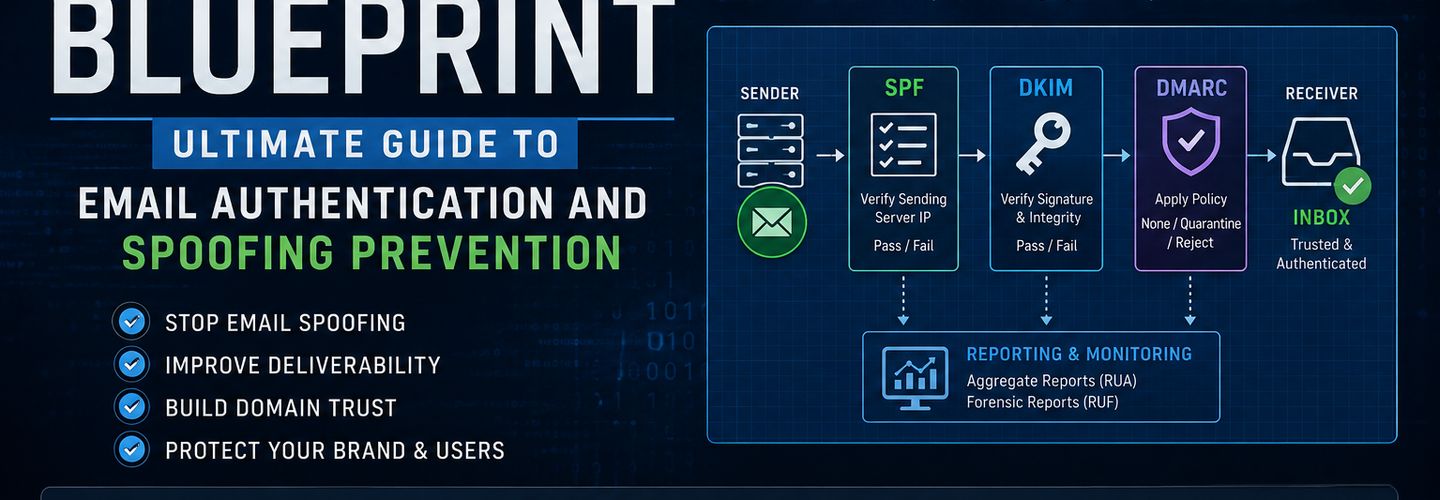
The Complete SPF-DKIM-DMARC Blueprint: Ultimate Guide to Email Authentication and Spoofing Prevention
You've probably already set up an email server or configured a domain for your organization — but if SPF, DKIM, and DMARC aren't working together as a unified framework, your domain is still wide open to spoofing and phishing attacks. What most teams miss is that deploying each protocol in isolation delivers only a fraction of the protection. In this guide, you'll get the complete SPF-DKIM-DMARC blueprint: DNS configurations, deployment workflows, troubleshooting strategies, and enforcement best practices for securing your email infrastructure.
Key Takeaways
- ▸SPF, DKIM, and DMARC are complementary email authentication protocols that must be deployed together to effectively prevent spoofing and phishing attacks.
- ▸SPF verifies whether a mail server is authorized to send email on behalf of a domain by checking the sender's IP against a published DNS record.
- ▸DKIM uses cryptographic signatures to confirm that email content was not altered during transmission between servers.
- ▸DMARC enforces authentication policies and provides visibility into unauthorized email activity through aggregate and forensic reporting.
- ▸Correct DNS configuration is essential — a single misconfigured TXT record can cause authentication failures across your entire mail infrastructure.
- ▸Gradual DMARC enforcement (none → quarantine → reject) helps organizations safely transition from monitoring to blocking malicious emails without disrupting legitimate delivery.
- ▸Continuous reporting and auditing through DMARC RUA/RUF reports improve long-term email security posture and domain reputation.
What Are SPF, DKIM, and DMARC and How Do They Work Together?
SPF, DKIM, and DMARC are three distinct email authentication protocols that collectively verify the identity and integrity of email senders. Each protocol addresses a different layer of the email trust problem, and together they form a coordinated defense against spoofing, phishing, and business email compromise (BEC).
Understanding each one individually before examining how they interact is the clearest way to build a deployable mental model.
What Is SPF (Sender Policy Framework)?
SPF is an email authentication protocol that verifies whether a mail server is authorized to send email on behalf of a domain. It works by publishing a DNS TXT record that lists all IP addresses and mail servers permitted to send email from your domain. When a receiving mail server gets an inbound email claiming to be from yourdomain.com, it queries your DNS for an SPF record and checks whether the sending server's IP is on the approved list.
For example, if your domain uses Google Workspace to send email, your SPF record would explicitly authorize Google's mail servers. Any email arriving from an unauthorized IP would fail the SPF check. SPF alone, however, only validates the envelope sender — the technical routing address — not the visible "From" address the recipient sees in their inbox.
What Is DKIM (DomainKeys Identified Mail)?
DKIM uses cryptographic signatures to validate that email content has not been altered during transmission. When your mail server sends an outbound email, it attaches a digital signature to the message header using a private key. The corresponding public key is published in your DNS. Receiving mail servers retrieve that public key and use it to verify the signature — confirming both that the message came from your domain and that no content was modified in transit.
This is particularly important because SPF only checks the sending server. DKIM adds a layer of content integrity. Even if an attacker relays a message through a legitimate server, a tampered email body will cause the DKIM signature to fail verification.
What Is DMARC (Domain-based Message Authentication, Reporting & Conformance)?
DMARC is a policy framework that tells receiving mail servers how to handle emails that fail SPF or DKIM authentication checks. Beyond enforcement, DMARC also requires alignment — the authenticated domain used by SPF or DKIM must match the visible "From" domain in the email header. This is what closes the loophole that SPF alone leaves open.
DMARC policies operate in three modes: p=none (monitor only), p=quarantine (deliver to spam), and p=reject (block the message entirely). Crucially, DMARC generates XML reports that give domain owners visibility into every email being sent under their domain name — including unauthorized attempts.
How the Three Protocols Form a Unified Authentication Flow
Think of the three protocols as a layered checkpoint system. SPF confirms the sending server is authorized. DKIM confirms the message content is intact. DMARC enforces what happens when either check fails — and requires the authenticated identity to align with what the recipient actually sees. An email must pass at least one of SPF or DKIM and achieve DMARC alignment to be considered authenticated. You can audit your domain's current SPF and DMARC configurations passively using the DNS Security Analysis tool on ReconShield, which queries live DNS records without sending any traffic to your mail servers.
Why Are SPF, DKIM, and DMARC Important for Email Security?
SPF, DKIM, and DMARC matter because email remains the primary attack vector for phishing, spoofing, and business email compromise — and without all three protocols enforced, domains are trivially impersonatable. The threat is not theoretical. According to Verizon's Data Breach Investigations Report, over 90% of cyberattacks begin with a phishing email — Source: Verizon DBIR, 2024. The FBI reported that BEC attacks caused over $2.9 billion in losses in 2023 alone — Source: FBI IC3, 2024.
Email spoofing occurs when attackers forge sender identities to impersonate trusted domains in phishing campaigns. Without DMARC enforcement, any attacker can send an email that appears to come from ceo@yourcompany.com using any mail server on the internet. The receiving server has no mechanism to reject it. For a deeper look at how these impersonation attacks are executed in practice, see ReconShield's analysis of hackers exploiting Microsoft Teams to impersonate IT helpdesk staff — the same social engineering principles apply directly to email-based attacks.
Beyond security, authentication directly affects deliverability. Gmail, Microsoft 365, and Yahoo now enforce strict sender authentication requirements. Domains without proper SPF, DKIM, and DMARC configurations face increased spam filtering, rejection, and degraded sender reputation — Source: Google Postmaster Guidelines, 2024. Proper deployment protects not just security but also the operational integrity of every transactional email, notification, and marketing campaign your organization sends.
How Does the Anatomy of Email Authentication Work?
Email authentication is a multi-step DNS-driven process that occurs invisibly during the seconds between when a message is sent and when it arrives in a recipient's inbox. Understanding the sequence helps administrators troubleshoot failures and design DNS records correctly.
The Mail Flow Authentication Process
First, the sender's mail server composes the email and applies a DKIM signature to the message headers using the domain's private key. Second, the email is transmitted over SMTP toward the recipient's mail server. Third, the receiving server performs three checks in rapid succession: it queries DNS for the sender's SPF record to validate the sending IP, it retrieves the DKIM public key from DNS to verify the signature, and it queries for a DMARC record to determine the domain's authentication policy.
Finally, the receiving server evaluates DMARC alignment. DMARC alignment ensures that authenticated email domains match the visible sender domain presented to recipients. If SPF passes but the SPF-authenticated domain doesn't match the From header domain, DMARC alignment fails. The same logic applies to DKIM. This alignment requirement is what makes DMARC genuinely effective against display-name spoofing.
Authentication Pass/Fail Decision Logic
When DMARC is set to p=reject, the outcome is binary: an email that fails both SPF and DKIM — or fails DMARC alignment on both — is blocked. An email that passes either SPF alignment or DKIM alignment passes DMARC, regardless of the other check's result. This means organizations can maintain DKIM-based authentication even when using third-party senders that route through different IP ranges, as long as the DKIM signature aligns with the From domain.
How Can Organizations Configure SPF Records Correctly?
SPF configuration requires publishing a single DNS TXT record at your root domain that explicitly lists every mail server and IP range authorized to send email on your behalf. A correctly formed SPF record prevents unauthorized servers from passing SPF checks while ensuring all your legitimate sending sources are covered.
Creating and Structuring an SPF TXT Record
An SPF record always begins with the version tag v=spf1 and ends with an all mechanism that defines the default action for unlisted senders. A typical SPF record for an organization using Google Workspace and a third-party email marketing platform might look like this:
v=spf1 include:_spf.google.com include:sendgrid.net ip4:203.0.113.10 -all
Breaking this down: include:_spf.google.com delegates authorization to Google's published SPF record. include:sendgrid.net does the same for SendGrid. ip4:203.0.113.10 explicitly authorizes a specific IP. -all at the end means any server not listed should fail SPF — the strictest and most secure setting. Using ~all (softfail) instead is common during testing but should not remain in production.
Avoiding the SPF 10-Lookup Limit
SPF records are subject to a hard limit of 10 DNS lookups during evaluation, and exceeding this limit causes a permerror that results in SPF failure regardless of whether the sending server is authorized. Every include:, a:, mx:, and redirect= mechanism that requires a DNS query counts toward this limit. Organizations using many third-party senders — ESPs, CRMs, ticketing systems — frequently hit this limit.
The solution is SPF record flattening: replacing include: mechanisms with the actual resolved IP ranges. Several tools automate this process and keep the flattened record updated as vendor IP ranges change. You can verify your current SPF record's lookup count using the ReconShield DNS Lookup tool, which surfaces the raw TXT record alongside SPF and DMARC analysis.
Common SPF Mistakes to Avoid
Multiple SPF records on the same domain cause an immediate permerror — you can only have one SPF TXT record at the root of your domain. Using +all (pass all) completely defeats the purpose of SPF by authorizing every server on the internet. Forgetting to add subdomains used for sending (such as mail.yourdomain.com) leaves those addresses unprotected. Each sending subdomain requires its own SPF record.
What Are the Most Common DKIM Configuration Mistakes?
DKIM configuration requires generating an asymmetric key pair, publishing the public key in DNS as a TXT record, and configuring your mail server to sign outbound messages with the corresponding private key. Mistakes at any of these three stages break the entire signature chain.
Generating DKIM Keys and Publishing to DNS
Most mail platforms — Google Workspace, Microsoft 365, Postfix, and others — provide a built-in DKIM key generation wizard. The output is a public key that must be published as a DNS TXT record at a selector-based hostname in the format selector._domainkey.yourdomain.com. The "selector" is a label you choose (commonly google, mail, s1) that allows multiple DKIM keys to coexist — useful when authorizing several sending services.
A correctly formatted DKIM DNS record looks like this:
v=DKIM1; k=rsa; p=MIGfMA0GCSqGSIb3DQEBAQUAA4GNADCBiQKBgQ...
The p= value is the base64-encoded public key. A blank or missing p= value signals a revoked key and will cause all DKIM checks to fail.
DKIM Key Rotation Best Practices
DKIM private keys should be rotated at least every 6 to 12 months to limit exposure if a key is ever compromised. The rotation process involves generating a new key pair, publishing the new public key under a new selector in DNS, configuring the mail server to begin signing with the new private key, and then waiting for the old selector's TTL to expire before removing it. Never delete the old DNS record before confirming the new key is actively signing messages, as in-flight emails signed with the old key will fail verification if the old record is removed prematurely.
A common mistake is generating a 1024-bit RSA key. Modern best practice requires at least 2048-bit keys, as 1024-bit keys are considered weak against modern cryptographic attacks — Source: NIST SP 800-131A, 2022.
How Should Businesses Deploy DMARC Without Breaking Email Delivery?
DMARC deployment should follow a phased enforcement strategy that begins with monitoring-only mode and gradually escalates to full rejection only after the domain's legitimate email sending sources are fully mapped and authenticated. Jumping directly to p=reject without this preparation is the most common cause of DMARC-related email delivery failures.
Understanding DMARC Policy Modes: None, Quarantine, and Reject
The three DMARC policy levels — p=none, p=quarantine, and p=reject — control what happens to messages that fail authentication, escalating from passive observation to active blocking. p=none instructs receiving servers to take no action on failing messages but to send reports back to the domain owner. This is the correct starting point for every DMARC deployment. p=quarantine causes failing messages to be delivered to the recipient's spam or junk folder. p=reject causes receiving servers to refuse delivery of failing messages entirely.
A phased DMARC deployment strategy helps organizations monitor authentication results before enforcing email rejection policies. The recommended timeline is: deploy p=none and collect reports for 30–60 days, analyze reports to identify all legitimate sending sources, ensure all sources pass SPF or DKIM with proper alignment, move to p=quarantine at a low percentage using the pct= tag, and finally escalate to p=reject once confidence in authentication coverage is high.
Constructing a DMARC TXT Record
A complete DMARC record is published as a TXT record at _dmarc.yourdomain.com. A monitoring-phase record looks like:
v=DMARC1; p=none; rua=mailto:dmarc-reports@yourdomain.com; ruf=mailto:dmarc-forensics@yourdomain.com; fo=1
Here, rua= specifies where aggregate (XML) reports are sent. ruf= specifies where forensic (failure) reports are sent. fo=1 requests forensic reports for any authentication failure, not just full DMARC failures. Once ready to enforce, moving to p=quarantine; pct=10 applies the quarantine policy to only 10% of failing mail — a safe intermediate step.
DMARC Alignment Modes: Strict vs. Relaxed
DMARC supports two alignment modes for both SPF and DKIM: relaxed and strict. In relaxed alignment (the default), the organizational domain must match. For example, a message From: user@mail.yourdomain.com would satisfy relaxed alignment if SPF or DKIM authenticates yourdomain.com. In strict alignment (aspf=s; adkim=s), the domains must match exactly. Strict alignment is more secure but can break legitimate subdomain-based sending setups if not carefully audited first.
How Can Companies Troubleshoot SPF and DKIM Failures?
SPF and DKIM failures are almost always caused by DNS misconfigurations, third-party sender omissions, or key management errors — and each failure type produces distinct diagnostic signals in mail headers and DMARC reports. Knowing where to look dramatically reduces resolution time.
Diagnosing SPF Failures
SPF permerror means the SPF record has a syntax error or exceeds the 10-lookup limit. SPF softfail means the sending server is not in the SPF record but the domain has used ~all instead of -all. SPF none means no SPF record exists at all for the domain. The most reliable way to diagnose SPF issues is to inspect the Authentication-Results header in the raw message source of a failing email — it will show exactly which mechanism matched (or failed) and the evaluated sender IP.
For domains with complex third-party sender ecosystems, checking for DNS security misconfigurations regularly catches SPF drift — the gradual accumulation of unauthorized or forgotten sending sources. Also consider auditing your domain's full HTTP security posture alongside email authentication, since both DNS and HTTP header misconfigurations often occur in the same infrastructure environments.
Diagnosing DKIM Failures
DKIM failures fall into two main categories: selector not found (the DNS record doesn't exist at the expected hostname) and signature verification failure (the public key was found but the signature didn't match, usually because the message body was modified in transit). Mailing list software, forwarding services, and certain spam filters that modify message headers or bodies frequently cause DKIM failures in forwarded email. This is a known limitation of DKIM — and it's one reason DMARC relies on either SPF or DKIM alignment passing, not both.
Diagnosing DMARC Alignment Failures
DMARC alignment failures are particularly common when organizations use third-party ESPs that send email "from" the organization's domain but authenticate under the ESP's own domain. For example, a marketing platform might pass SPF for esp.com but the visible From address is @yourcompany.com — this creates an alignment mismatch. The fix is to configure the ESP to sign with your domain's DKIM key, which requires publishing a DKIM DNS record authorized for that ESP. Reviewing IOC and threat intelligence data sourced from DMARC forensic reports can also reveal whether alignment failures are the result of misconfiguration or active abuse.
Which Tools Help Monitor SPF, DKIM, and DMARC Authentication?
A combination of DNS lookup tools, DMARC report analyzers, and email authentication checkers is required to maintain continuous visibility into your domain's authentication health. No single tool covers the full spectrum.
ReconShield DNS Security Analysis
The ReconShield DNS Lookup and Security Analysis tool queries your domain's A, MX, TXT, and NS records in real time and surfaces SPF and DMARC configurations alongside security audit annotations — entirely passively, with zero packets sent to your mail servers. It's a fast first-stop diagnostic for confirming record publication and detecting obvious syntax errors. For a broader infrastructure audit including open ports and exposed services that could be exploited alongside email attacks, the ReconShield Port Scanner maps your full network exposure surface.
ReconShield Email Security Tool
The dedicated Email Security Tool at ReconShield provides a focused SPF and DMARC validation workflow for domain administrators. It's particularly useful for validating configurations after DNS changes, where propagation delays can make it unclear whether a record update has taken effect globally.
External DMARC Report Analyzers
MXToolbox provides free SPF, DKIM, and DMARC record checkers alongside email header analysis. DMARC Analyzer and EasyDMARC offer automated DMARC report parsing, turning raw XML aggregate reports into actionable dashboards showing which sources are passing and failing authentication. Valimail and PowerDMARC are enterprise-grade platforms that automate third-party sender discovery and provide guided enforcement workflows. Postmark's SPF checker is useful for quickly validating SPF record syntax and lookup counts during initial deployment.
For teams managing security operations alongside email authentication, the ReconShield IP Reputation Intelligence tool lets you cross-reference suspicious sending IPs found in DMARC forensic reports against global threat feeds — identifying whether a failing source is a misconfigured legitimate server or an active threat actor.
[Insert image: DMARC aggregate report dashboard showing pass/fail rates by sending source | Alt text: "Analyze DMARC aggregate report data for SPF DKIM authentication failures"]
Best Practices for Secure Email Authentication
Secure email authentication requires more than correct initial configuration — it demands ongoing DNS auditing, third-party sender governance, and systematic DMARC report analysis to remain effective as your email infrastructure evolves.
First, enforce the principle of least privilege for mail authorization. Only include explicitly needed servers and IP ranges in your SPF record. Every include: statement is a trust delegation — treat it the way you'd treat granting admin access. Second, conduct quarterly DNS audits. SPF records drift as teams onboard new SaaS tools that send email under your domain without informing security teams. The ReconShield DNS Lookup tool makes it straightforward to pull and review your current record state.
Third, monitor DMARC reports continuously rather than only during the initial deployment phase. Aggregate reports reveal new unauthorized sending sources, gradual SPF drift, and early indicators of spoofing campaigns targeting your domain. Fourth, manage third-party senders actively. Require every vendor sending email under your domain to either be included in your SPF record with proper IP scope or — preferably — to sign messages with your domain's DKIM key. Fifth, prioritize moving toward p=reject as the long-term goal. Moving toward p=reject enforcement is the only configuration that actively blocks spoofed emails from reaching recipients — p=none and p=quarantine are monitoring and transition states, not end states.
Additionally, organizations concerned about the broader web attack surface alongside email security should audit HTTP security headers and validate SSL/TLS configurations using the ReconShield SSL/TLS Crypto Checker, since attackers who fail at email impersonation often pivot to web-based spoofing methods.
What Security Improvements Come After DMARC Enforcement?
After achieving full DMARC p=reject enforcement, organizations can layer additional brand protection and threat intelligence capabilities on top of the established authentication foundation. DMARC rejection is not the final destination — it's the baseline from which advanced controls become viable.
BIMI: Brand Indicators for Message Identification
BIMI (Brand Indicators for Message Identification) is an emerging email standard that displays a verified brand logo directly in the recipient's inbox — visible in the sender avatar space in Gmail, Apple Mail, Yahoo Mail, and other BIMI-supporting clients. BIMI requires p=quarantine or p=reject DMARC enforcement as a prerequisite, along with a Verified Mark Certificate (VMC) from an approved certification authority. For brand-conscious organizations, BIMI provides a visible trust signal that distinguishes legitimate emails from spoofed lookalikes in the recipient's inbox.
Threat Intelligence Integration
DMARC forensic reports (ruf=) contain detailed data about individual authentication failures — including sending IP addresses, message headers, and envelope metadata. Feeding this data into a threat intelligence platform enables detection of coordinated spoofing campaigns, identification of infrastructure reuse across multiple attack attempts, and correlation with known malicious IP ranges. The ReconShield IP Reputation Intelligence tool lets analysts cross-reference IPs from DMARC forensic reports against global threat feeds in real time. For teams building structured threat intelligence workflows, the ReconShield guide to IOC analysis and cyber threat intelligence provides a practical methodology for operationalizing this data.
Continuous Email Security Monitoring
After enforcement, the work shifts from configuration to continuous monitoring. DMARC aggregate reports should be reviewed at least monthly to catch new unauthorized sending sources. SPF records should be audited quarterly. DKIM keys should be rotated on a defined schedule. Any anomaly in authentication pass rates — a sudden increase in SPF failures from a specific IP range, for example — is an early warning signal that should trigger investigation using your IP intelligence tools and threat feeds.
[Insert image: BIMI brand logo displayed in Gmail inbox for a DMARC-enforced domain | Alt text: "BIMI logo displayed in Gmail inbox after DMARC reject enforcement"]
Conclusion
SPF, DKIM, and DMARC form the essential foundation of trustworthy email infrastructure. Individually, each protocol addresses a specific vulnerability in how email identity works. Together, when correctly configured and progressively enforced, they eliminate the attack surface that phishing campaigns and business email compromise attacks depend on.
The path forward is clear: audit your current DNS records today using the ReconShield DNS Security Analysis tool, map every legitimate sending source, close SPF gaps, verify DKIM signatures, and commit to a phased DMARC enforcement roadmap with a defined target date for p=reject. Don't let the complexity of the configuration process delay action — every day your domain operates without DMARC enforcement at p=reject is a day attackers can impersonate you to your customers, partners, and employees without consequence.
Start with monitoring. Build toward enforcement. Then use the visibility DMARC provides to drive continuous improvement in your organization's email security posture.
Written by Surendra Reddy Cybersecurity Researcher & Founder, ReconShield. Surendra is a cybersecurity engineer specializing in Open Source Intelligence (OSINT), exposure intelligence, and AI-driven threat analysis. He built ReconShield to democratize access to enterprise-grade infrastructure visibility tools and secure the digital internet-facing assets.
Reviewed by the ReconShield Editorial Team Technical content is cross-referenced with vendor security documentation, RFC specifications, and live DNS validation before publication.
## Analyst Commentary & Implementation Blueprint
Security advisory
Phishing remains the primary vector for malware distribution. SPF, DKIM, and DMARC form the foundation of email brand protection. Without a strict DMARC reject policy, any unauthorized actor can forge your domain name, destroying partner trust and triggering email spam-list classification.
Secure DNS Email Records Layout
# TXT SPF and DMARC Records
reconshield.in.  TXT "v=spf1 ip4:192.0.2.0/24 include:_spf.google.com -all"
_dmarc.reconshield.in. TXT "v=DMARC1; p=reject; pct=100; rua=mailto:dmarc-reports@reconshield.in"
Actionable Mitigation Checklist
- ✔Transition DMARC policy from 'none' to 'reject'.
- ✔Ensure SPF uses the strict '-all' qualifier.
- ✔Rotate DKIM private keys at least once a year.
Common Inquiries & FAQs
What does p=reject do?
The 'reject' policy instructs receiving mail servers to block emails that fail SPF/DKIM verification entirely.
How often should I monitor DMARC reports?
Weekly or daily monitoring helps track unauthorized senders using your domain.
Surendra Reddy
Surendra Reddy is a cybersecurity researcher and founder of ReconShield, specializing in OSINT and defensive infrastructure analysis.
Connect on LinkedIn ↗// AUDIT BRIEFING DISCUSSION (2 COMMENTS)
Great breakdown of the passive infrastructure vectors. We recently audited our external DNS zones and found multiple dangling staging environments. Implementing wildcard certificates reduced our CT log leaks significantly.
Is there any automated tooling you recommend for daily crt.sh scraping? Manually checking CT logs is becoming unsustainable for our domain portfolio.
// MORE ARTICLES
Security Researchers Warn Critical n8n Flaws May Expose Automation Platforms to RCE
Researchers have disclosed critical vulnerabilities in n8n that could expose automation workflows and connected enterprise systems to remote code execution risks, prompting urgent patch recommendations for users and administrators.

How Agentic AI Is Changing Software Engineering and Expanding Mobile Attack Surfaces
Agentic AI is rapidly transforming software engineering workflows through automation and intelligent coding assistance, while cybersecurity experts warn of expanding mobile attack surfaces and emerging application security risks.

SplitVPN Hacked: Data Breach Exposes 865,000 User Records and 58 Million Hidden Connection Logs (July 2026)
SplitVPN hacked: 865,336 user records and 58 million connection logs exposed, directly contradicting the VPN's "no-logs" promise. What was leaked and what to do now.