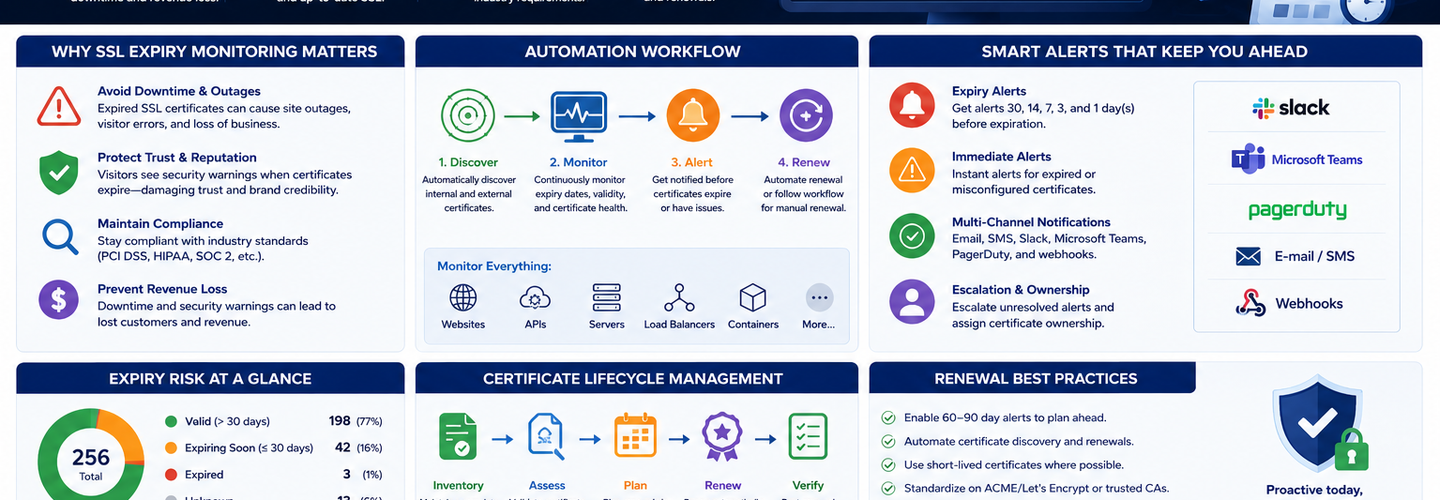
SSL Expiry Monitoring: Automation, Alerts, and Renewal Best Practices in 2026
An expired SSL certificate doesn't just show a browser warning — it breaks HTTPS entirely, kills API connectivity, blocks mobile app updates, and makes your website completely inaccessible. Yet organizations lose uptime to expired certificates every week because monitoring is treated as optional. In 2026, with certificate lifespans shrinking to 90 days (and soon to 6 days for beta programs), certificate management has shifted from a quarterly task to a continuous operation. In this guide, you'll learn how to set up automated certificate renewal using ACME, implement multi-layer expiry alerting (30, 14, 7 days), monitor certificate changes, and design renewal workflows that eliminate the "emergency renewal at 2am" scenario.
## Key Takeaways
- ▸SSL certificates now expire every 90 days (Let's Encrypt) to 397 days (commercial CAs), making automated renewal a requirement, not an option — manual renewal processes can no longer keep up with modern certificate lifecycles.
- ▸The ACME protocol (Automated Certificate Management Environment) enables fully automated certificate issuance and renewal — when properly configured, certificates renew themselves every 60-90 days without human intervention.
- ▸Multi-layer alerting is critical: set alerts at 30 days (administrative planning), 14 days (technical troubleshooting), and 7 days (emergency fallback) — these windows give your team time to act before outages.
- ▸Monitoring tools should track not just certificate expiry but also certificate changes, chain validity, cipher suite strength, and TLS version support — expiry alone is only one dimension of certificate health.
- ▸Renewal automation must include redundancy and monitoring for renewal failures — a failed automation creates a hidden expiry bomb that detonates 60-90 days later when the certificate expires.
- ▸Organizations must maintain separate monitoring for each certificate deployment: internal APIs, CDNs, managed platforms, on-premise servers — a certificate that auto-renews on a CDN might not auto-renew on your on-premise Apache server.
- ▸With 6-day certificates now in beta testing, renewal must happen at least every 2-3 days, requiring monitoring to trigger hourly, not daily — the shift to micro-certificate lifespans is fundamentally changing how certificates are managed.
## Why Certificate Expiry Matters in 2026
Certificate expiry is one of the most preventable but highest-impact security incidents. An expired certificate doesn't just show a warning — it breaks core functionality.
Impact of an expired certificate:
Browser connections: Browsers display "NET::ERR_CERT_AUTHORITY_INVALID" and refuse to load the site. Users cannot proceed. Site traffic drops to zero.
API clients: SDKs and libraries that validate certificates strictly will refuse to connect. Mobile apps, backend services, and automation all fail silently.
Load balancers: Many load balancers reject requests when the certificate is expired, causing complete outage.
WebSockets and real-time systems: Applications relying on persistent HTTPS connections break when the certificate expires mid-session.
Automated systems: Certificate validation in scripts, webhooks, CI/CD pipelines, and monitoring agents all fail. A single expired certificate can cascade into multiple downstream failures.
Real-world cost: A 2-hour expired certificate outage on an e-commerce site can cost $100,000+ in lost sales. For API-dependent services, a 30-minute outage can cascade across dozens of dependent systems.
The irony: Expiry is 100% preventable through automation and monitoring. Yet it remains one of the most common security incidents.
## How Certificate Lifecycle Works in 2026
Modern certificate lifecycle: request → validation → issuance → deployment → monitoring → renewal → repeat.
Request and Validation Phase
You generate a Certificate Signing Request (CSR) containing your domain, public key, and organization details. You submit it to a Certificate Authority.
The CA validates either:
- ▸Domain ownership (DV) — by email confirmation or DNS/HTTP file verification
- ▸Organization identity (OV) — domain ownership plus company registration verification
- ▸Legal entity (EV) — extensive multi-week verification process
Issuance Phase
The CA issues the certificate valid for 90 days (Let's Encrypt), 1 year (commercial DV/OV), or up to 3 years (EV, though becoming rare).
Deployment Phase
You install the certificate on your servers, CDNs, load balancers, and any other infrastructure serving HTTPS traffic.
Monitoring Phase
You monitor the certificate for: expiry date, chain validity, cipher suite strength, TLS version support, and certificate changes.
Renewal Phase
30-60 days before expiry, you renew the certificate through the same CA (or a different CA). The renewal process generates a new CSR, undergoes validation again, and issues a new certificate.
Automated renewal systems (ACME) repeat this every 60 days automatically.
Redeployment Phase
The new certificate replaces the old certificate on all servers and endpoints. This should happen within minutes of renewal, not within hours or days.
## ACME and Automated Renewal with Certbot
The ACME protocol (RFC 8555) is the standardized way to automate certificate issuance and renewal. ACME clients like Certbot, acme.sh, and others speak this protocol to Certificate Authorities.
How ACME automation works:
Certbot (or another ACME client) runs on your server — typically as a cron job every 8-12 hours
Certbot requests a new certificate from Let's Encrypt — sending domain ownership proof (DNS challenge or HTTP challenge)
Let's Encrypt validates domain ownership — by checking a TXT record in DNS or a file on your web server
Certificate is issued — valid for 90 days
Certbot installs the certificate — replacing the old one on your web server
Certbot reloads your web server — (e.g., nginx reload) to load the new certificate
Cycle repeats — Certbot doesn't issue a new certificate until 60 days before expiry, but checks every day
The critical components:
ACME client (Certbot): Runs on your server, orchestrates the renewal workflow
Validation method: DNS-01 (TXT record) or HTTP-01 (file on web root) — proves you control the domain
Deploy hook: Shell commands to reload services after certificate installation
Monitoring: Alerts if renewal fails (this is crucial — automation failures are silent)
Certbot Installation and Configuration
Basic setup:
bash
apt-get install certbot python3-certbot-nginx certbot --nginx -d example.com -d www.example.com
This creates the certificate, installs it on Nginx, and sets up automatic renewal.
Configure cron job (already done by Certbot in most cases):
bash
certbot renew --quiet --post-hook "systemctl reload nginx"
This runs twice daily and renews certificates that are 30 days from expiry.
Test renewal (doesn't actually renew, just tests the workflow):
bash
certbot renew --dry-run
## Multi-Layer Alerting Strategy
Effective certificate monitoring requires alerts at multiple windows before expiry, giving your team time to investigate and fix issues at each stage.
Alert Structure: 30 Days, 14 Days, 7 Days
30-day alert: "Your certificate expires in 30 days. Start planning renewal."
- ▸Gives administrative time to verify renewal is configured
- ▸Allows time to test renewal in staging before production
- ▸Typical audience: DevOps lead, infrastructure owner
14-day alert: "Your certificate expires in 14 days. Verify renewal is proceeding."
- ▸Automation should have renewed by now (Certbot renews 30 days before)
- ▸If this alert fires and renewal hasn't happened, investigate immediately
- ▸Typical audience: On-call engineer, DevOps team
7-day alert: "Your certificate expires in 7 days. Emergency renewal required."
- ▸At this point, manual intervention is required if automation failed
- ▸Every minute counts; escalate to senior engineers
- ▸Typical audience: DevOps lead, SRE on-call, management
This three-tier approach ensures:
- ▸Administrative visibility (30 days)
- ▸Technical verification (14 days)
- ▸Emergency response capability (7 days)
## Certificate Change Monitoring
Beyond expiry alerts, monitor for unexpected certificate changes — a certificate replacement can indicate unauthorized activity or automation failures.
What to monitor:
Issuer changes: Is the certificate suddenly issued by a different CA? This could indicate compromise or misconfiguration.
Subject/Domain changes: Did the certificate domains change unexpectedly? This could indicate a renewal that added/removed domains.
Key algorithm changes: Did the server switch from RSA to ECDSA unexpectedly? Usually intentional but worth verifying.
Cipher suite changes: Did the server's supported ciphers change? Could indicate a server update or configuration change.
Chain changes: Is the certificate chain different (different intermediate CAs)? This is usually fine but worth verifying.
Tools like Oh Dear and TrackSSL specialize in certificate change detection, comparing current certificate against historical baseline and alerting on any deviation.
## Automation Failure Scenarios and Safeguards
Automated renewal systems are reliable but can fail silently, creating hidden expiry bombs. These scenarios are real risks:
DNS challenge validation fails: Your ACME client couldn't update DNS records because:
- ▸DNS API credentials are wrong or expired
- ▸API is unreachable
- ▸DNS TTL is too high
- ▸Wildcard certificate requires DNS validation but your automation only supports HTTP
HTTP challenge validation fails: The ACME client couldn't create the HTTP validation file because:
- ▸Web server root path is misconfigured
- ▸File permissions prevent creation
- ▸Load balancer isn't routing the validation request to the certificate server
Deploy hook fails silently: Certificate was renewed but the reload command failed:
- ▸Nginx config has a syntax error (can't reload without fixing)
- ▸Systemctl reload command has permission issues
- ▸Server crashed or restarted mid-deployment
Rate limiting kicks in: Let's Encrypt rate-limited your requests and you're unaware
Safeguards Against Automation Failures
Monitor the renewal process itself, not just the certificate expiry:
bash
# Log renewal attempts and results certbot renew --quiet --logs-dir /var/log/letsencrypt \ --post-hook "systemctl reload nginx" 2>&1 | logger
Test renewal regularly:
bash
# Dry run every week to catch configuration issues 0 2 * * 0 /usr/bin/certbot renew --dry-run --quiet
Alert on stale certificates:
bash
# Certificate hasn't changed in over 30 days? # That's suspicious (means renewal failed) CERT_DATE=$(openssl x509 -in /etc/letsencrypt/live/example.com/cert.pem \ -noout -dates | grep "Not Before" | cut -d= -f2) DAYS_OLD=$(( ($(date +%s) - $(date -d "$CERT_DATE" +%s)) / 86400 )) if [ "$DAYS_OLD" -gt 30 ]; then # Alert: Certificate hasn't renewed in over 30 days fi
Monitor renewal logs:
bash
tail -f /var/log/letsencrypt/letsencrypt.log
## Monitoring Multiple Deployment Targets
Organizations deploy certificates across multiple infrastructure layers, each with different renewal mechanisms:
CDN-managed certificates: Cloudflare, Akamai, AWS CloudFront often auto-renew
- ▸Requires separate monitoring to verify renewal is happening
- ▸May not notify you of renewal events
- ▸Some CDNs charge for custom renewals
Load balancer certificates: ALB, NLB, classic ELB typically support auto-renewal
- ▸Verify auto-renewal is enabled (not all do by default)
- ▸Monitor that renewed certificates are correctly deployed
Kubernetes: cert-manager automates renewal on Kubernetes clusters
- ▸Monitors certificate secrets and auto-renews
- ▸Still requires monitoring to ensure renewals succeed
On-premise servers: Manual Certbot or commercial certificate providers
- ▸Requires Certbot or equivalent automation
- ▸Requires monitoring of the automation itself
Internal services: Private CAs (PKI infrastructure)
- ▸May have different renewal timelines
- ▸Often overlooked in expiry monitoring
## Tools and Best Practices for 2026
Use a dedicated certificate monitoring platform in addition to your server-level automation. Platforms like Dotcom-Monitor, Oh Dear, TrackSSL, or even open-source options like Prometheus + cert-exporter provide visibility you can't get from server logs alone.
Implement end-to-end monitoring:
- ▸Monitor certificate expiry dates
- ▸Monitor certificate changes
- ▸Monitor cipher suite strength
- ▸Monitor TLS version support
- ▸Monitor chain validity
Automate everything except verification:
- ▸Automate renewal (ACME)
- ▸Automate deployment (hooks, automation in code)
- ▸Automate alerting (multi-layer)
- ▸Manually verify renewal logs and monitor dashboards (weekly)
Plan for the shift to shorter lifespans:
- ▸Let's Encrypt is testing 6-day certificates
- ▸Your renewal automation must support frequent renewal (every 2-3 days)
- ▸Current Certbot configuration typically renews every 60 days; this won't be sufficient for 6-day certificates
## Real-World Renewal Runbook
Create a documented procedure for manual renewal in case automation fails:
Receive alert: "Certificate expires in 7 days"
Check automation status: Review Certbot logs, check renewal frequency
Verify cert renewal occurred: openssl x509 -in /etc/letsencrypt/live/example.com/cert.pem -noout -dates
If renewed: Verify it's deployed on all endpoints (CDN, load balancer, servers)
If not renewed: Manually trigger renewal:bash
certbot renew --force-renewal -d example.com
Verify deployment: Check browser, test API, monitor logs
Document the incident: What failed? Why? How to prevent next time?
## Conclusion
Certificate expiry is a solved problem through automation and monitoring. In 2026, every organization should have:
Automated renewal using ACME (Let's Encrypt, commercial CAs)
Multi-layer alerting at 30, 14, and 7 days before expiry
Certificate change monitoring to detect unexpected renewals or compromises
Renewal failure monitoring to catch automation failures before they become outages
Monitoring across all deployment targets (CDN, load balancers, servers, Kubernetes)
Use ReconShield's SSL/TLS checker to audit your certificate infrastructure, verify renewal is working, and test your alerting. Combine with the SSL certificate explained and TLS 1.3 guide to ensure your complete HTTPS infrastructure is modern, automated, and resilient.
Written by Surendra Reddy Cybersecurity Researcher & Founder, ReconShield. Surendra is a cybersecurity engineer specializing in Open Source Intelligence (OSINT), exposure intelligence, and AI-driven threat analysis. He built ReconShield to democratize access to enterprise-grade infrastructure visibility tools and secure digital internet-facing assets.
Reviewed by ReconShield Editorial Team
June 2026 Cybersecurity Review: Top Cyber Attacks, Data Breaches & Critical Vulnerabilities
WHOIS vs RDAP: Understanding the Protocol Transition for Domain Intelligence in 2026
## Analyst Commentary & Implementation Blueprint
Security advisory
Continuous security exposure assessment is critical to identifying public vulnerabilities before they are exploited. Organizations should maintain a passive inventory of all web servers, TLS configs, and open ports, ensuring that default configurations are eliminated and security advisories are actively implemented.
Hardened Security Configuration Blueprint
# General Security Hardening Directive
ServerTokens ProductOnly
ServerSignature Off
FileETag None
Actionable Mitigation Checklist
- ✔Perform passive asset inventories weekly.
- ✔Restrict administrative ports using local firewall controls.
- ✔Monitor active CVE alerts for exposed software.
Common Inquiries & FAQs
Why is passive scanning preferred for continuous auditing?
Passive audits do not cause operational impact or trigger firewall blocks, making them ideal for constant surveillance of internet-facing assets.
What should I do if a vulnerability is flagged?
Apply the latest vendor patches, restrict access to the resource via firewalls, or verify configuration flags to mitigate risks.
Surendra Reddy
Surendra Reddy is a cybersecurity researcher and founder of ReconShield, specializing in OSINT and defensive infrastructure analysis.
Connect on LinkedIn ↗// AUDIT BRIEFING DISCUSSION (2 COMMENTS)
Great breakdown of the passive infrastructure vectors. We recently audited our external DNS zones and found multiple dangling staging environments. Implementing wildcard certificates reduced our CT log leaks significantly.
Is there any automated tooling you recommend for daily crt.sh scraping? Manually checking CT logs is becoming unsustainable for our domain portfolio.
// MORE ARTICLES
Chrome 149 Released With Critical Security Fixes for Windows, macOS, and Linux
Chrome 149 is out with critical security fixes for Windows, macOS, and Linux. Learn what's patched, the risks of waiting, and how to update Chrome now.

Billions of Passwords at Risk After Massive Infostealer Data Leak
Billions of passwords are at risk after a massive infostealer data leak. Learn how the breach happened, who's exposed, and how to secure your accounts now.

Update Firefox Now: Multiple Vulnerabilities Expose Users to RCE Attacks
Update Firefox now: multiple vulnerabilities expose users to RCE attacks. Learn which flaws matter, who's affected, and how to patch your browser safely today.