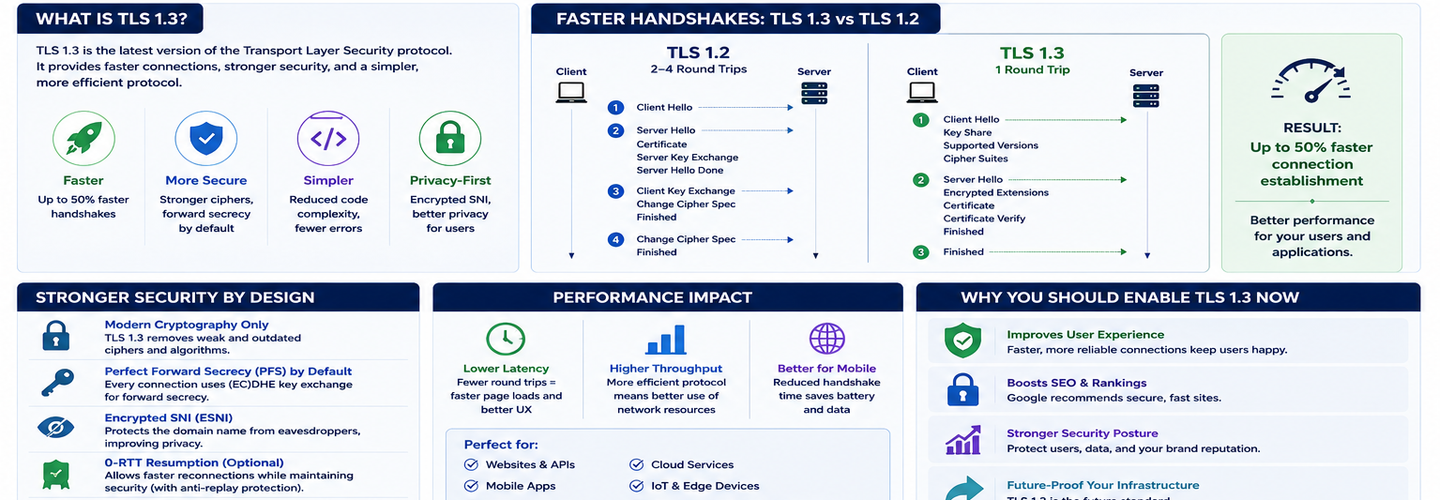
TLS 1.3 Guide: Faster Handshakes, Better Security, and Why You Should Enable It Now
TLS 1.3 has been the standard since 2018, yet many organizations still run servers that support only TLS 1.2. The upgrade is free, the performance gains are immediate, and the security improvements are substantial. Yet inertia persists: teams worry about breaking legacy clients or making deployment mistakes. In this guide, you'll learn exactly what TLS 1.3 changed, how the 1-RTT handshake saves 50ms per connection, what 0-RTT resumption means, how the new cipher suites compare, and how to safely enable TLS 1.3 without breaking backward compatibility.
## Key Takeaways
- ▸TLS 1.3 reduces the handshake from 2 round trips (TLS 1.2) to 1 round trip (1-RTT), saving approximately 50-100ms per new connection depending on network latency.
- ▸Zero Round Trip Time (0-RTT) session resumption allows returning clients to send encrypted application data in the first packet, eliminating handshake latency entirely — but carries replay attack risk for non-idempotent operations.
- ▸TLS 1.3 mandates forward secrecy: even if a server's long-term private key is compromised, past sessions remain secure because session keys are ephemeral and not derived from the long-term key.
- ▸All weak cipher suites were removed from TLS 1.3, leaving only four secure AEAD suites — eliminating configuration complexity and removing a major source of TLS vulnerabilities.
- ▸TLS 1.3 is supported by 99%+ of modern clients as of 2026, making legacy client concerns largely obsolete except for very specific cases (Windows XP, IE 11 on old systems, legacy Android devices).
- ▸For returning connections, TLS 1.3's 0-RTT can reduce time-to-first-byte by an additional 50ms, resulting in faster page loads and lower latency for real-time applications.
- ▸The recommended deployment strategy in 2026 is to enable TLS 1.3 for all new servers, keep TLS 1.2 enabled for compatibility, and monitor access logs to measure TLS 1.2 usage — disabling TLS 1.2 only after confirming adoption of TLS 1.3.
## What Changed in TLS 1.3?
TLS 1.3 (standardized in 2018, RFC 8446) made fundamental changes to the handshake protocol, cipher suite negotiation, and security guarantees compared to TLS 1.2. Most changes were driven by research revealing practical vulnerabilities in TLS 1.2 and the desire to simplify an increasingly complex protocol.
The TLS 1.2 Handshake: A Slow, Complex Process
TLS 1.2 requires two round trips (2-RTT) and involves negotiating cipher suites, key exchange mechanisms, and other parameters that expose the handshake to misconfiguration and downgrade attacks.
TLS 1.2 handshake (simplified):
Client sends ClientHello (cipher suites, extensions, random number)
Server responds with ServerHello (selected cipher suite, certificate, random number)
Client generates encryption keys, sends ClientKeyExchange
Both sides send ChangeCipherSpec and Finished (encrypted)
This process requires two full round trips. On a 50ms network (typical for east-coast US to west-coast), this adds 100ms of latency before any application data can be sent. On a 100ms intercontinental connection, you're waiting 200ms just for the handshake.
Additionally, the handshake in TLS 1.2 is sent in plaintext until the changeCipherSpec message, meaning packet structure, supported algorithms, and extensions are visible on the network. This metadata leakage is a minor but measurable privacy concern.
The TLS 1.3 Handshake: Optimized, Encrypted, and Faster
TLS 1.3 reorganized the handshake to combine key exchange and authentication into a single round trip, and encrypted everything after ServerHello.
TLS 1.3 handshake:
Client sends ClientHello + KeyShare (precomputed ECDHE key)
Server responds with ServerHello + Certificate + KeyShare + Finished (all encrypted)
Application data can now flow
By having the client pre-compute and send the key share in ClientHello, the server can immediately derive the shared session key and send ServerHello encrypted. The client receives ServerHello, derives the same session key, and encryption is established.
Result: One round trip instead of two. 50ms saved per connection.
## How 1-RTT Improves Real-World Performance
The 1-RTT handshake saves real time in every network scenario, with the most dramatic improvements on high-latency connections.
On a 50ms network (AWS us-east-1 to us-west-1):
- ▸TLS 1.2: ~100ms handshake latency (50ms × 2 RTT)
- ▸TLS 1.3: ~50ms handshake latency (50ms × 1 RTT)
- ▸Savings: 50ms per connection
On a 100ms intercontinental connection:
- ▸TLS 1.2: ~200ms handshake latency
- ▸TLS 1.3: ~100ms handshake latency
- ▸Savings: 100ms per connection
For a website making 10 TLS connections per page load (multiple domains, CDN, third-party services), the savings are:
- ▸50ms network: 500ms total saved per page load
- ▸100ms network: 1000ms total saved per page load
For APIs making hundreds of short-lived TLS connections per operation, the per-connection savings become a major performance factor.
Real-world measurements from early TLS 1.3 adopters (Google, Cloudflare) reported 30-50% improvements in connection setup latency, especially on mobile networks where connection chaining is common.
## Zero Round Trip Time (0-RTT) Session Resumption
TLS 1.3's 0-RTT feature allows returning clients to send encrypted application data without completing the full handshake, eliminating handshake latency entirely for repeat connections.
How 0-RTT works:
Client connects to server, completes full handshake, stores the session Pre-Shared Key (PSK)
Client reconnects later, sends ClientHello + application data immediately (encrypted with PSK)
Server receives ClientHello + data, decrypts with the cached PSK, processes immediately
Result: Zero additional latency beyond the initial packet round trip. Returning visitors load faster with no handshake overhead.
0-RTT Replay Attack Risk
The critical limitation of 0-RTT: data sent in the first round trip is sent before the server has fully verified the client's identity, creating a replay attack vulnerability.
An attacker who intercepts the 0-RTT packet can replay it to the server multiple times, and the server will process it each time because the client hasn't yet proven it has the matching private key.
This risk is acceptable for idempotent operations (GET requests, read-only queries) but dangerous for non-idempotent operations (POST, PUT, DELETE, financial transactions).
Best practice: Enable 0-RTT for GET requests and read-only traffic; disable it for mutating operations or authenticated sessions that could be replayed.
## Cipher Suites: Simplification and Removal of Weak Algorithms
TLS 1.2 included 100+ cipher suites, many of them weak, deprecated, or subject to known attacks. TLS 1.3 removed all weak ciphers and mandated only four secure AEAD (Authenticated Encryption with Associated Data) suites.
TLS 1.2 cipher suite problems:
- ▸Static RSA key exchange (server could not achieve forward secrecy)
- ▸3DES (inadequate for modern threats)
- ▸RC4 (cryptographically broken)
- ▸MD5 hashing (collision attacks)
- ▸Incomplete AEAD support
TLS 1.3 cipher suites (all AEAD, all with forward secrecy):
- ▸TLS_AES_128_GCM_SHA256
- ▸TLS_AES_256_GCM_SHA384
- ▸TLS_CHACHA20_POLY1305_SHA256
- ▸TLS_AES_128_CCM_SHA256
This simplification eliminates:
- ▸Misconfiguration risk (no weak ciphers to accidentally enable)
- ▸Downgrade attacks (no ciphers to downgrade to)
- ▸Cipher negotiation complexity (just four choices)
For server operators, this means no need to maintain complex cipher suite configuration files. For clients, it means no risk of being forced onto a weak cipher.
## Perfect Forward Secrecy (PFS) Enforcement
TLS 1.3 mandates Perfect Forward Secrecy (PFS): session encryption keys are independent of the server's long-term private key, meaning compromise of the private key does not compromise past sessions.
In TLS 1.2, static RSA key exchange could be used, where the client would encrypt the session key directly with the server's public key. If that private key were later compromised, an attacker could decrypt all recorded sessions.
TLS 1.3 mandates ephemeral Diffie-Hellman or ECDHE for all key exchanges. Session keys are derived from ephemeral values that are discarded after the session ends. Even if the server's private key is compromised:
- ▸Future connections are still secure (new ephemeral keys generated)
- ▸Past sessions are still secure (ephemeral keys no longer exist and are unknown to the attacker)
This is a significant security improvement: long-term key compromise no longer translates to historical session compromise.
## Migration Strategy: Enabling TLS 1.3 Without Breaking Clients
The recommended approach in 2026 is to enable TLS 1.3 on all new deployments, keep TLS 1.2 enabled for compatibility, and monitor adoption before considering TLS 1.2 deprecation.
Client Support Status (2026)
TLS 1.3 support is nearly universal:
- ▸Chrome/Edge/Firefox: Full support
- ▸Safari (iOS 12.2+, macOS 10.13+): Full support
- ▸Android 10+: Full support
- ▸Windows 11: Full support
Legacy clients without TLS 1.3 support:
- ▸Windows XP (out of support since 2014)
- ▸Internet Explorer 11 on older Windows versions
- ▸Android devices on version 9 or earlier (~1% of traffic globally)
- ▸Some IoT devices and legacy embedded systems
Safe Enablement Strategy
Phase 1: Enable TLS 1.3, Keep TLS 1.2 Enabled Configure your web server to accept both TLS 1.3 and TLS 1.2. Clients negotiate the highest version they support.
Nginx configuration:
nginx
ssl_protocols TLSv1.2 TLSv1.3; ssl_ciphers HIGH:!aNULL:!MD5; ssl_prefer_server_ciphers on;
Apache configuration:
apache
SSLProtocol TLSv1.2 TLSv1.3 SSLCipherSuite HIGH:!aNULL:!MD5
Phase 2: Monitor Access Logs Track what percentage of traffic uses TLS 1.3 vs TLS 1.2. Most logs include the negotiated protocol version.
After 3-6 months, if TLS 1.2 traffic drops below 1-2%, you can consider disabling it entirely.
Phase 3: Disable TLS 1.2 (Optional, Not Recommended) Only disable TLS 1.2 if your access logs show zero TLS 1.2 traffic for 30+ days. Even then, many operators keep TLS 1.2 enabled indefinitely for compatibility.
Handshake Negotiation Rules
Clients and servers always negotiate the highest supported version both parties agree on. If a client supports TLS 1.3 and the server enables it, they will use TLS 1.3. If a client only supports TLS 1.2 and the server enables both, they use TLS 1.2.
This means enabling TLS 1.3 never breaks clients that support it; it only enables faster connections for those clients.
## Performance Testing and Verification
Verify that TLS 1.3 is actually enabled and active on your servers using multiple testing methods.
Command line:
bash
openssl s_client -connect example.com:443 -tls1_3
Online SSL testing: Use ReconShield's SSL/TLS checker to analyze your certificate, verify TLS 1.3 support, and check cipher suite strength.
Measure actual connection latency:
bash
curl -w "Time to connect: %{time_connect}s\nTime to SSL handshake: %{time_appconnect}s\n" https://example.com
Compare TLS 1.2 vs TLS 1.3 handshake times. If TLS 1.3 shows ~50% lower handshake latency, it's working correctly.
## Potential Issues and Troubleshooting
0-RTT is disabled by default on most servers for good reason: it carries replay attack risk. Only enable it on idempotent operations or if you implement anti-replay mechanisms.
Certificate chain issues: Ensure your certificate chain is complete and valid. TLS 1.3 is strict about certificate validation. Use ReconShield's SSL/TLS checker to verify chain completeness.
Cipher suite mismatch: If you see "no shared ciphers" errors, you may have disabled all TLS 1.3 ciphers. Verify at least one of the four mandatory AEAD suites is enabled.
Session resumption slowness: If sessions aren't resuming, check that your server is caching PSKs and that clients are sending session tickets correctly.
## The Relationship Between TLS 1.3 and HTTP/2
TLS 1.3 pairs well with HTTP/2 (which requires HTTPS) because both reduce overhead: HTTP/2 multiplexes connections, TLS 1.3 speeds handshakes. Combined, they significantly improve real-world performance.
The inverse is also true: HTTP/2 often makes tens of requests on a single connection, so connection-level speedups (like TLS 1.3's faster handshake) have less relative impact than on HTTP/1.1 (which typically opens one connection per resource).
Nevertheless, the absolute latency savings from TLS 1.3 remain valuable, especially for new connections and cross-domain requests.
## Conclusion
TLS 1.3 is faster, simpler, and more secure than TLS 1.2. The handshake is twice as fast, weak ciphers are eliminated, and forward secrecy is mandatory. Client support is nearly universal, making legacy compatibility concerns largely obsolete.
For any organization running HTTPS infrastructure in 2026, enabling TLS 1.3 is a zero-risk upgrade: keep TLS 1.2 enabled for compatibility, monitor adoption, and benefit from the immediate performance and security improvements. The investment is essentially zero; the gains are measurable.
Verify your current TLS configuration using ReconShield's SSL/TLS checker. Combine with the SSL certificate explained guide to ensure your complete HTTPS infrastructure is modern, secure, and performant.
Written by Surendra Reddy Cybersecurity Researcher & Founder, ReconShield. Surendra is a cybersecurity engineer specializing in Open Source Intelligence (OSINT), exposure intelligence, and AI-driven threat analysis. He built ReconShield to democratize access to enterprise-grade infrastructure visibility tools and secure digital internet-facing assets.
June 2026 Cybersecurity Review: Top Cyber Attacks, Data Breaches & Critical Vulnerabilities
WHOIS vs RDAP: Understanding the Protocol Transition for Domain Intelligence in 2026
## Analyst Commentary & Implementation Blueprint
Security advisory
Continuous security exposure assessment is critical to identifying public vulnerabilities before they are exploited. Organizations should maintain a passive inventory of all web servers, TLS configs, and open ports, ensuring that default configurations are eliminated and security advisories are actively implemented.
Hardened Security Configuration Blueprint
# General Security Hardening Directive
ServerTokens ProductOnly
ServerSignature Off
FileETag None
Actionable Mitigation Checklist
- ✔Perform passive asset inventories weekly.
- ✔Restrict administrative ports using local firewall controls.
- ✔Monitor active CVE alerts for exposed software.
Common Inquiries & FAQs
Why is passive scanning preferred for continuous auditing?
Passive audits do not cause operational impact or trigger firewall blocks, making them ideal for constant surveillance of internet-facing assets.
What should I do if a vulnerability is flagged?
Apply the latest vendor patches, restrict access to the resource via firewalls, or verify configuration flags to mitigate risks.
Surendra Reddy
Surendra Reddy is a cybersecurity researcher and founder of ReconShield, specializing in OSINT and defensive infrastructure analysis.
Connect on LinkedIn ↗// AUDIT BRIEFING DISCUSSION (2 COMMENTS)
Great breakdown of the passive infrastructure vectors. We recently audited our external DNS zones and found multiple dangling staging environments. Implementing wildcard certificates reduced our CT log leaks significantly.
Is there any automated tooling you recommend for daily crt.sh scraping? Manually checking CT logs is becoming unsustainable for our domain portfolio.
// MORE ARTICLES

Chrome 149 Released With Critical Security Fixes for Windows, macOS, and Linux
Chrome 149 is out with critical security fixes for Windows, macOS, and Linux. Learn what's patched, the risks of waiting, and how to update Chrome now.
Billions of Passwords at Risk After Massive Infostealer Data Leak
Billions of passwords are at risk after a massive infostealer data leak. Learn how the breach happened, who's exposed, and how to secure your accounts now.

Update Firefox Now: Multiple Vulnerabilities Expose Users to RCE Attacks
Update Firefox now: multiple vulnerabilities expose users to RCE attacks. Learn which flaws matter, who's affected, and how to patch your browser safely today.