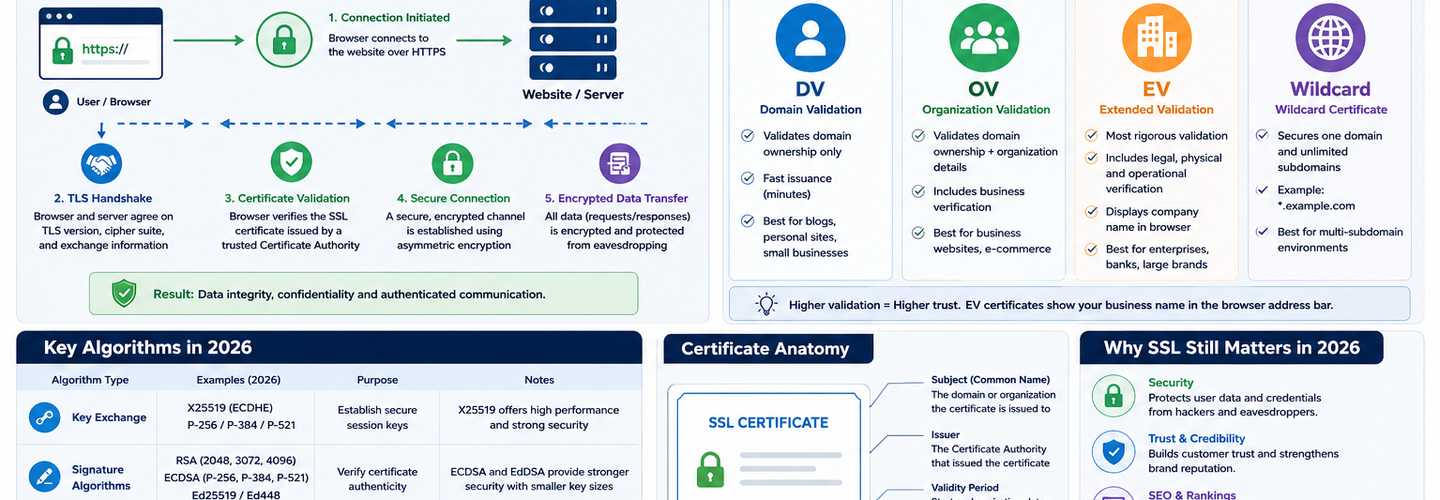
SSL Certificate Explained: How HTTPS Works, Validation Types, and Key Algorithms in 2026
Every time you visit an HTTPS website, an SSL certificate establishes an encrypted connection between your browser and the server. Yet most people have no idea how this works or what that padlock icon actually means. Security teams often manage hundreds of certificates without truly understanding the cryptographic mechanisms underneath. In this guide, you'll learn exactly what an SSL certificate is, how the TLS handshake establishes encryption, why different validation types exist, how RSA and ECDSA key algorithms compare, what certificate chains reveal, and how to audit your certificates for security misconfigurations.
## Key Takeaways
- ▸An SSL certificate is a digital document that binds a domain name to a public cryptographic key, issued and signed by a Certificate Authority — the signature is cryptographic proof that the CA verified the domain ownership.
- ▸The TLS handshake is the protocol that uses an SSL certificate to establish an encrypted connection — the certificate provides the public key; the handshake negotiates shared encryption keys without ever transmitting the private key.
- ▸Domain Validation (DV) certificates only verify domain ownership; Organization Validation (OV) certificates verify company identity; Extended Validation (EV) certificates verify legal entity and require manual verification — each level provides different trust signals.
- ▸RSA 2048-bit remains the most compatible key algorithm, but ECDSA P-256 is faster, uses smaller keys, and is the recommended choice for new deployments — ECDSA handshakes complete 40% faster than RSA.
- ▸A certificate chain consists of the end-entity certificate (your domain), intermediate certificates, and the root CA certificate — the browser trusts the entire chain only if every link is valid and trusted.
- ▸Cipher suites define the specific encryption algorithms used during the handshake — TLS 1.3 removed weak ciphers, leaving only four secure AEAD (Authenticated Encryption with Associated Data) suites.
- ▸Certificate transparency logs publicly record every issued certificate, enabling detection of fraudulently issued certs and providing visibility into an organization's complete subdomain inventory.
## What Is an SSL Certificate?
An SSL certificate is a digital file that binds a domain name to a public cryptographic key and is digitally signed by a trusted Certificate Authority, serving as cryptographic proof that the domain is owned by the entity listed on the certificate. The certificate tells browsers: "This domain (example.com) is controlled by Example Inc, and here is their public key to use for encrypted communication."
An SSL certificate contains:
Subject/Domain Name — the domain(s) the certificate is issued for (example.com, or *.example.com for wildcards)
Subject Alternative Names (SANs) — additional domain names covered by the same certificate (e.g., www.example.com, api.example.com)
Public Key — the cryptographic key used by clients to initiate encryption (typically RSA 2048-bit or ECDSA P-256)
Issuer — the Certificate Authority that signed and validated the certificate
Validity Period — the start and end dates during which the certificate is valid (typically 90 days for Let's Encrypt, 1 year for commercial CAs)
Digital Signature — the CA's cryptographic signature proving they verified the domain and issued the certificate
Certificate Chain — pointers to the intermediate and root CA certificates that form the trust chain
When a browser connects to an HTTPS website, the server presents its SSL certificate, and the browser verifies the signature using the CA's public key. If the signature is valid and the domain matches, the browser displays the padlock icon and initiates encrypted communication.
Why SSL Certificates Exist
SSL certificates solve the fundamental problem of public-key cryptography on the internet: how do you know the public key you receive actually belongs to the domain you're trying to communicate with? Without certificates, anyone could claim to own a domain and provide a public key. A Certificate Authority is a trusted third party that verifies domain ownership before issuing a certificate, creating a chain of trust.
## How the TLS Handshake Works
The TLS handshake is the protocol that uses an SSL certificate to establish an encrypted connection between a client and server. The handshake happens in milliseconds before any application data is sent.
TLS 1.2 Handshake (2-RTT)
TLS 1.2 requires two round trips between client and server:
Round Trip 1:
Client sends ClientHello with supported cipher suites and TLS version
Server responds with ServerHello, selects a cipher suite, and sends its SSL certificate
Server sends ServerKeyExchange (for ECDHE key exchange) and requests ClientKeyExchange
Round Trip 2:
Client verifies the certificate, generates the encryption keys, and sends ClientKeyExchange
Both client and server derive the shared session key
Client sends ChangeCipherSpec + Finished (encrypted)
Server responds with ChangeCipherSpec + Finished (encrypted)
All subsequent application data is encrypted
This process takes approximately 50-100ms depending on network latency. On a 50ms network, you lose 50ms per new connection just establishing TLS.
TLS 1.3 Handshake (1-RTT)
TLS 1.3 combines steps and reduces to one round trip:
Round Trip 1:
Client sends ClientHello with key share + cipher suite preferences
Server responds with ServerHello + certificate + key share + Finished (encrypted)
All handshake data after ServerHello is encrypted, protecting metadata
Result: Encrypted communication established after one round trip, saving 50ms per connection. For applications making hundreds of TLS connections, this adds up.
## SSL Certificate Validation Types
Validation types determine what identity verification the CA performed before issuing the certificate. Each type provides a different trust signal.
Domain Validation (DV)
DV certificates only verify that the applicant controls the domain — typically by responding to an email sent to the domain or by placing a file on the domain's web server. No verification of company identity is performed.
Characteristics: Issued in minutes, lowest cost, most common for websites, provides no organization identity information.
Browser display: Padlock icon, "Secure" label (same as all certificate types), no organization name shown.
Use case: Personal blogs, test environments, small websites where organization identity is not critical.
Organization Validation (OV)
OV certificates verify both domain ownership and the legal organization behind the domain. The CA confirms the business registration, verifies that the organization exists, and confirms that the applicant is authorized to request a certificate on behalf of the organization.
Characteristics: Issued in hours to days (manual verification required), moderate cost, provides organization identity, suitable for business websites.
Browser display: Padlock icon, organization name visible in certificate details (requires clicking the certificate to see, not displayed prominently in address bar).
Use case: Business websites, e-commerce, any site where customers need to verify the organization behind the domain.
Extended Validation (EV)
EV certificates require the most rigorous verification: the CA verifies legal entity status, business registration, physical address, phone number, and operational legitimacy through multiple independent checks — sometimes including phone calls to the business address.
Characteristics: Issued in days to weeks (extensive manual verification required), highest cost, provides strongest identity assurance, requires ongoing monitoring.
Browser display: Historically displayed a green bar with organization name in the address bar, but modern browsers no longer provide special visual treatment (this changed around 2021-2022). The certificate is still valid and trusted, but no longer specially highlighted.
Use case: Financial institutions, e-commerce with high-value transactions, any organization where customer trust and identity verification are critical.
## Key Algorithms: RSA vs ECDSA
The key algorithm determines how the public/private key pair is generated and how the certificate is signed. RSA has dominated for 30+ years; ECDSA is the modern replacement.
RSA (Rivest-Shamir-Adleman)
RSA is based on the mathematical difficulty of factoring the product of two large prime numbers. RSA 2048-bit is the most common key size.
Characteristics:
- ▸Key size: 2048-bit (minimum), 3072-bit or 4096-bit (for higher security margin)
- ▸Handshake speed: ~1,500 sign operations/second (modern CPU, single core)
- ▸Compatibility: Supported by all browsers and clients, including legacy systems
- ▸Security margin: NIST considers RSA 2048 safe through 2030
- ▸Private key remains with the server (never transmitted)
When to use RSA: When you need maximum compatibility with legacy systems, or when your infrastructure doesn't yet support ECDSA.
ECDSA (Elliptic Curve Digital Signature Algorithm)
ECDSA is based on the mathematical difficulty of the discrete logarithm problem on elliptic curves. ECDSA P-256 and P-384 are the most common curve sizes.
Characteristics:
- ▸Key size: P-256 (256-bit), P-384 (384-bit) — smaller than RSA equivalents, equivalent security
- ▸Handshake speed: ~30,000 sign operations/second (P-256) — 20x faster than RSA 2048
- ▸Compatibility: Supported by all modern browsers (>99% of traffic by 2026)
- ▸Certificate size: Smaller (saves bandwidth)
- ▸Security: P-256 provides equivalent security to RSA 3072-bit
When to use ECDSA: For all new deployments, especially performance-critical applications. Use ECDSA exclusively if your user base is modern; use dual certificates (RSA + ECDSA) if you need legacy support.
ECDSA vs RSA Performance
In real-world conditions on a server handling thousands of TLS connections per second:
ECDSA P-256 handshakes are 40% faster than RSA 2048 handshakes. On a 50ms network, ECDSA saves ~20ms per connection. For APIs making hundreds of short-lived connections, ECDSA's speed advantage is immediately noticeable in latency metrics.
## Certificate Chains and Trust
A certificate chain connects your domain's certificate to a trusted root CA through one or more intermediate certificates — the browser validates the entire chain before trusting the connection.
A typical chain consists of:
End-entity certificate — issued for your domain (example.com), signed by an intermediate CA
Intermediate certificate(s) — issued to the CA, signed by the root CA (typically 1-2 intermediate certs)
Root CA certificate — the self-signed certificate at the top of the chain, trusted by browsers and operating systems
The browser validates each link: Is the domain certificate signed by a trusted intermediate? Is the intermediate signed by a trusted root? If all links are valid, the entire chain is trusted.
A broken chain (missing intermediate, untrusted root, expired certificate at any level) causes browser warnings and breaks HTTPS connections. Use ReconShield's SSL/TLS checker to analyze your complete certificate chain and identify chain validation issues.
## Cipher Suites and Encryption Algorithms
A cipher suite is the specific combination of algorithms used during the TLS handshake and for encrypting application data — it includes key exchange algorithm, encryption algorithm, hash algorithm, and authentication algorithm.
TLS 1.2 included 100+ cipher suites, many of them weak or deprecated. TLS 1.3 removes all weak ciphers and mandates only four secure AEAD cipher suites:
- ▸TLS_AES_128_GCM_SHA256
- ▸TLS_AES_256_GCM_SHA384
- ▸TLS_CHACHA20_POLY1305_SHA256
- ▸TLS_AES_128_CCM_SHA256
This simplification eliminates a major source of TLS vulnerabilities. Servers no longer need to negotiate cipher suites or support legacy algorithms.
## Certificate Transparency and Public Logging
Certificate Transparency (CT) logs are public databases where every issued SSL certificate must be logged before browsers will trust it. This requirement provides visibility into every certificate issued for any domain.
For security teams, CT logs are invaluable: query Certificate Transparency logs for your domain and discover every subdomain that has received a certificate, even if the DNS record no longer exists or privacy protection is enabled. Learn the complete methodology in the Certificate Transparency guide.
For attackers, CT logs are equally transparent: a single query reveals an organization's complete subdomain inventory. Controlling this visibility — knowing what your organization looks like through CT logs — is a critical part of attack surface management.
## Best Practices for SSL Certificate Management
Audit your certificates regularly. Use ReconShield's SSL/TLS checker to verify every domain's certificate: validity period, algorithm strength, chain completeness, and cipher suite security.
Use ECDSA for new certificates. RSA is still secure but slower. ECDSA provides superior performance with equivalent security. If you need legacy support, use dual certificates (RSA + ECDSA).
Monitor certificate expiry. Expired certificates break HTTPS connections and cause entire websites to become inaccessible. Set up expiry alerts 30, 14, and 7 days before expiration. Automate renewal using ACME (Let's Encrypt, Certbot) to eliminate the renewal burden entirely.
Verify certificate chains. Test your SSL configuration with SSL Labs or our checker tool to ensure browsers can validate the entire chain without issues.
Rotate keys regularly. Request new certificates periodically (every 1-2 years even if you don't have to). This limits the window a compromised private key can be exploited.
Use TLS 1.3. Enable TLS 1.3 on your servers (keep TLS 1.2 enabled for legacy client compatibility). TLS 1.3 provides faster handshakes and removes weak ciphers.
## Conclusion
SSL certificates are the foundation of trust on the internet. Understanding how they work, what validation types mean, how different key algorithms compare, and what the certificate chain reveals is essential for any security professional managing internet-facing infrastructure. Certificates are no longer a one-time deployment decision — with shorter validity periods (90 days for Let's Encrypt) and increasing automation, continuous monitoring and automated renewal are now operational requirements.
Audit your certificate posture using ReconShield's SSL/TLS checker to verify algorithm strength, chain validity, and cipher suite security across all your domains. Combine with Certificate Transparency log queries to discover your complete external subdomain inventory. The combination provides comprehensive visibility into your organization's HTTPS infrastructure.
Written by Surendra Reddy Cybersecurity Researcher & Founder, ReconShield. Surendra is a cybersecurity engineer specializing in Open Source Intelligence (OSINT), exposure intelligence, and AI-driven threat analysis. He built ReconShield to democratize access to enterprise-grade infrastructure visibility tools and secure digital internet-facing assets.
Reviewed by ReconShield Editorial Team
June 2026 Cybersecurity Review: Top Cyber Attacks, Data Breaches & Critical Vulnerabilities
WHOIS vs RDAP: Understanding the Protocol Transition for Domain Intelligence in 2026
## Analyst Commentary & Implementation Blueprint
Security advisory
Continuous security exposure assessment is critical to identifying public vulnerabilities before they are exploited. Organizations should maintain a passive inventory of all web servers, TLS configs, and open ports, ensuring that default configurations are eliminated and security advisories are actively implemented.
Hardened Security Configuration Blueprint
# General Security Hardening Directive
ServerTokens ProductOnly
ServerSignature Off
FileETag None
Actionable Mitigation Checklist
- ✔Perform passive asset inventories weekly.
- ✔Restrict administrative ports using local firewall controls.
- ✔Monitor active CVE alerts for exposed software.
Common Inquiries & FAQs
Why is passive scanning preferred for continuous auditing?
Passive audits do not cause operational impact or trigger firewall blocks, making them ideal for constant surveillance of internet-facing assets.
What should I do if a vulnerability is flagged?
Apply the latest vendor patches, restrict access to the resource via firewalls, or verify configuration flags to mitigate risks.
Surendra Reddy
Surendra Reddy is a cybersecurity researcher and founder of ReconShield, specializing in OSINT and defensive infrastructure analysis.
Connect on LinkedIn ↗// AUDIT BRIEFING DISCUSSION (2 COMMENTS)
Great breakdown of the passive infrastructure vectors. We recently audited our external DNS zones and found multiple dangling staging environments. Implementing wildcard certificates reduced our CT log leaks significantly.
Is there any automated tooling you recommend for daily crt.sh scraping? Manually checking CT logs is becoming unsustainable for our domain portfolio.
// MORE ARTICLES
Chrome 149 Released With Critical Security Fixes for Windows, macOS, and Linux
Chrome 149 is out with critical security fixes for Windows, macOS, and Linux. Learn what's patched, the risks of waiting, and how to update Chrome now.
Billions of Passwords at Risk After Massive Infostealer Data Leak
Billions of passwords are at risk after a massive infostealer data leak. Learn how the breach happened, who's exposed, and how to secure your accounts now.
Update Firefox Now: Multiple Vulnerabilities Expose Users to RCE Attacks
Update Firefox now: multiple vulnerabilities expose users to RCE attacks. Learn which flaws matter, who's affected, and how to patch your browser safely today.