11 Free Cybersecurity Tools Every Security Researcher Should Be Using in 2026
The attack surface has never been larger. Cloud sprawl, unmonitored subdomains, misconfigured mail servers, expired SSL certificates — the list of exposure points that attackers actively target keeps growing, and the tools to audit them have historically sat behind expensive enterprise licenses or required local installation with steep learning curves.
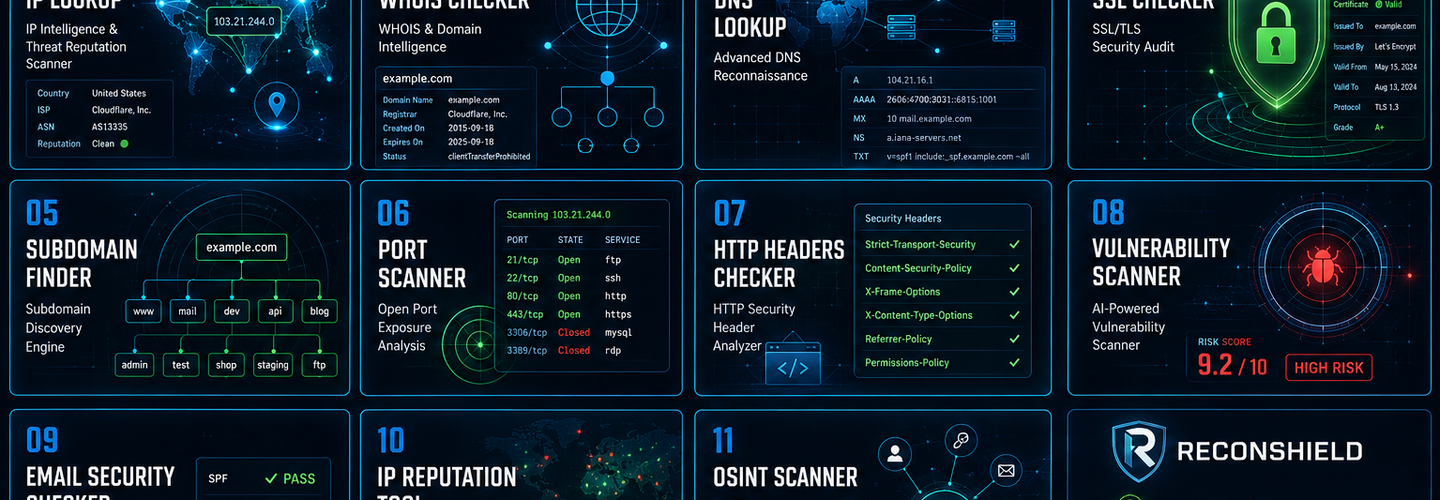
ReconShield changes that equation. Built specifically for security researchers, penetration testers, network administrators, and OSINT analysts, the platform offers 11 professional-grade security tools at zero cost, with no account registration required. Every tool runs passive reconnaissance techniques — pulling from authoritative public sources, certificate transparency logs, and real-time threat intelligence feeds — which means you get accurate, actionable results without generating noisy traffic against your target infrastructure.
This guide walks through all 11 tools, what they do, when to use them, and how they fit together into a coherent security assessment workflow.
1. IP Lookup — Geolocate, Identify, and Assess Threat Reputation Instantly
Every security investigation eventually comes back to an IP address. Whether you're tracing a suspicious login, investigating an inbound threat, or auditing the infrastructure your own domain resolves to, you need more than just a location — you need the full picture: ISP, Autonomous System Number (ASN), hosting provider, proxy or VPN status, and threat reputation score all in a single query.
The ReconShield IP Lookup tool delivers exactly that. Paste any IPv4 or IPv6 address and get geolocation data alongside ISP attribution, ASN details, and reputation intelligence sourced from live threat feeds. For threat hunters and SOC analysts, the proxy and VPN detection capability is particularly useful — it flags whether the IP is associated with known anonymization infrastructure, which is a reliable early indicator of evasive behavior.
Best used for: Threat attribution, suspicious login investigation, infrastructure reconnaissance, phishing source analysis.
2. WHOIS Checker — Uncover Domain Registration History and Ownership Data
Domain intelligence is foundational to almost every category of security research. Phishing campaigns rely on lookalike domains. Malware infrastructure rotates through freshly registered domains. Brand abuse and typosquatting depend on registration gaps. None of that analysis is possible without clean, reliable WHOIS data.
The ReconShield WHOIS Checker surfaces registrar identity, domain creation and expiration dates, name server configuration, and domain status codes — all from authoritative WHOIS registries. Expiry date monitoring alone is worth building into any domain monitoring workflow: a lapsed domain registration is an open invitation for adversarial re-registration, and the WHOIS Checker gives you the data you need to catch that risk before it materializes.
For threat attribution work, cross-referencing WHOIS records with the IP Lookup tool and DNS Lookup tool creates a richer picture of who controls a piece of infrastructure and how long they've controlled it.
Best used for: Domain monitoring, phishing investigation, threat attribution, brand protection, asset inventory audits.
3. DNS Lookup — The Definitive Record Check for Every Domain You Monitor
DNS is the backbone of internet infrastructure, and misconfigurations at the DNS layer have downstream consequences across email delivery, web application security, and domain reputation. A missing SPF record leaves a domain open to spoofing. An incorrect MX record can silently redirect mail. An unconfigured DMARC policy means phishing emails sent "from" your domain reach recipients' inboxes without a warning.
ReconShield's DNS Lookup tool queries the full record set: A, AAAA, MX, TXT, NS, and CNAME records, with built-in detection for DNSSEC, SPF, and DMARC configuration. That breadth matters. Most online DNS checkers query only A or MX records; this tool gives security teams the complete view needed to identify configuration gaps before they become security incidents.
For a complete email security assessment, run DNS Lookup alongside the Email Security Checker — the two tools complement each other, with DNS Lookup providing raw record data and the Email Security Checker interpreting that data against security best practices.
Best used for: DNS configuration auditing, email deliverability troubleshooting, SPF/DMARC validation, infrastructure mapping, incident response.
4. SSL Checker — Audit TLS Certificates Before Attackers Exploit the Gaps
An expired SSL certificate takes down HTTPS and destroys user trust in seconds. A weak cipher suite silently exposes encrypted traffic to interception. A TLS 1.0 or 1.1 configuration leaves a site vulnerable to known protocol downgrade attacks. These are not edge-case scenarios — they are among the most common security findings in web application assessments, and they are entirely preventable with routine certificate auditing.
The ReconShield SSL Checker performs deep TLS analysis: certificate validity and expiry dates, cipher suite enumeration, TLS version support (including detection of deprecated versions), and an overall security grade that gives you an immediate qualitative assessment. This goes significantly beyond the basic "padlock present/absent" check that most browser tools provide.
For web application security audits, pair the SSL Checker with the HTTP Headers Checker to cover both the transport layer and the application-level security headers in a single pass. HSTS misconfiguration, for example, can undermine even a properly configured TLS certificate.
Best used for: Certificate expiry monitoring, TLS configuration auditing, compliance verification, web application security assessments, pre-launch security checks.
5. Subdomain Finder — Map the Attack Surface You Didn't Know You Had
The subdomains an organization forgets are frequently the ones attackers find first. Development environments, staging servers, legacy API endpoints, and deprecated microsites — all of them can carry live credentials, exposed admin interfaces, or unpatched software that the security team stopped monitoring years ago. Subdomain enumeration is one of the first steps in any responsible attack surface assessment for exactly this reason.
ReconShield's Subdomain Finder uses passive OSINT techniques — pulling from certificate transparency logs, public DNS databases, and OSINT aggregators — rather than active brute-force enumeration. This means no noisy traffic against your target and no legal grey area: the tool discovers only what is already publicly visible. Results are exportable, making it straightforward to feed subdomain lists into downstream tools for further analysis.
For a comprehensive external attack surface assessment, combine the Subdomain Finder with the Port Scanner and SSL Checker to determine which discovered subdomains are actually live, what services they expose, and whether their certificates are properly configured.
Best used for: Attack surface discovery, external infrastructure auditing, bug bounty reconnaissance, forgotten asset identification, pre-penetration test enumeration.
6. Port Scanner — Identify Open Ports and High-Risk Service Exposures
An open port is an invitation. Every service listening on a publicly accessible port is a potential entry point, and many organizations have no accurate inventory of what is actually exposed on their external-facing infrastructure. Remote desktop services left open to the internet, database ports reachable from outside the network perimeter, outdated management interfaces — these are the kinds of findings that appear in breach post-mortems with disturbing regularity.
The ReconShield Port Scanner detects open ports, identifies the services running behind them, and applies a risk rating to flag high-risk exposures. The tool operates passively, using service fingerprinting and banner analysis rather than aggressive probing, which keeps it within the bounds of authorized reconnaissance without generating IDS alerts against your own infrastructure.
Cross-reference port scan results with the Vulnerability Scanner to understand not just what's open but what known vulnerabilities are associated with the services discovered. For subdomain assessments, feed the output of the Subdomain Finder into the Port Scanner to systematically audit every discovered asset.
Best used for: External network auditing, firewall rule validation, exposure identification, service inventory, attack surface reduction assessments.
7. HTTP Headers Checker — Find the Security Header Gaps That Enable XSS and Clickjacking
HTTP security headers are one of the most cost-effective mitigations available to web application security teams — and one of the most commonly misconfigured. A missing Content Security Policy (CSP) leaves a site open to cross-site scripting attacks. The absence of HTTP Strict Transport Security (HSTS) allows downgrade attacks that bypass HTTPS. Misconfigured X-Frame-Options enables clickjacking. None of these require an attacker to find a zero-day; they require only that your headers are absent or incorrectly set.
The ReconShield HTTP Headers Checker analyzes the full set of security-relevant response headers — CSP, HSTS, X-Frame-Options, X-XSS-Protection, Referrer-Policy, Permissions-Policy — and flags missing or misconfigured protections with clear remediation guidance. For development teams, this tool integrates naturally into a pre-deployment checklist. For security teams, it provides a rapid baseline assessment of any web property.
Pair this with the SSL Checker for transport layer coverage and the Tech Detector to understand what frameworks and CDN/WAF layers are in play, since header configurations often depend on web server and platform context.
Best used for: Web application security reviews, pre-deployment checklists, compliance audits, developer security training, bug bounty assessments.
8. Email Security Checker — Validate SPF, DKIM, and DMARC Before Phishers Do
Email remains the number one initial access vector in data breaches, and the most common reason phishing campaigns succeed is not sophisticated spoofing technology — it is the absence of basic email authentication records. Without a valid SPF record, anyone can send email that appears to come from your domain. Without DKIM, message integrity cannot be verified. Without a DMARC policy set to enforcement mode, even a properly configured SPF and DKIM setup may not protect recipients from spoofed messages.
ReconShield's Email Security Checker validates all three records in a single query and assesses mail server security against established best practices. The tool interprets configuration quality — not just presence — which means it distinguishes between a DMARC policy set to p=none (monitoring only, no protection) and one set to p=reject (full enforcement). That distinction is the difference between a record that exists on paper and one that actually prevents phishing.
For complete email infrastructure analysis, use this tool alongside the DNS Lookup tool for raw record verification and the Threat Intelligence tool to check whether the sending IP ranges associated with your mail infrastructure have accumulated any reputation issues.
Best used for: Email authentication auditing, anti-phishing posture assessment, mail server hardening, compliance verification, domain reputation management.
9. Threat Intelligence — Check IP and Domain Reputation Against 50+ Databases
Knowing that an IP address resolves to a particular ISP tells you where traffic is coming from. Knowing that it appears on 12 spam blacklists, two malware distribution feeds, and a botnet command-and-control blocklist tells you what it is. Reputation intelligence is what separates network monitoring from threat-informed network monitoring, and it's what allows security teams to prioritize response based on demonstrated malicious behavior rather than theoretical risk.
The ReconShield Threat Intelligence tool cross-references any IP address or domain against more than 50 threat intelligence feeds — including spam databases, malware distribution lists, phishing registries, and botnet blocklists — and returns a consolidated reputation assessment. For incident responders, this is a first-response tool: any IP address involved in a suspicious event should be queried here before more resource-intensive investigation begins.
The tool works in close combination with the IP Lookup tool for infrastructure context and the WHOIS Checker for domain ownership verification, creating a three-tool combination that covers geolocation, registration data, and threat reputation in a single investigative sweep.
Best used for: Incident response triage, threat hunting, IP reputation monitoring, email deliverability troubleshooting, supply chain security assessments.
10. Tech Detector — Fingerprint the Full Technology Stack of Any Website
Understanding what technology stack a web application runs on is valuable from multiple perspectives. For defenders auditing their own assets, it confirms whether a CDN or WAF is functioning correctly and identifies outdated framework versions that may need patching. For OSINT researchers and bug bounty hunters, technology fingerprinting reveals the attack surface — which CMS is running, which JavaScript framework version, which analytics and tracking tools are loaded, and whether a web application firewall is intercepting requests.
ReconShield's Tech Detector identifies CMS platforms (WordPress, Drupal, Joomla, and others), JavaScript frameworks (React, Vue, Angular), analytics services, CDN providers, and WAF solutions through passive fingerprinting — no active probing, no invasive scanning. The output is clean, exportable, and immediately actionable for security assessment or threat intelligence workflows.
When combined with the Subdomain Finder and Port Scanner, the Tech Detector completes a three-layer reconnaissance picture: what assets exist, what ports and services they expose, and what technology stack they run on.
Best used for: Attack surface analysis, CMS vulnerability research, WAF verification, OSINT reconnaissance, competitive technology analysis, bug bounty prep.
11. Vulnerability Scanner — Passive Assessment of Web Application and Infrastructure Risk
Most vulnerability scanners fall into two extremes: lightweight tools that produce surface-level findings with little actionable depth, or aggressive enterprise scanners that generate intrusive traffic, require agents, and carry five-figure license fees. ReconShield's Vulnerability Scanner occupies the middle ground that security teams actually need: a passive vulnerability assessment that identifies configuration weaknesses and known exposure patterns in web applications and infrastructure without generating active attack traffic against the target.
The scanner draws on publicly known vulnerability databases and passive analysis of observable infrastructure characteristics to identify exposure indicators, making it suitable for authorized assessments of both your own assets and third-party systems where you hold explicit authorization. For teams running structured security reviews, it serves naturally as the final step in a workflow that begins with the Subdomain Finder, moves through the Port Scanner and HTTP Headers Checker, and concludes with a vulnerability-level assessment.
Best used for: Web application security reviews, infrastructure risk assessment, pre-penetration test surface mapping, third-party security due diligence, compliance-driven audits.
How to Build a Complete Security Assessment Workflow with ReconShield Tools
Individual tools answer individual questions. A workflow answers the question that actually matters: how exposed is this asset, and where do I start fixing it?
Here are two practical assessment workflows you can run entirely with ReconShield's free tools.
External Attack Surface Audit (any domain you own or are authorized to test): Start with the WHOIS Checker to confirm registration status and expiry. Run the DNS Lookup for a complete record inventory. Feed the domain into the Subdomain Finder to enumerate every public asset. Run each discovered subdomain through the Port Scanner and SSL Checker. Finish with the HTTP Headers Checker and Vulnerability Scanner on live properties.
Threat Investigation Workflow (suspicious IP or domain): Start with IP Lookup for geolocation and ASN attribution. Run the Threat Intelligence tool for reputation database checks. Use the WHOIS Checker for domain registration context. Pull DNS Lookup records to map the infrastructure. Use Tech Detector to fingerprint the serving infrastructure. Cross-reference the Email Security Checker if the investigation involves email-based phishing.
Why ReconShield Tools Are Built for Professionals, Not Just Beginners
The free security tool space is crowded with simplified checkers designed for non-technical users. ReconShield takes a different approach. Every tool on the platform — from the IP Lookup to the Vulnerability Scanner — surfaces the depth of data that security professionals actually need: raw DNS records rather than simplified summaries, cipher suite enumeration rather than a binary pass/fail, stealer log context rather than a single reputation score.
All 11 tools are free, require no account registration, and are available at reconshield.in/tools. They use exclusively passive reconnaissance techniques — pulling from public registries, certificate transparency logs, and third-party threat intelligence databases — ensuring that every query is legal, non-invasive, and safe to run against any asset you are authorized to assess.
For security teams building out their toolkit, OSINT researchers mapping digital infrastructure, or developers who want to understand the security posture of the applications they ship, ReconShield's tool suite covers the full reconnaissance and assessment lifecycle without requiring a budget, an account, or a local install.
All tools are intended for authorized security research and educational purposes only. Users are responsible for ensuring they have explicit permission to assess any infrastructure they do not own. For full terms, see reconshield.in/terms.
Read More:
F5 BIG-IP Appliances Targeted by Hackers for SSH Intrusions Into Enterprise Linux Systems
Vellore Man Arrested in Cambodia Cyber Slavery Racket Linked to Online Scam Networks
Cyber Fraud in Bengaluru: Elderly Woman Loses Rs 7.69 Lakh After Clicking Fake WhatsApp Link
10,000+ Zero-Day Vulnerabilities Identified by Anthropic Claude Mythos in Glasswing Project
PyrsistenceSniper Detects 117 Malware Persistence Techniques Across Windows, Linux, and macOS
Greenwood Cyber + AI Lab Opens in Tulsa Through Microsoft and Black Tech Street Collaboration
## Analyst Commentary & Implementation Blueprint
Security advisory
Continuous security exposure assessment is critical to identifying public vulnerabilities before they are exploited. Organizations should maintain a passive inventory of all web servers, TLS configs, and open ports, ensuring that default configurations are eliminated and security advisories are actively implemented.
Hardened Security Configuration Blueprint
# General Security Hardening Directive
ServerTokens ProductOnly
ServerSignature Off
FileETag None
Actionable Mitigation Checklist
- ✔Perform passive asset inventories weekly.
- ✔Restrict administrative ports using local firewall controls.
- ✔Monitor active CVE alerts for exposed software.
Common Inquiries & FAQs
Why is passive scanning preferred for continuous auditing?
Passive audits do not cause operational impact or trigger firewall blocks, making them ideal for constant surveillance of internet-facing assets.
What should I do if a vulnerability is flagged?
Apply the latest vendor patches, restrict access to the resource via firewalls, or verify configuration flags to mitigate risks.
Surendra Reddy
Surendra Reddy is a cybersecurity researcher and founder of ReconShield, specializing in OSINT and defensive infrastructure analysis.
Connect on LinkedIn ↗// AUDIT BRIEFING DISCUSSION (2 COMMENTS)
Great breakdown of the passive infrastructure vectors. We recently audited our external DNS zones and found multiple dangling staging environments. Implementing wildcard certificates reduced our CT log leaks significantly.
Is there any automated tooling you recommend for daily crt.sh scraping? Manually checking CT logs is becoming unsustainable for our domain portfolio.
// MORE ARTICLES
Security Researchers Warn Critical n8n Flaws May Expose Automation Platforms to RCE
Researchers have disclosed critical vulnerabilities in n8n that could expose automation workflows and connected enterprise systems to remote code execution risks, prompting urgent patch recommendations for users and administrators.

How Agentic AI Is Changing Software Engineering and Expanding Mobile Attack Surfaces
Agentic AI is rapidly transforming software engineering workflows through automation and intelligent coding assistance, while cybersecurity experts warn of expanding mobile attack surfaces and emerging application security risks.
SplitVPN Hacked: Data Breach Exposes 865,000 User Records and 58 Million Hidden Connection Logs (July 2026)
SplitVPN hacked: 865,336 user records and 58 million connection logs exposed, directly contradicting the VPN's "no-logs" promise. What was leaked and what to do now.