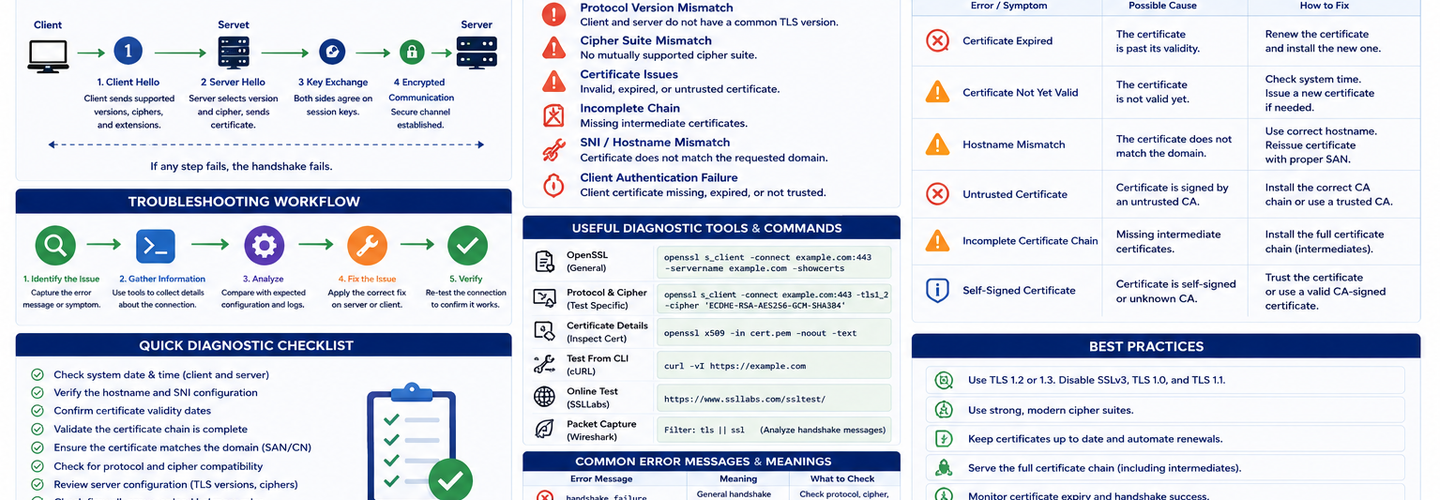
SSL/TLS Troubleshooting Guide: Diagnose and Fix Handshake Failures and Certificate Errors
"SSL Handshake Failed" is the most cryptic error message on the internet. Browsers show it when HTTPS connections break, but the error hides the real problem: your certificate expired? TLS version mismatch? Incomplete certificate chain? Cipher suite incompatibility? Proxy interception? Without proper diagnostic tools, troubleshooting becomes trial-and-error debugging. In this guide, you'll learn a systematic methodology for diagnosing SSL/TLS failures, master the OpenSSL command-line tools that reveal the exact problem, understand the eight most common failure scenarios, and implement fixes that actually work.
## Key Takeaways
- ▸90% of SSL/TLS handshake failures are caused by three things: expired certificates, incomplete certificate chains, or TLS version mismatches — fixing these three eliminates most incidents.
- ▸OpenSSL s_client is the diagnostic superpower for SSL troubleshooting — it connects to any HTTPS server and displays the exact certificate, chain, cipher suite, and protocol version being used.
- ▸The systematic debugging approach is: network reachability → certificate validity → chain completeness → TLS version support → cipher suite compatibility → proxy/firewall interference.
- ▸Client-side errors (outdated browser, wrong system time, VPN/proxy interference) cause 40% of handshake failures — checking server configuration alone won't fix these.
- ▸Cloudflare Error 525 (SSL Handshake Failed) specifically indicates the origin server doesn't have a valid certificate or doesn't support TLS 1.2+ — requires direct connection testing to the origin IP.
- ▸Server logs are your most valuable troubleshooting resource — Nginx error logs, Apache logs, and OpenSSL debug logs provide the exact error codes that client errors hide.
- ▸Automated certificate monitoring eliminates 95% of handshake failures by catching expirations before they cause outages — preventing problems is far easier than diagnosing them.
## The Eight Most Common SSL/TLS Failures
Understanding the eight most common failures accelerates diagnosis from hours to minutes.
1. Expired SSL Certificate
The #1 cause of SSL handshake failures. A certificate is valid only between its "Not Before" and "Not After" dates. After expiration, clients reject it.
Symptoms: "Certificate has expired" error, date mismatch warnings
Diagnosis:
bash
echo | openssl s_client -connect yourdomain.com:443 -servername yourdomain.com 2>/dev/null | openssl x509 -noout -dates
Look for "notAfter" date in the past.
Fix: Renew the certificate immediately. Enable automated renewal using ACME to prevent recurrence.
2. Domain Mismatch
The certificate is valid but issued for a different domain. You're connecting to www.example.com but the certificate is for example.com (or vice versa).
Symptoms: "Hostname mismatch" or "Certificate name mismatch"
Diagnosis:
bash
echo | openssl s_client -connect yourdomain.com:443 -servername yourdomain.com 2>/dev/null | openssl x509 -noout -text | grep -A1 "Subject:"
Check if the certificate's domain matches the hostname you're connecting to.
Fix: Install the certificate for the correct domain, or use a wildcard certificate (*.example.com) covering all subdomains.
3. Incomplete Certificate Chain
The server is not sending the required intermediate certificate(s). The client can't complete the trust chain from the server certificate to the trusted root.
Symptoms: "Unable to get local issuer certificate" or "incomplete certificate chain"
Diagnosis:
bash
echo | openssl s_client -connect yourdomain.com:443 -servername yourdomain.com 2>/dev/null | openssl x509 -noout -text | grep -A2 "Authority Information Access"
Verify the chain is complete:
bash
echo | openssl s_client -connect yourdomain.com:443 -servername yourdomain.com 2>/dev/null
Count the certificates in the output. Should show: server cert + intermediate(s) + root.
Fix: Configure your server to send the full certificate chain (provided by your CA as "fullchain" or "bundle" file).
Nginx:
nginx
ssl_certificate /path/to/fullchain.pem; # Contains: server cert + intermediates ssl_certificate_key /path/to/private.key;
Apache:
apache
SSLCertificateFile /path/to/cert.pem SSLCertificateChainFile /path/to/chain.pem
4. TLS Version Mismatch
Server supports TLS 1.3 only, but client only supports TLS 1.2. (Or vice versa.)
Symptoms: "Protocol version mismatch" or "unsupported protocol"
Diagnosis:
bash
# Check server's supported TLS versions echo | openssl s_client -connect yourdomain.com:443 -tls1_2 2>/dev/null | grep "Protocol" echo | openssl s_client -connect yourdomain.com:443 -tls1_3 2>/dev/null | grep "Protocol"
Fix: Enable multiple TLS versions on the server to support broader client compatibility.
Nginx:
nginx
ssl_protocols TLSv1.2 TLSv1.3;
Apache:
apache
SSLProtocol TLSv1.2 TLSv1.3
Old Java clients (Java 8-10) don't support TLS 1.3:
bash
java -Djdk.tls.client.protocols="TLSv1.2" -jar application.jar
5. Cipher Suite Mismatch
Server only supports ciphers the client doesn't support, or both support different ciphers with no overlap.
Symptoms: "No shared cipher suites" or "no ciphers available"
Diagnosis:
bash
echo | openssl s_client -connect yourdomain.com:443 -servername yourdomain.com 2>/dev/null | grep "Cipher"
Fix: Configure server cipher suites to include modern, commonly supported ciphers.
Nginx:
nginx
ssl_ciphers 'ECDHE-ECDSA-AES128-GCM-SHA256:ECDHE-RSA-AES128-GCM-SHA256:ECDHE-ECDSA-AES256-GCM-SHA384:ECDHE-RSA-AES256-GCM-SHA384'; ssl_prefer_server_ciphers on;
Or use Mozilla's recommended SSL configuration generator for your server type.
6. Incorrect System Time
The client's system clock is significantly wrong. A certificate valid from Jan 1 to Dec 31 2026 is rejected if the client's clock thinks it's January 2027.
Symptoms: "Certificate not yet valid" or "certificate has expired" (but certificate actually looks valid)
Diagnosis:
bash
date # Check if your system time is correct
Fix: Synchronize system time:
bash
timedatectl set-ntp true systemctl restart systemd-timesyncd # Or for older systems: ntpdate pool.ntp.org
Particularly common in VMs, containers, and after system suspend/resume.
7. Missing SNI (Server Name Indication)
The server hosts multiple HTTPS certificates (one per domain), and the client didn't specify which domain it's trying to connect to. The server doesn't know which certificate to send.
Symptoms: "Alert: unrecognized_name" or certificate mismatch when connecting to a shared hosting environment
Diagnosis:
bash
# Test WITH SNI (correct): echo | openssl s_client -connect yourdomain.com:443 -servername yourdomain.com # Test WITHOUT SNI (will fail): echo | openssl s_client -connect yourdomain.com:443
Fix: Always specify SNI when testing or connecting:
- ▸curl: curl -H "Host: yourdomain.com" https://yourdomain.com
- ▸OpenSSL: openssl s_client -servername yourdomain.com
- ▸Nginx: Should work by default if SNI is configured
- ▸Old clients (IE on Windows XP) don't support SNI; avoid if possible
8. Proxy or Firewall Interception
Corporate proxy, firewall, or antivirus software is intercepting TLS traffic and replacing the certificate with their own. The client sees the proxy's certificate, not the real one.
Symptoms: Intermittent failures, works on personal network but not corporate network, certificate issuer is "Corporate Proxy CA" instead of the real CA
Diagnosis:
bash
# Check if the issuer is your corporate proxy (not the real CA): echo | openssl s_client -connect yourdomain.com:443 2>/dev/null | grep "issuer" # If issuer is not the expected CA, traffic is being intercepted
Fix: This is a network-level issue, not an SSL issue. Solutions:
- ▸Use a VPN that avoids the proxy
- ▸Ask network admin to whitelist the domain
- ▸Use certificate pinning in clients (advanced)
- ▸Accept the proxy's CA in your client (security risk)
## Diagnostic Flowchart: Systematic SSL Troubleshooting
Follow this sequence to isolate the problem in 5 minutes instead of 5 hours.
Can you reach the server at all?bash
telnet yourdomain.com 443 # or nc -zv yourdomain.com 443
If this fails: network connectivity issue, not SSL. Check firewall, routing, DNS resolution.
Is the certificate valid and not expired?bash
echo | openssl s_client -connect yourdomain.com:443 -servername yourdomain.com 2>/dev/null | openssl x509 -noout -dates
If expired: renew immediately.
Does the domain match?bash
echo | openssl s_client -connect yourdomain.com:443 -servername yourdomain.com 2>/dev/null | openssl x509 -noout -text | grep -A2 "Subject:"
If mismatch: install certificate for correct domain.
Is the certificate chain complete?bash
echo | openssl s_client -connect yourdomain.com:443 -servername yourdomain.com 2>/dev/null
Count certificates in output. Should show 2-3 (server + intermediate + root). If incomplete: configure server to send full chain.
What TLS version does the server support?bash
echo | openssl s_client -connect yourdomain.com:443 -tls1_2 2>/dev/null | grep "Protocol" echo | openssl s_client -connect yourdomain.com:443 -tls1_3 2>/dev/null | grep "Protocol"
If only TLS 1.3: add TLS 1.2 for compatibility. If only TLS 1.2: enable TLS 1.3 for clients that support it.
What ciphers does the server support?bash
echo | openssl s_client -connect yourdomain.com:443 -servername yourdomain.com 2>/dev/null | grep "Cipher"
If weak or deprecated ciphers: update to modern AEAD ciphers.
Is the error happening through a proxy/firewall?bash
# Check issuer to detect proxy interception echo | openssl s_client -connect yourdomain.com:443 2>/dev/null | grep "issuer"
If issuer is not the expected CA: proxy interference. Test from different network.
Is the client system time correct?bash
date
If wrong: synchronize NTP.
## Server Log Errors: The Real Clues
Browser errors hide the true problem. Server logs are where truth lives.
Nginx Error Log (/var/log/nginx/error.log)
Common Nginx SSL errors:
[error] ... SSL_ERROR_RX_RECORD_OVERFLOW: ... cipher: 0x0000
→ Cipher mismatch or protocol incompatibility
[error] ... SSL_ERROR_BAD_CERT_DOMAIN: ...
→ Domain mismatch
[crit] ... SSL_CTX_use_certificate_chain_file() failed
→ Certificate file not found or corrupted
OpenSSL Debug Logs
Run OpenSSL with verbose output:
bash
echo | openssl s_client -connect yourdomain.com:443 -servername yourdomain.com -v 2>&1 | head -50
This shows every step: certificate exchange, protocol negotiation, cipher selection, handshake completion.
## Tools for Rapid Diagnosis
Use the right tool for the situation.
ReconShield's SSL/TLS Checker — instant analysis of certificate validity, chain completeness, TLS versions, and cipher suites. Shows exactly what's wrong without needing OpenSSL knowledge.
OpenSSL s_client — the universal diagnostic tool, works everywhere, requires command line.
Curl with verbose output:
bash
curl -v https://yourdomain.com
nmap for TLS enumeration:
bash
nmap --script ssl-enum-ciphers -p 443 yourdomain.com
testssl.sh — comprehensive automated TLS testing suite.
## Prevention: Build Resilience, Not Just Recovery
The best troubleshooting is the troubleshooting you never have to do.
Automate certificate renewal using ACME (Let's Encrypt, Certbot). Prevents expiration failures.
Monitor certificate health continuously using tools like Dotcom-Monitor, Oh Dear, or ReconShield. Catch problems before they affect users.
Test your SSL configuration regularly — monthly SSL Checker scans ensure cipher suites, TLS versions, and chains remain healthy.
Monitor server logs for SSL warnings before they become outages. Parse error logs looking for "SSL_ERROR" patterns.
Configure alerts at 30, 14, and 7 days before certificate expiry. Never be surprised by expiration again.
## Conclusion
SSL/TLS troubleshooting follows a predictable diagnostic path: network connectivity → certificate validity → domain match → chain completeness → TLS version → cipher suites → proxy/firewall. Master this sequence, know the OpenSSL commands, and you'll diagnose problems in minutes instead of hours.
For rapid diagnosis, use ReconShield's SSL/TLS Checker to instantly identify certificate issues, chain problems, and configuration weaknesses. Combine with SSL certificate explained, TLS 1.3 guide, and SSL expiry monitoring guides to understand the underlying mechanics and implement long-term solutions that eliminate recurring SSL incidents.
Written by Surendra Reddy Cybersecurity Researcher & Founder, ReconShield. Surendra is a cybersecurity engineer specializing in Open Source Intelligence (OSINT), exposure intelligence, and AI-driven threat analysis. He built ReconShield to democratize access to enterprise-grade infrastructure visibility tools and secure digital internet-facing assets.
Reviewed by ReconShield Editorial Team
## Analyst Commentary & Implementation Blueprint
Security advisory
Continuous security exposure assessment is critical to identifying public vulnerabilities before they are exploited. Organizations should maintain a passive inventory of all web servers, TLS configs, and open ports, ensuring that default configurations are eliminated and security advisories are actively implemented.
Hardened Security Configuration Blueprint
# General Security Hardening Directive
ServerTokens ProductOnly
ServerSignature Off
FileETag None
Actionable Mitigation Checklist
- ✔Perform passive asset inventories weekly.
- ✔Restrict administrative ports using local firewall controls.
- ✔Monitor active CVE alerts for exposed software.
Common Inquiries & FAQs
Why is passive scanning preferred for continuous auditing?
Passive audits do not cause operational impact or trigger firewall blocks, making them ideal for constant surveillance of internet-facing assets.
What should I do if a vulnerability is flagged?
Apply the latest vendor patches, restrict access to the resource via firewalls, or verify configuration flags to mitigate risks.
Surendra Reddy
Surendra Reddy is a cybersecurity researcher and founder of ReconShield, specializing in OSINT and defensive infrastructure analysis.
Connect on LinkedIn ↗// AUDIT BRIEFING DISCUSSION (2 COMMENTS)
Great breakdown of the passive infrastructure vectors. We recently audited our external DNS zones and found multiple dangling staging environments. Implementing wildcard certificates reduced our CT log leaks significantly.
Is there any automated tooling you recommend for daily crt.sh scraping? Manually checking CT logs is becoming unsustainable for our domain portfolio.
// MORE ARTICLES
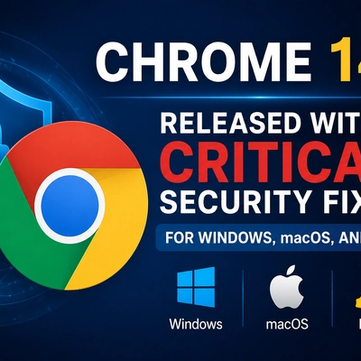
Chrome 149 Released With Critical Security Fixes for Windows, macOS, and Linux
Chrome 149 is out with critical security fixes for Windows, macOS, and Linux. Learn what's patched, the risks of waiting, and how to update Chrome now.
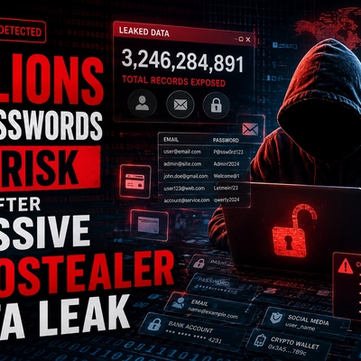
Billions of Passwords at Risk After Massive Infostealer Data Leak
Billions of passwords are at risk after a massive infostealer data leak. Learn how the breach happened, who's exposed, and how to secure your accounts now.
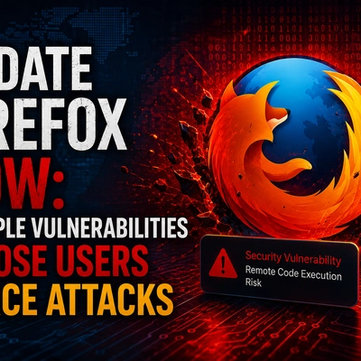
Update Firefox Now: Multiple Vulnerabilities Expose Users to RCE Attacks
Update Firefox now: multiple vulnerabilities expose users to RCE attacks. Learn which flaws matter, who's affected, and how to patch your browser safely today.