SPF Record Complete Guide: How Sender Policy Framework Works, How to Configure It, and How to Fix Every Common Mistake
Summarize this blog post with: ChatGPT | Perplexity | Claude | Grok
You've probably added an SPF record to a domain at some point — either following your email provider's setup guide or copying a record from documentation — but if you've never audited that record for lookup limit violations, soft-fail misconfigurations, or missing third-party sender inclusions, there is a meaningful chance your SPF record is either broken or providing less protection than you think. SPF is one of three foundational email authentication protocols and the most commonly misconfigured of the three. In this guide, you'll learn exactly how SPF works at the protocol level, how to write a correct and complete SPF record for any sending environment, and how to diagnose and fix every common SPF misconfiguration.
## Key Takeaways
- ▸SPF (Sender Policy Framework) is a DNS-published email authentication protocol that specifies which IP addresses and mail servers are authorized to send email from your domain — enabling receiving mail servers to reject or flag messages from unauthorized senders.
- ▸An SPF record is a TXT record published at the root of your domain that begins with v=spf1 and ends with an all qualifier that determines how unauthorized senders are treated.
- ▸The -all hard fail qualifier instructs receiving servers to reject email from unauthorized senders — the only terminator that provides genuine spoofing protection. The ~all soft fail only marks messages as suspicious and is frequently treated as passing by receiving servers.
- ▸The 10 DNS lookup limit is the most commonly violated SPF specification: an SPF record that requires more than 10 DNS lookups to fully resolve causes a PermError that causes SPF evaluation to fail entirely — potentially allowing unauthorized senders through.
- ▸SPF alone does not prevent display-name spoofing or header-From spoofing — it validates the envelope sender (MAIL FROM) address, not the From header displayed to recipients. DKIM and DMARC are required to close this gap.
- ▸SPF flattening is the technique of resolving all include: mechanisms to their underlying IP addresses at publication time — eliminating DNS lookups during evaluation and solving the 10-lookup limit problem.
- ▸Every domain that sends email — including subdomains and non-sending domains — needs an SPF record. Non-sending domains require a null SPF record (v=spf1 -all) to prevent their use in spoofing campaigns.
## What Is SPF and How Does It Work?
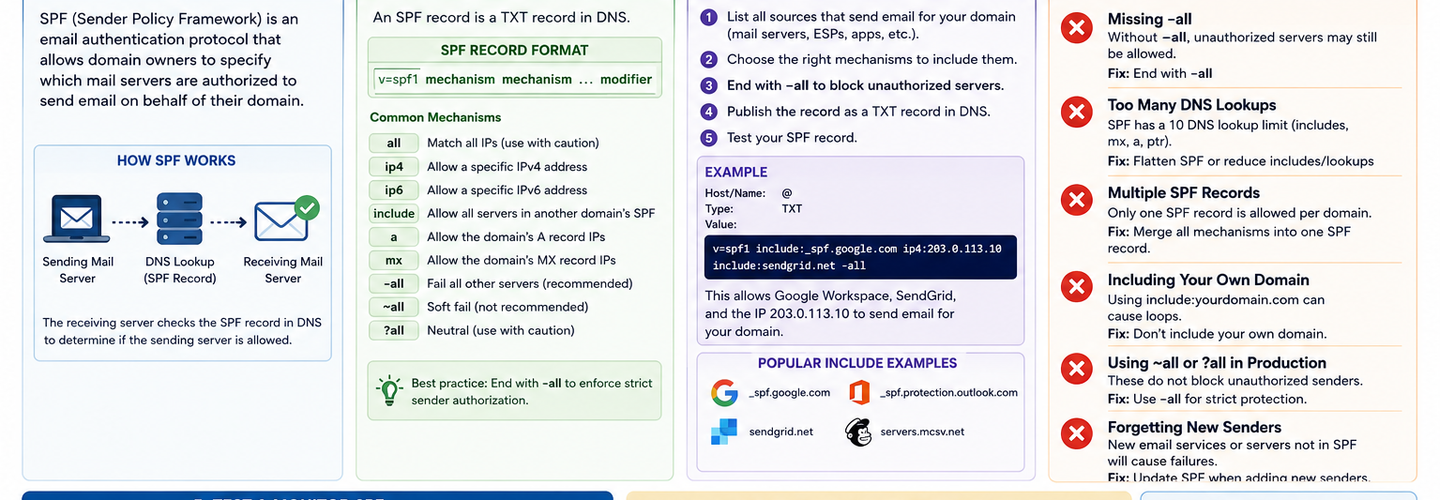
SPF (Sender Policy Framework) is an email authentication protocol that allows domain owners to publish a DNS record listing every IP address and mail server authorized to send email on behalf of their domain — enabling receiving mail servers to verify that an incoming email claiming to be from your domain actually originated from infrastructure you have explicitly authorized.
SPF was standardized in RFC 7208 (2014) and operates at the SMTP envelope layer. When a sending mail server connects to a receiving mail server and presents the MAIL FROM command (the envelope sender address, also called the Return-Path), the receiving server extracts the domain from that address and queries DNS for that domain's SPF TXT record. It then checks whether the connecting IP address matches any of the mechanisms listed in the SPF record. If it matches and the record permits that sender, the SPF check passes. If it does not match and the record ends with -all, the check fails and the message is rejected.
Business email compromise (BEC) attacks — many of which rely on domain spoofing that SPF prevents — cost organizations $2.9 billion in 2023 — Source: FBI Internet Crime Report, 2023. SPF is the first line of defense against these attacks, and its absence or misconfiguration directly enables the email spoofing that BEC campaigns depend on. Verify your current SPF record is correctly published and syntactically valid using the ReconShield DNS Security Analysis tool, which validates SPF mechanism syntax, counts DNS lookups, and flags the +all and missing-record misconfigurations that undermine protection. For the complete integrated email authentication deployment that pairs SPF with DKIM and DMARC, the ReconShield SPF-DKIM-DMARC Blueprint is the definitive reference.
## What Is the Structure of an SPF TXT Record?
An SPF record is a DNS TXT record published at the root of your domain (e.g., example.com) that follows a specific syntax structure: a version tag, zero or more mechanisms, zero or more modifiers, and a mandatory all qualifier. Every element of this structure has precise semantics that determine how receiving servers evaluate the record.
A complete SPF record looks like this: v=spf1 ip4:203.0.113.0/24 include:_spf.google.com include:sendgrid.net -all
v=spf1 — The version tag. Always the first element. Tells the evaluating server that this is an SPF record version 1. No other version exists; this field is mandatory and immutable.
ip4: and ip6: mechanisms — Explicit IP address authorizations. ip4:203.0.113.1 authorizes a single IPv4 address. ip4:203.0.113.0/24 authorizes an entire IPv4 CIDR range. ip6:2001:db8::/32 authorizes an IPv6 prefix. These mechanisms require zero DNS lookups during evaluation and are the most efficient way to authorize known static IP addresses.
include: mechanisms — References to another domain's SPF record. include:_spf.google.com instructs the evaluating server to fetch and evaluate Google's SPF record as part of yours. Each include: costs one DNS lookup toward the 10-lookup limit. Major email providers publish their sending IP ranges through include: mechanisms — Google Workspace uses include:_spf.google.com, Microsoft 365 uses include:spf.protection.outlook.com, SendGrid uses include:sendgrid.net.
a: and mx: mechanisms — Authorize the IP addresses associated with your domain's A record or MX records respectively. Both require DNS lookups and are generally unnecessary if you are explicitly listing IP ranges or using include: mechanisms.
The all qualifier — The final mechanism. Prefixed with one of four qualifiers: +all (pass — authorizes all senders, effectively disabling SPF), ~all (soft fail — marks unmatched senders as suspicious but typically delivers them), -all (hard fail — rejects unmatched senders), or ?all (neutral — no action). Only -all provides genuine protection against spoofing from unauthorized senders.
## What Is the SPF 10 DNS Lookup Limit and How Do You Fix It?
The SPF 10 DNS lookup limit is an RFC 7208-mandated constraint that allows a maximum of 10 DNS lookups to occur during the evaluation of a single SPF record — and exceeding this limit causes the SPF evaluation to return a PermError result, which many receiving servers treat as equivalent to a failed SPF check, potentially delivering email that should be rejected or flagging legitimate email.
The lookup limit exists to prevent SPF evaluation from creating a denial-of-service vector where a single incoming email triggers hundreds of recursive DNS queries on receiving servers. Every include:, a:, mx:, ptr:, and exists: mechanism in an SPF record — and in every recursively referenced SPF record — consumes one lookup toward this limit. ip4: and ip6: mechanisms consume no lookups and do not count against the limit.
The problem becomes acute for organizations using multiple email service providers. A typical enterprise using Google Workspace for corporate email, Mailchimp for marketing, Salesforce for CRM notifications, Zendesk for support, and SendGrid for transactional email might have an SPF record requiring 12–15 DNS lookups by the time all nested include: records are fully resolved — exceeding the limit and causing sporadic SPF failures for legitimate email.
How SPF Flattening Solves the Lookup Problem
SPF flattening is the technique of pre-resolving all include: mechanisms in an SPF record to their underlying IP addresses at publication time — replacing recursive DNS-resolved include: statements with static ip4: and ip6: ranges that consume zero lookups during evaluation. The result is an SPF record that never exceeds the 10-lookup limit regardless of how many email providers you use.
A flattened SPF record for a domain using five email providers might replace five include: statements (each potentially nesting further includes) with a single list of IP ranges: v=spf1 ip4:74.125.0.0/16 ip4:209.85.128.0/17 ip4:108.177.8.0/21 ip4:149.72.0.0/16 ip4:167.89.0.0/16 -all. Each IP block is an explicit authorization requiring no DNS resolution during evaluation.
The limitation of manual SPF flattening is maintenance: when email providers update their sending IP ranges (which they do regularly without notice), your flattened record becomes stale and may reject legitimate email. Automated SPF flattening services monitor provider IP ranges and automatically update your SPF record when they change — making automated flattening the production-grade solution for organizations with complex multi-provider sending environments. Verify your current lookup count using the ReconShield DNS Security Analysis tool, which counts the total DNS lookups required by your SPF record and flags any violation of the 10-lookup limit.
## What Are the Most Common SPF Misconfigurations?
The five most common SPF misconfigurations — ordered by frequency and security impact — are using ~all instead of -all, exceeding the 10 DNS lookup limit, missing include: statements for third-party senders, having no SPF record on non-sending domains, and publishing multiple SPF TXT records.
Using ~all (Soft Fail) Instead of -all (Hard Fail)
~all (soft fail) is the most common SPF misconfiguration because it is the default recommended in many email provider setup guides — providers prefer it because it reduces the risk of accidentally blocking legitimate email during initial SPF setup. The problem is that ~all provides minimal protection in practice: most major receiving mail servers treat soft-fail SPF results the same as a pass when no DMARC policy is enforcing rejection.
Over 43% of domains with SPF records use ~all instead of -all — Source: Valimail Email Fraud Landscape, 2024 — meaning the majority of SPF deployments worldwide are not actually rejecting unauthorized senders. The correct approach is to deploy SPF with ~all initially, use DMARC monitoring at p=none to map all legitimate sending sources, verify no legitimate senders are being unintentionally excluded, then advance SPF to -all and DMARC to p=quarantine or p=reject enforcement simultaneously.
Missing Third-Party Sender include: Statements
Every cloud service that sends email on behalf of your domain must have an include: reference in your SPF record, or email from that service will fail SPF checks and risk delivery failure when DMARC enforcement is active. Common missing inclusions involve services added after initial SPF setup: new marketing automation platforms, customer support ticketing systems, HR platforms sending automated notifications, and e-commerce platforms sending order confirmations.
Audit your complete sending environment by reviewing email headers from every automated message sent from your organization — each will contain the originating IP address and sending server identity that must be represented in your SPF record. Map each sending source to its required SPF mechanism and add any missing include: statements. For the complete process of identifying all legitimate senders and building an accurate SPF record, the ReconShield SPF-DKIM-DMARC Blueprint provides the full sender inventory methodology.
No SPF Record on Non-Sending Domains
Every domain your organization owns — including parked domains, legacy domains, acquired company domains, and regional domains that do not send email — needs a null SPF record to prevent their use in spoofing campaigns. A domain with no SPF record can be freely spoofed in email campaigns because receiving servers have no published policy to evaluate against.
A null SPF record for a non-sending domain is simply: v=spf1 -all. This record tells receiving servers that no IP addresses are authorized to send email from this domain — and any email claiming to be from it should be rejected. Publish null SPF records on every non-sending domain in your portfolio. Use the ReconShield DNS Security Analysis tool to audit each domain for SPF record presence and correctness.
Publishing Multiple SPF TXT Records
A domain must have exactly one SPF record — publishing multiple TXT records beginning with v=spf1 at the same hostname causes a PermError result for receiving servers that are unable to determine which record is authoritative. This misconfiguration is surprisingly common in environments where SPF records have been added by different teams at different times without coordination.
If you discover multiple SPF TXT records on the same hostname, consolidate them into a single record by merging all mechanisms. For example, if one record contains include:_spf.google.com and another contains include:sendgrid.net, the correct consolidated record is v=spf1 include:_spf.google.com include:sendgrid.net -all.
## How Do You Write an SPF Record for Different Email Environments?
Writing a correct SPF record requires first inventorying every service authorized to send email from your domain, then mapping each service to its correct SPF mechanism type. The resulting record should authorize all legitimate senders with the most efficient mechanism type available while staying within the 10-lookup limit and terminating with -all.
For Google Workspace users: v=spf1 include:_spf.google.com -all This single include covers all Google Workspace sending infrastructure. If you also send from additional services, add their mechanisms before -all.
For Microsoft 365 users: v=spf1 include:spf.protection.outlook.com -all Microsoft 365's SPF include covers all Exchange Online sending infrastructure globally.
For organizations using multiple providers: v=spf1 include:_spf.google.com include:sendgrid.net include:spf.protection.outlook.com ip4:203.0.113.5 -all List all authorized providers and any additional static IPs. Count lookups carefully — three include: statements here, plus nested lookups inside each, may approach the 10-lookup limit. Validate the lookup count using the ReconShield DNS Security Analysis tool.
For non-sending domains: v=spf1 -all Publish this on every domain that does not send email — parked domains, legacy domains, defensive registrations.
## How Does SPF Interact With DMARC and DKIM?
SPF is most effective when deployed as part of a complete email authentication stack alongside DKIM and DMARC — because SPF alone cannot prevent the display-name spoofing and header-From manipulation that most phishing emails use to deceive recipients.
SPF validates the envelope sender — the MAIL FROM address used in SMTP negotiation, which is typically invisible to email recipients in their mail client. Attackers exploiting this limitation send email with a spoofed From header (the address recipients see) while using a legitimate MAIL FROM address that passes SPF validation. This technique, called header-From spoofing, bypasses SPF entirely while still presenting a convincing spoofed identity to the recipient.
DMARC closes this gap by requiring that the domain in the SPF-validated MAIL FROM address aligns with the domain in the From header that recipients see — a check called SPF alignment. Without DMARC, a passing SPF check on a mismatched domain provides no protection against header-From spoofing. With DMARC at p=reject enforcement, an email must pass either SPF alignment or DKIM alignment to be delivered — eliminating the header-From spoofing vector entirely.
DKIM provides the second alignment path — cryptographically signing outbound email so that receiving servers can verify the signature against a public key published in DNS, regardless of the SPF result. For the complete DKIM deployment and configuration guide, the ReconShield DKIM configuration guide covers every aspect of key generation, DNS record publication, selector management, and key rotation. The complete three-protocol deployment — SPF, DKIM, and DMARC together — is covered in the ReconShield SPF-DKIM-DMARC Blueprint.
## How to Audit Your SPF Record: Step-by-Step
A complete SPF record audit validates six properties: record presence, syntax correctness, lookup count compliance, all-qualifier strength, third-party sender completeness, and non-sending domain coverage.
Step 1 — Verify SPF record presence. Query your domain's TXT records using the ReconShield DNS Security Analysis tool. Confirm exactly one TXT record beginning with v=spf1 exists. If zero records exist, email spoofing from your domain is unrestricted. If multiple records exist, SPF evaluation returns PermError.
Step 2 — Validate record syntax. Check that the record begins with v=spf1, contains only valid mechanisms (ip4:, ip6:, include:, a:, mx:), and ends with one of the four valid all qualifiers. Invalid mechanism syntax causes evaluation failure.
Step 3 — Count DNS lookups. Manually trace every include:, a:, and mx: mechanism in your record and every nested mechanism in referenced records. The total must not exceed 10. If it does, implement SPF flattening or reduce the number of include: statements.
Step 4 — Check the all qualifier. If your record ends with ~all, evaluate whether advancement to -all is appropriate. If DMARC is already at p=reject enforcement, the ~all vs -all distinction is less critical — DMARC enforcement overrides. If DMARC is at p=none, advancing to -all provides meaningful additional protection.
Step 5 — Audit for missing senders. Send test emails from every service authorized to send on your domain's behalf and check the SPF result in the received email headers. Any softfail or fail result from a legitimate sender indicates a missing include: mechanism.
Step 6 — Audit non-sending domains. Query TXT records for every domain in your portfolio that does not send email. Any domain without v=spf1 -all is a spoofing target. Complement this audit with the passive scanner suite for a complete external email security posture assessment.
## What's Next: SPF in a BIMI and AI-Filtering World
SPF is evolving from a standalone email authentication check into a prerequisite component of advanced email trust indicators — including BIMI (Brand Indicators for Message Identification), which displays verified brand logos in supporting email clients for organizations that have achieved full DMARC enforcement, and AI-powered spam filters that weight SPF, DKIM, and DMARC alignment signals as primary trust inputs.
BIMI requires DMARC at p=quarantine or p=reject enforcement with SPF and DKIM alignment — meaning SPF is a prerequisite for the visual brand trust indicator that increasingly differentiates legitimate corporate email in crowded inboxes. Organizations that have not achieved SPF -all and DMARC enforcement cannot deploy BIMI regardless of other email security investments.
AI-powered email filtering systems in 2026 weight email authentication signals — SPF alignment, DKIM signature validity, DMARC compliance — as primary classification inputs, ahead of content-based signals that are increasingly gamed by AI-generated phishing content. A correctly authenticated email is significantly more likely to reach the inbox; an unauthenticated email is increasingly likely to be filtered regardless of content quality.
## Conclusion
SPF is not a set-and-forget configuration. Email sending environments change — new marketing platforms are added, CRM services are upgraded, transactional email providers are switched — and each change requires an SPF record update to maintain authentication coverage. A misconfigured SPF record can simultaneously fail to protect your domain from spoofing and cause legitimate email from your own services to be rejected.
Audit your SPF record now using the ReconShield DNS Security Analysis tool. Verify the lookup count, check the all qualifier, and confirm every legitimate sender is represented. Publish null SPF records on all non-sending domains. Then advance to DKIM and DMARC deployment using the ReconShield SPF-DKIM-DMARC Blueprint for the complete email authentication stack.
Email spoofing is preventable. The protocol exists, the tools are free, and the DNS changes take minutes. Every day a domain operates without correctly enforced SPF is a day it can be freely impersonated.
Written by Surendra Reddy Cybersecurity Researcher & Founder, ReconShield. Surendra specializes in OSINT, exposure intelligence, and AI-driven threat analysis. Author Profile →
Reviewed by ReconShield Editorial Team — Peer-reviewed for technical accuracy against RFC 7208, ICANN policy, and current email authentication standards.
## Analyst Commentary & Implementation Blueprint
Security advisory
Continuous security exposure assessment is critical to identifying public vulnerabilities before they are exploited. Organizations should maintain a passive inventory of all web servers, TLS configs, and open ports, ensuring that default configurations are eliminated and security advisories are actively implemented.
Hardened Security Configuration Blueprint
# General Security Hardening Directive
ServerTokens ProductOnly
ServerSignature Off
FileETag None
Actionable Mitigation Checklist
- ✔Perform passive asset inventories weekly.
- ✔Restrict administrative ports using local firewall controls.
- ✔Monitor active CVE alerts for exposed software.
Common Inquiries & FAQs
Why is passive scanning preferred for continuous auditing?
Passive audits do not cause operational impact or trigger firewall blocks, making them ideal for constant surveillance of internet-facing assets.
What should I do if a vulnerability is flagged?
Apply the latest vendor patches, restrict access to the resource via firewalls, or verify configuration flags to mitigate risks.
Surendra Reddy
Surendra Reddy is a cybersecurity researcher and founder of ReconShield, specializing in OSINT and defensive infrastructure analysis.
Connect on LinkedIn ↗// AUDIT BRIEFING DISCUSSION (2 COMMENTS)
Great breakdown of the passive infrastructure vectors. We recently audited our external DNS zones and found multiple dangling staging environments. Implementing wildcard certificates reduced our CT log leaks significantly.
Is there any automated tooling you recommend for daily crt.sh scraping? Manually checking CT logs is becoming unsustainable for our domain portfolio.
// MORE ARTICLES
Security Researchers Warn Critical n8n Flaws May Expose Automation Platforms to RCE
Researchers have disclosed critical vulnerabilities in n8n that could expose automation workflows and connected enterprise systems to remote code execution risks, prompting urgent patch recommendations for users and administrators.

How Agentic AI Is Changing Software Engineering and Expanding Mobile Attack Surfaces
Agentic AI is rapidly transforming software engineering workflows through automation and intelligent coding assistance, while cybersecurity experts warn of expanding mobile attack surfaces and emerging application security risks.

SplitVPN Hacked: Data Breach Exposes 865,000 User Records and 58 Million Hidden Connection Logs (July 2026)
SplitVPN hacked: 865,336 user records and 58 million connection logs exposed, directly contradicting the VPN's "no-logs" promise. What was leaked and what to do now.