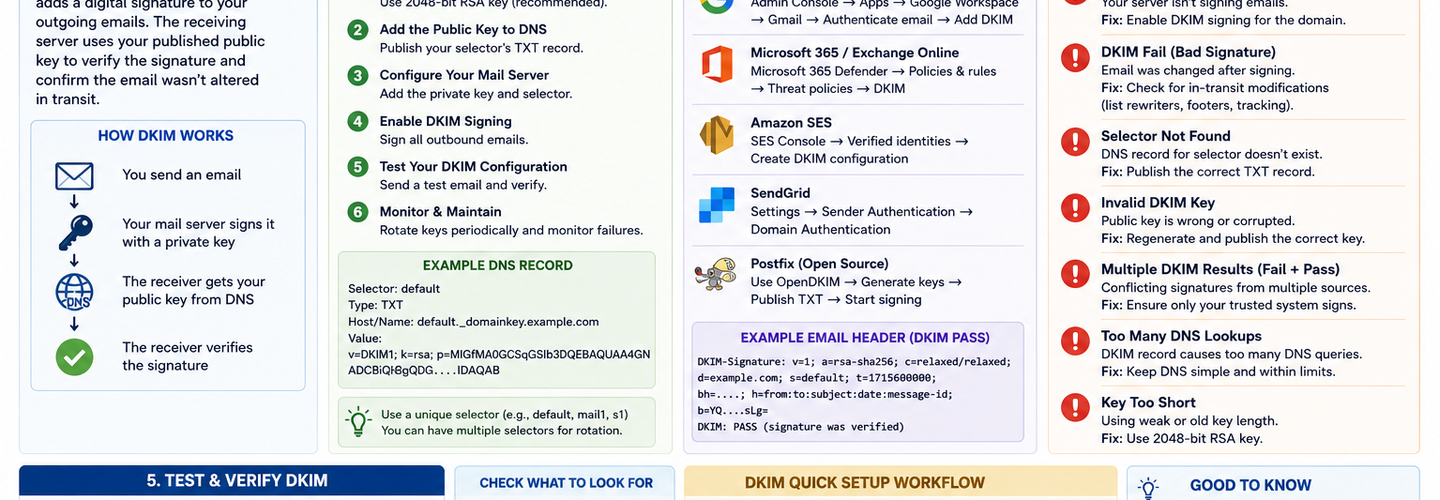
DKIM Configuration Guide: How DomainKeys Identified Mail Works, How to Set It Up, and How to Fix Every Common Failure
Summarize this blog post with: ChatGPT | Perplexity | Claude | Grok
You've probably followed a setup guide and published a DKIM TXT record at some point — but if you've never verified the full cryptographic chain, tested signature validity on actual outbound messages, understood how selector management works, or planned a key rotation procedure, your DKIM deployment may be incomplete, incorrectly signed, or drifting toward a security gap without any visible warning signs. DKIM is the most technically complex of the three email authentication protocols and the one most often partially deployed. In this guide, you'll learn exactly how DKIM works at the cryptographic level, how to generate keys and publish DNS records correctly, how to manage multiple selectors for multiple sending services, and how to diagnose every common DKIM failure.
## Key Takeaways
- ▸DKIM (DomainKeys Identified Mail) is an email authentication protocol that cryptographically signs outbound email using a private key held by the sending mail server, allowing receiving servers to verify the signature using the corresponding public key published in DNS.
- ▸A DKIM signature proves two things simultaneously: that the message was authorized by the domain whose key signed it, and that the signed portions of the message were not modified in transit between sender and recipient.
- ▸DKIM uses asymmetric cryptography — the sending server holds the private key (never published anywhere), while the public key is published as a TXT record in DNS at a specific subdomain format: selector._domainkey.yourdomain.com.
- ▸Selectors allow a domain to publish multiple DKIM key pairs simultaneously — one for each mail-sending service — enabling independent key rotation for each service without disrupting email from others.
- ▸RSA-2048 is the current minimum recommended key length — RSA-1024 keys are deprecated and rejected by some receiving servers; RSA-4096 keys are forward-looking but cause processing overhead that some mail systems struggle with.
- ▸DKIM signatures survive mail server relaying but are broken by certain content modifications — most commonly, mailing list software that adds footers, and email security gateways that modify message content or headers included in the signature.
- ▸DKIM alone does not prevent domain spoofing — it must be paired with DMARC to enforce alignment between the DKIM signing domain (d= tag) and the From header domain that recipients see.
## What Is DKIM and How Does It Work?
DKIM (DomainKeys Identified Mail) is an email authentication protocol that cryptographically signs outbound email messages using a private key held securely by the sending mail server — enabling any receiving mail server in the world to verify the authenticity and integrity of the message by checking the signature against the corresponding public key published in the sender's DNS.
DKIM was standardized in RFC 6376 (2011) and operates at the message layer rather than the SMTP envelope layer. This is the fundamental technical distinction between DKIM and SPF: SPF validates the SMTP connection (which server is sending), while DKIM validates the message itself (whether the message content and headers were signed by the claimed domain's private key). This distinction matters because DKIM signatures survive email forwarding — a DKIM-signed message forwarded by an intermediate server retains its original signature, which remains verifiable by the final receiving server. SPF typically breaks on forwarding because the forwarding server's IP address is not in the original domain's SPF record.
The signature is carried in a DKIM-Signature: header added to every outbound message by the signing mail server. This header contains the signature value, the signing domain (d=), the selector identifying which key pair was used (s=), the algorithm (a=), the list of signed header fields (h=), the body hash (bh=), and the signature itself (b=). Receiving servers extract the d= and s= values, construct the DNS query selector._domainkey.domain.com, retrieve the public key, and verify the cryptographic signature. A valid signature confirms that the message was authorized by the claimed domain and has not been modified since signing.
Email with valid DKIM signatures is 40% less likely to be flagged as spam by major receiving services compared to unsigned email from the same sending IP — Source: Google Postmaster Tools Research, 2024 — making DKIM not just a security control but a direct email deliverability investment. Verify whether your domain's DKIM keys are correctly published in DNS using the ReconShield DNS Security Analysis tool, which queries your selector TXT records and validates that the public key format is correct. For the complete three-protocol email authentication stack, the ReconShield SPF-DKIM-DMARC Blueprint covers DKIM in the context of the full authentication deployment sequence.
## What Is a DKIM Selector and Why Does It Matter?
A DKIM selector is a string identifier that allows a domain to publish multiple DKIM public keys simultaneously — one for each mail-sending service or use case — enabling independent key management, rotation, and revocation for each sender without affecting the others.
The selector is the first label in the DKIM public key DNS record hostname: selector._domainkey.yourdomain.com. The value before ._domainkey is the selector string — typically chosen to identify the service or the key generation date. For example, a domain using Google Workspace, SendGrid, and a self-hosted mail server might publish three DKIM keys at google._domainkey.example.com, sendgrid._domainkey.example.com, and mail._domainkey.example.com. Each service's outbound email uses its own selector in the DKIM-Signature: s= tag, allowing receiving servers to query the correct key for each message.
Selectors also enable key rotation without service interruption. To rotate a DKIM key, generate a new key pair, publish the new public key under a new selector, configure the mail server to sign with the new private key using the new selector, wait for DNS TTL propagation, then delete the old selector record. At no point during this process does DKIM signing fail — the old selector remains valid until explicitly removed. Without selectors, key rotation would require simultaneous DNS record update and mail server configuration change with zero propagation time tolerance, creating an availability risk.
Selector naming conventions should encode the year or month of key generation (e.g., 2024, 20241201) to make rotation tracking intuitive — making it immediately apparent from a DNS audit which keys are current and which are stale candidates for rotation. Audit your current published DKIM selectors using the ReconShield DNS Security Analysis tool.
## What Is the Structure of a DKIM DNS TXT Record?
A DKIM public key DNS TXT record is published at selector._domainkey.yourdomain.com and contains a semicolon-delimited set of tag-value pairs that specify the key type, algorithm, and base64-encoded public key, along with optional policy flags that restrict how the key may be used.
A complete DKIM TXT record looks like this:
v=DKIM1; k=rsa; p=MIIBIjANBgkqhkiG9w0BAQEFAAOCAQ8AMIIBCgKCAQEA[...base64 key data...]
v=DKIM1 — The version tag. Mandatory, always DKIM1. Tells receiving servers this is a DKIM public key record.
k=rsa — The key type. rsa is the standard value for RSA key pairs. ed25519 is an alternative using EdDSA elliptic curve cryptography — shorter keys with equivalent security, but with limited receiving server support compared to RSA.
p= — The base64-encoded public key. This is the DER-encoded ASN.1 representation of the RSA public key, encoded in base64 without line breaks. The value is generated during key pair creation and is the component the receiving server uses to verify signatures. An empty p= tag (p=) signals that the key has been revoked — receiving servers treat a revoked DKIM record as a signed-but-unverifiable message.
t=y — Optional testing flag. When present, signals that DKIM is in testing mode — receiving servers may still verify signatures but should not reject messages on DKIM failures. Remove this flag when DKIM is fully deployed.
s=email — Optional service type flag. Restricts the key to use only for email services. Rarely necessary in practice.
DNS TXT records have a 255-character limit per string, but DKIM public keys for 2048-bit RSA frequently exceed this. The solution is to split the key into multiple quoted strings in the TXT record — DNS concatenates adjacent quoted strings during parsing: "v=DKIM1; k=rsa; p=" "MIIBIj[first half]" "[second half]IDAQAB".
## How to Generate a DKIM Key Pair
Generating a DKIM key pair produces two files: a private key file that is installed on and kept secret by the sending mail server, and a public key that is extracted and published as a DNS TXT record. The private key must never be transmitted over insecure channels, stored in version control systems, or published anywhere — its compromise allows an attacker to sign email with your domain's authority.
Using OpenSSL (for self-hosted mail servers):
Generate the RSA private key: openssl genrsa -out dkim_private.pem 2048
Extract the public key in DER format and encode to base64: openssl rsa -in dkim_private.pem -pubout -outform der 2>/dev/null | openssl base64 -A
The base64 output becomes the p= value in your DKIM TXT record. The dkim_private.pem file is installed on your mail server at the path specified in your DKIM signing configuration (Postfix/OpenDKIM, Exim, etc.).
For cloud email providers — Google Workspace, Microsoft 365, Mailchimp, SendGrid, and other hosted services — DKIM key generation is handled by the provider's control panel. The provider generates the key pair internally, retains the private key, and displays the TXT record value for you to publish in DNS. For Google Workspace, navigate to Admin Console → Apps → Google Workspace → Gmail → Authenticate email, select your domain, click Generate New Record, choose 2048-bit key length, copy the TXT record value, and publish it at google._domainkey.yourdomain.com.
Key length selection: Use RSA-2048 as the baseline for new key generation. RSA-1024 is deprecated and rejected by major receiving services. RSA-4096 provides stronger security but creates signature headers that exceed DNS TXT record limits on some configurations and adds processing overhead without practical security benefit at current threat levels. Ed25519 keys are smaller and faster but have incomplete receiving server support — deploy alongside RSA-2048 selectors rather than as a replacement.
## How to Publish a DKIM TXT Record in DNS
Publishing a DKIM TXT record requires creating a new TXT record in your DNS zone at the hostname selector._domainkey.yourdomain.com — where selector is the string you chose during key generation and yourdomain.com is the domain your mail server is signing for.
Log into your DNS hosting provider's control panel (not your domain registrar — these may be different providers if you use a separate DNS host). Navigate to your domain's DNS zone management. Create a new TXT record with the following settings:
Name/Host: selector._domainkey (your provider may require the full hostname including your domain, or just the subdomain portion — follow their specific interface format).
Type: TXT
Value: The full DKIM TXT record string from your key generation step: v=DKIM1; k=rsa; p=[your base64 public key]
TTL: 3600 (1 hour) during initial deployment. Reduce to 300 (5 minutes) before any key rotation to enable faster propagation.
After publishing, verify the record is correctly visible using the ReconShield DNS Security Analysis tool — query your selector directly at selector._domainkey.yourdomain.com and confirm the TXT record value matches what your mail server is configured to sign with. DNS propagation typically completes within 5–30 minutes for records with standard TTLs, though it can take up to 48 hours globally for high-TTL records.
## What Are the Most Common DKIM Failures and How Do You Fix Them?
The five most common DKIM failures — in order of frequency — are: key not found in DNS, signature verification failure, body hash mismatch, selector mismatch, and domain alignment failure with DMARC.
DKIM Key Not Found (SERVFAIL or NXDOMAIN on selector lookup)
A DKIM-Status: none or permerror result caused by DNS lookup failure typically means the TXT record was either not published, published at the wrong hostname, or published with formatting errors that prevent the record from being returned correctly. Verify the exact DNS hostname: it must be exactselector._domainkey.exactdomain.com — matching the s= value in the outbound DKIM-Signature header and the d= signing domain exactly, including any subdomain structure.
Common hostname errors include publishing at _domainkey.example.com instead of selector._domainkey.example.com, using the wrong selector string (check the actual s= value in a sent email's DKIM-Signature header), or publishing under the apex domain instead of the specific signing domain. Use the ReconShield DNS Security Analysis tool to query the exact TXT record hostname and verify both record presence and content.
Signature Verification Failure (Private/Public Key Mismatch)
A signature verification failure where the record is found but the cryptographic check fails indicates a mismatch between the private key the mail server is using to sign and the public key published in DNS. This typically occurs when a key was regenerated but either the private key was updated without updating the DNS record, or the DNS record was updated without updating the private key on the mail server — leaving the two out of sync.
Verify the public key in DNS matches the public key derived from the private key on your mail server. Extract the public key from your private key file using: openssl rsa -in dkim_private.pem -pubout | openssl base64 -A and compare the output against the p= value in your DNS TXT record. Any discrepancy requires either republishing the DNS record or reinstalling the correct private key on the mail server.
Body Hash Mismatch (bh= verification failure)
A body hash mismatch occurs when the message body is modified after signing — the signature includes a hash of the canonicalized message body, and any modification after signing invalidates this hash. Common causes include mailing list software that appends footers to message bodies, email security gateways that rewrite message content, and line-ending normalization differences between different mail systems.
DKIM specifies two canonicalization algorithms: simple (strict — any whitespace change breaks the signature) and relaxed (tolerant of common whitespace normalization). Configure your mail server to use relaxed/relaxed canonicalization — relaxed for both the header and body — which tolerates the minor whitespace normalization that most mail processing systems apply without breaking the signature. If mailing list footers are breaking signatures, the solution is DMARC alignment using the list server's own domain and DKIM key rather than the original sender's.
Domain Alignment Failure With DMARC
DKIM signing alone does not satisfy DMARC alignment requirements if the d= signing domain in the DKIM-Signature header does not align with the From: header domain. DMARC requires either strict alignment (exact match) or relaxed alignment (organizational domain match) between the DKIM signing domain and the From address.
This failure is common when third-party email services sign with their own domain rather than yours. A marketing email service that signs as d=mailchimpapp.net while the From address shows @yourdomain.com passes DKIM verification for Mailchimp's domain but fails DMARC alignment for your domain — because the d= value does not align with your From: domain. The solution is to configure the sending service to sign with your domain's DKIM key (d=yourdomain.com) using a selector you provide — which requires publishing your domain's DKIM public key for that service's use in your DNS zone.
## How to Manage DKIM Key Rotation
DKIM key rotation is the process of replacing an existing signing key pair with a new one — publishing the new public key in DNS under a new selector, updating the mail server to sign with the new private key, verifying correct operation, then removing the old selector record. Key rotation is a security maintenance practice that limits the exposure window of a compromised private key.
Recommended rotation frequency: Annually for low-risk environments. Every 6 months for high-volume senders or organizations with elevated security requirements. Immediately upon any suspected private key compromise.
The safe rotation sequence prevents signing gaps:
Step 1 — Generate the new key pair and publish the new public key in DNS under a new selector (e.g., advance from 2024._domainkey to 2025._domainkey). Do not change anything on the mail server yet.
Step 2 — Wait for the new DNS record to propagate — at least the TTL value of the record, typically 1–24 hours.
Step 3 — Update the mail server configuration to sign outbound email using the new private key and new selector name. Test by sending an email and verifying the DKIM-Signature: s= tag shows the new selector.
Step 4 — Monitor DMARC reports for DKIM pass rates over 24–48 hours to confirm the new key is working correctly for all mail streams.
Step 5 — Reduce the TTL of the old selector record to 300 seconds. Wait one full old TTL period. Then delete the old selector TXT record from DNS.
This sequence ensures that no legitimate email signed with the old key fails verification during the transition — old keys remain valid in DNS until explicitly removed, and receiving server caches expire before deletion.
## How DKIM Works With SPF and DMARC
DKIM is the second of three interdependent email authentication protocols — SPF validates the sending server, DKIM validates the message signature, and DMARC enforces policy when either or both checks fail and their results align with the From header domain. Understanding how the three protocols interact is essential for correctly diagnosing authentication failures and deploying effective protection.
DMARC requires that at least one of SPF or DKIM passes AND aligns with the From header domain to consider a message authenticated. This means DKIM passing alone is insufficient for DMARC compliance if the signing domain does not align with the From address. And SPF passing alone is insufficient if the envelope sender domain does not align. Both mechanisms must be considered when troubleshooting DMARC failures.
The practical deployment implication: configure every legitimate mail-sending service to sign with your domain's DKIM key (achieving DKIM alignment) rather than relying exclusively on SPF alignment, because DKIM alignment survives email forwarding while SPF alignment does not. A forwarded message from a legitimate sender retains a valid DKIM signature but fails SPF because the forwarding server's IP is not in your SPF record. With DKIM alignment established, forwarded legitimate email continues to pass DMARC even when SPF fails.
For the SPF configuration that works alongside DKIM to create the complete pre-DMARC authentication foundation, the ReconShield SPF Complete Guide covers every SPF mechanism, misconfiguration, and the 10-lookup limit in depth. The complete three-protocol deployment sequence is in the ReconShield SPF-DKIM-DMARC Blueprint.
## Tools for DKIM Configuration and Verification
Verifying and maintaining a DKIM deployment requires DNS query tools, email header analysis, and continuous DNS monitoring — all of which the ReconShield passive intelligence suite provides:
DNS Security Analysis Tool — Queries DKIM selector TXT records at any hostname, returning the full record content for verification. Validates SPF and DMARC records simultaneously, providing a complete email authentication audit in a single lookup. Essential for verifying selector publication and detecting stale or misconfigured key records.
WHOIS Intelligence Tool — Provides domain registration context for DKIM investigations — verifying domain ownership, name server configuration, and EPP lock status that determines whether DNS records can be modified without authorization. Domain hijacking that modifies name servers can invalidate or replace legitimate DKIM records; continuous WHOIS monitoring detects this risk.
Passive Scanner Suite — Runs a complete email authentication audit including SPF syntax validation, DKIM selector presence check, and DMARC policy enforcement analysis across any domain in a single non-intrusive workflow.
IP Reputation Intelligence Tool — Cross-references the IP addresses of mail servers listed in your MX records against global threat feeds. A mail server IP with a poor reputation undermines deliverability even when DKIM is correctly configured — IP reputation and DKIM work together to establish sending trust.
## What's Next: Ed25519 DKIM and Post-Quantum Considerations
Ed25519 DKIM keys represent the current evolution of DKIM cryptography — using elliptic curve Edwards-curve Digital Signature Algorithm (EdDSA) to produce signatures that are smaller, faster to generate and verify, and cryptographically equivalent in strength to RSA-2048 using far shorter key material. RFC 8463 standardized Ed25519 for DKIM in 2018, and major mail infrastructure providers have progressively added support since then.
Google's Gmail infrastructure began accepting Ed25519 DKIM signatures in 2022. Microsoft 365 added support in 2023. The practical constraint is that legacy mail infrastructure — older corporate mail servers, some smaller ISP mail systems — may not yet validate Ed25519 signatures. The recommended deployment strategy is dual-signing: configure your mail server to add both an Ed25519 signature and an RSA-2048 signature to every outbound message using separate selectors. Modern receivers validate the Ed25519 signature; legacy systems fall back to RSA-2048.
Looking further ahead, post-quantum cryptography will eventually affect DKIM as quantum computing advances threaten RSA's underlying mathematical hardness. NIST finalized its first post-quantum cryptographic standards in 2024, and email authentication protocols will need to transition to quantum-resistant algorithms as the threat timeline clarifies. The current priority is maximizing RSA-2048 and Ed25519 deployment coverage — post-quantum DKIM migration will be a future standard update rather than an immediate operational requirement. Audit your current TLS cryptographic posture alongside email authentication using the ReconShield SSL/TLS Checker to identify the full cryptographic surface that will eventually require post-quantum migration.
## Conclusion
DKIM is the authentication protocol that provides cryptographic proof that email from your domain was actually authorized and has not been tampered with in transit. When deployed correctly with properly generated RSA-2048 or Ed25519 keys, correctly published selector records, relaxed canonicalization, and DMARC alignment — it closes the email spoofing attack surface that SPF alone leaves open, survives email forwarding, and contributes directly to inbox deliverability.
Verify your DKIM selectors are correctly published right now using the ReconShield DNS Security Analysis tool. Check that each sending service you use has a dedicated selector. Confirm the d= signing domain aligns with your From address. Plan and schedule key rotation on an annual cadence. Then pair DKIM with SPF and DMARC enforcement using the ReconShield SPF-DKIM-DMARC Blueprint for the complete, production-grade email authentication stack.
Cryptographically authenticated email is not optional in 2026 — it is the baseline expectation of every major receiving mail infrastructure, and domains without it are increasingly filtered regardless of content quality.
Written by Surendra Reddy Cybersecurity Researcher & Founder, ReconShield. Surendra specializes in OSINT, exposure intelligence, and AI-driven threat analysis. Author Profile →
Reviewed by ReconShield Editorial Team — Peer-reviewed for technical accuracy against RFC 6376, RFC 8463, and current DKIM deployment standards.
## Analyst Commentary & Implementation Blueprint
Security advisory
Continuous security exposure assessment is critical to identifying public vulnerabilities before they are exploited. Organizations should maintain a passive inventory of all web servers, TLS configs, and open ports, ensuring that default configurations are eliminated and security advisories are actively implemented.
Hardened Security Configuration Blueprint
# General Security Hardening Directive
ServerTokens ProductOnly
ServerSignature Off
FileETag None
Actionable Mitigation Checklist
- ✔Perform passive asset inventories weekly.
- ✔Restrict administrative ports using local firewall controls.
- ✔Monitor active CVE alerts for exposed software.
Common Inquiries & FAQs
Why is passive scanning preferred for continuous auditing?
Passive audits do not cause operational impact or trigger firewall blocks, making them ideal for constant surveillance of internet-facing assets.
What should I do if a vulnerability is flagged?
Apply the latest vendor patches, restrict access to the resource via firewalls, or verify configuration flags to mitigate risks.
Surendra Reddy
Surendra Reddy is a cybersecurity researcher and founder of ReconShield, specializing in OSINT and defensive infrastructure analysis.
Connect on LinkedIn ↗// AUDIT BRIEFING DISCUSSION (2 COMMENTS)
Great breakdown of the passive infrastructure vectors. We recently audited our external DNS zones and found multiple dangling staging environments. Implementing wildcard certificates reduced our CT log leaks significantly.
Is there any automated tooling you recommend for daily crt.sh scraping? Manually checking CT logs is becoming unsustainable for our domain portfolio.
// MORE ARTICLES
Security Researchers Warn Critical n8n Flaws May Expose Automation Platforms to RCE
Researchers have disclosed critical vulnerabilities in n8n that could expose automation workflows and connected enterprise systems to remote code execution risks, prompting urgent patch recommendations for users and administrators.

How Agentic AI Is Changing Software Engineering and Expanding Mobile Attack Surfaces
Agentic AI is rapidly transforming software engineering workflows through automation and intelligent coding assistance, while cybersecurity experts warn of expanding mobile attack surfaces and emerging application security risks.

SplitVPN Hacked: Data Breach Exposes 865,000 User Records and 58 Million Hidden Connection Logs (July 2026)
SplitVPN hacked: 865,336 user records and 58 million connection logs exposed, directly contradicting the VPN's "no-logs" promise. What was leaked and what to do now.