What Is a WHOIS Lookup? How Domain Registration Intelligence Works and Why It Matters for Security
Summarize this blog post with: ChatGPT | Perplexity | Claude | Grok
You've probably clicked "WHOIS" on a domain registrar page or typed a command into a terminal during an investigation — but if you've ever wondered what data is actually being returned, which databases it comes from, or why some results show registrant details while others show only a privacy proxy, this guide is for you. WHOIS is one of the internet's oldest and most widely used intelligence protocols, yet it is consistently misunderstood by the security professionals who rely on it most. In this guide, you'll learn exactly what a WHOIS lookup is, how the query-and-response chain works, what every field means, and how security teams operationalize WHOIS data across investigations, incident response, and defensive monitoring.
## Key Takeaways
- ▸A WHOIS lookup is a query to a distributed network of domain and IP registration databases that returns ownership information, registrar details, name servers, registration dates, and domain status codes for any queried resource.
- ▸WHOIS operates over TCP port 43 using a simple text-based query-and-response protocol, while its modern successor RDAP (Registration Data Access Protocol) uses structured JSON responses over HTTPS.
- ▸GDPR enforcement since 2018 has caused most registrars to redact personal registrant contact data from public WHOIS records, replacing it with privacy proxy details — but registration metadata including creation dates, registrars, and name servers remains fully visible.
- ▸The creation date field is the single most analytically powerful field in a WHOIS record for security investigations — immediately distinguishing established legitimate infrastructure from freshly registered phishing or malware campaign domains.
- ▸EPP status codes embedded in every WHOIS record indicate whether a domain is protected against unauthorized transfer, update, or deletion — and their absence is a direct, auditable security risk.
- ▸WHOIS for IP addresses queries Regional Internet Registry (RIR) databases to return network block ownership, ASN registration, and abuse reporting contacts — critical for incident response attribution and abuse reporting.
- ▸Security teams use WHOIS for phishing domain investigation, domain hijacking detection, third-party vendor due diligence, and monitoring their own domain portfolio for unauthorized changes.
## What Is a WHOIS Lookup?
A WHOIS lookup is a query-and-response transaction that retrieves publicly available registration information about a domain name or IP address from the distributed databases maintained by domain registrars, registry operators, and Regional Internet Registries. The name means literally "who is" responsible for this internet resource — and the answer has been available through the same basic protocol since 1982.
The WHOIS system is not a single database. It is a globally distributed hierarchy of databases, each authoritative for a specific piece of the internet's address space. For domain names, registry operators (like Verisign for .com, Public Interest Registry for .org) maintain the top-level zone databases, while individual registrars maintain more detailed records for the domains they have sold. For IP addresses and ASNs, the five Regional Internet Registries — ARIN, RIPE NCC, APNIC, LACNIC, and AFRINIC — each maintain authoritative databases for their geographic regions.
Over 350 million domain names are currently registered globally — Source: Verisign Domain Name Industry Brief, 2024 — and every single one of them has a corresponding WHOIS record. The intelligence density of those records varies significantly based on the registrar's privacy policies and the registrant's location relative to GDPR jurisdiction, but the metadata that remains consistently visible — creation dates, registrars, name servers, EPP codes — is sufficient for the majority of security investigation use cases. Run a WHOIS lookup on any domain or IP using the ReconShield WHOIS Intelligence tool, which queries both RDAP endpoints and legacy WHOIS fallback servers and returns normalized data regardless of which protocol the target registry supports.
## How Does a WHOIS Query Actually Work?
A WHOIS query follows a two-step referral process: the client first queries the root WHOIS server for the target TLD, receives a referral to the authoritative registrar WHOIS server, then queries that server to receive the full domain registration record. This referral chain ensures that the most detailed, up-to-date data is always retrieved from the registrar's own database rather than from a cached intermediate source.
For a .com domain lookup, the process works like this. The WHOIS client connects to whois.verisign-grs.com (the authoritative registry WHOIS server for .com) over TCP port 43, sends the domain name as a text query, and receives a brief response including a Registrar WHOIS Server field pointing to the registrar's own WHOIS server. The client then connects to that registrar server — for example, whois.godaddy.com — and retrieves the full registration record including all contact data, dates, name servers, and status codes.
RDAP (Registration Data Access Protocol), the modern successor, performs the same lookup over HTTPS with structured JSON responses. The client queries the IANA RDAP bootstrap registry to discover the correct RDAP server for the target TLD, then sends a single HTTPS GET request to that endpoint. The response is a machine-parseable JSON object with consistent field names across all registries — eliminating the text-parsing complexity that makes legacy WHOIS difficult to automate. The ReconShield WHOIS domain intelligence deep-dive covers the full technical comparison between legacy WHOIS and RDAP, including how IANA bootstrap discovery works and why RDAP matters for security automation.
## What Information Does a WHOIS Record Contain?
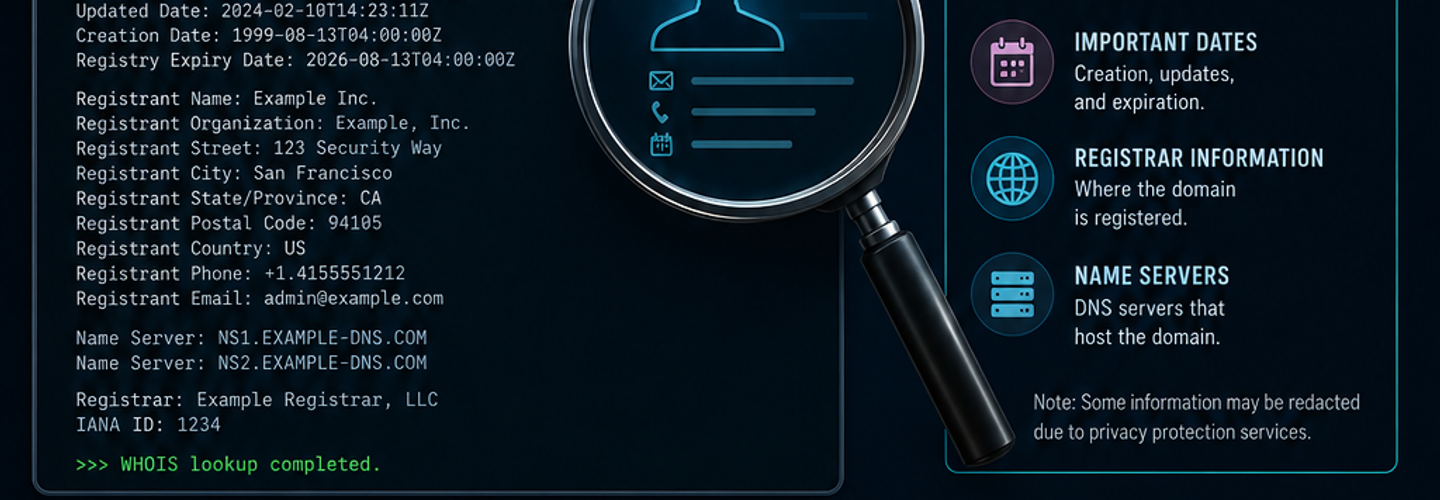
A complete WHOIS record contains the registrant contact data, administrative and technical contacts, registrar identification, three key registration dates, authoritative name servers, and EPP domain status codes — seven categories of data that collectively describe the full administrative and technical state of a domain registration.
Registrant data is the legal owner's contact information: name, organization, address, email, and phone. Since 2018, most registrars redact this for EEA-located registrants and many apply redaction by default globally, replacing it with privacy proxy contact details. Registrar information identifies the ICANN-accredited company that sold the registration, including their IANA Registrar ID and abuse contact email. Registration dates include the creation date (first registered), updated date (last modification), and expiry date (when the registration lapses if not renewed).
Name servers are the authoritative DNS servers for the domain — the field most directly relevant to operational security because unauthorized name server changes redirect all domain traffic. EPP status codes indicate which registry and registrar-level locks are active, determining whether the domain is protected against transfer, modification, and deletion. Missing lock codes represent auditable, immediately remediable security gaps. Audit your domain's current EPP status and name server configuration using the ReconShield WHOIS Checker alongside the DNS Security Analysis tool to cross-reference that live name servers match WHOIS-registered servers.
## How Do Security Teams Use WHOIS Data in Investigations?
Security teams apply WHOIS intelligence across four primary investigation workflows: phishing domain attribution, incident response IP investigation, domain hijacking detection, and third-party vendor security assessment. Each workflow extracts different fields from the same WHOIS record, applying them to distinct analytical questions.
Phishing domain investigation uses creation date, registrar identity, and name server patterns to rapidly determine whether a suspicious domain is newly registered malicious infrastructure or an established legitimate domain. A domain impersonating a major bank with a 3-day creation date, a consumer registrar known for permissive abuse policies, and name servers pointing to bulletproof hosting is classifiable as malicious within 30 seconds of a WHOIS lookup. Incident response uses WHOIS for IP address blocks to attribute connections seen in firewall and SIEM logs to ASN operators, enabling both blocking decisions and abuse report routing. The ReconShield IP Reputation Intelligence tool extends WHOIS IP data with live threat feed scoring and proxy detection for complete incident response attribution.
Domain hijacking detection monitors WHOIS records for unauthorized field changes — specifically name server modifications, EPP lock removal, and registrar account access events. Automated monitoring that compares live WHOIS output against a known-good baseline and alerts on any field change is the only reliable early-warning system for domain hijacking in progress. Third-party vendor assessment uses WHOIS data to objectively evaluate vendor infrastructure hygiene — checking whether vendor domains have appropriate EPP protections, examining creation dates of vendor-operated domains, and reviewing the registrar choices that determine the baseline security posture of vendor registration management. Complement WHOIS-based vendor assessment with passive port and DNS auditing using the Port Scanner and DNS Security Analysis tool.
## What Is the Difference Between WHOIS and RDAP?
RDAP (Registration Data Access Protocol) is the standards-based successor to legacy WHOIS that delivers structured JSON responses over encrypted HTTPS instead of unformatted plain text over TCP port 43 — addressing WHOIS's core limitations of inconsistent formatting across registries, lack of transport encryption, poor internationalization, and absence of granular access control.
Legacy WHOIS was defined in RFC 3912 (2004) as an extremely minimal protocol: a client opens a TCP connection to port 43, sends a query string, receives a text block, and the connection closes. The response format is entirely at each registry's discretion — meaning the same field (registrant email, name servers, creation date) appears at a different line number and with different label text across every TLD's WHOIS server. Parsing this data programmatically requires maintaining hundreds of registry-specific regex patterns that break whenever registrars update their output format.
RDAP, defined in RFC 7480-7485, replaces this with RESTful HTTPS queries against endpoints discovered through IANA bootstrap registries. Responses are standardized JSON with consistent field names across all compliant registries — any programming language can parse an RDAP response without registry-specific configuration. For security automation, this distinction is operationally significant: an automated SOAR playbook can reliably extract the creation date from any domain's RDAP response with a single JSON field access, compared to the brittle text parsing WHOIS automation requires. The full technical details of RDAP architecture and IANA bootstrap discovery are covered in the ReconShield complete WHOIS and RDAP guide.
## How Has GDPR Changed WHOIS Data Availability?
GDPR enforcement from 2018 onward has fundamentally changed what is available in public WHOIS records for most newly registered domains — requiring registrars to redact personally identifiable information from WHOIS outputs for EEA-located registrants, and causing most major global registrars to apply redaction as a default policy worldwide regardless of registrant location.
Before GDPR, WHOIS records for most domains contained the registrant's actual name, organization, physical address, email address, and phone number. This made domain ownership attribution straightforward for most investigation use cases — a security researcher could identify the individual or organization behind a phishing domain within seconds. Post-GDPR, public WHOIS records for the majority of newly registered domains display registrar proxy contact details rather than actual registrant information.
The practical impact on security investigations is significant but not fatal. The fields that remain visible — creation date, registrar identity, name servers, EPP status codes — are sufficient for the majority of active investigation triage decisions. Historical WHOIS archives that captured pre-GDPR registration data remain accessible through commercial and open-source databases, preserving a substantial fraction of pre-2018 registrant data. And ICANN's System for Standardized Access/Disclosure (SSAD) provides a formal channel for vetted security researchers and law enforcement to request non-public registration data from registrars. The GDPR impact is covered in full detail in the ReconShield WHOIS privacy protection guide.
## How to Perform a WHOIS Lookup: Step-by-Step
Running a productive WHOIS lookup takes under 60 seconds — the entire process from entering a domain name to interpreting the key security-relevant fields is straightforward once you know which fields matter most and what each one tells you.
Step 1: Navigate to the ReconShield WHOIS Intelligence tool and enter the target domain name or IP address. The tool queries both RDAP and legacy WHOIS endpoints and returns a normalized, clearly labeled record regardless of which protocol the target registry uses.
Step 2: Check the creation date immediately. A domain created within the last 30 days that is impersonating an established brand is almost certainly malicious infrastructure. A domain with a creation date of more than five years ago is far more likely to be legitimate — though not definitively so.
Step 3: Review the registrar identity. Enterprise organizations typically use registrars like CSC Global, MarkMonitor, or Network Solutions that offer registry-level lock support and enterprise security controls. Consumer registrars with permissive abuse policies and anonymous payment acceptance are disproportionately represented in malicious domain registrations.
Step 4: Examine the EPP status codes. A domain without clientTransferProhibited is vulnerable to registrar account compromise leading to unauthorized transfer. A domain without clientUpdateProhibited can have its name servers changed by any attacker who compromises the registrar account. Add missing locks through your registrar's control panel immediately.
Step 5: Cross-reference name servers against live DNS. The WHOIS record shows registrar-listed name servers. The ReconShield DNS Security Analysis tool shows the name servers that DNS resolvers are currently returning. Any discrepancy between the two is a potential sign of active name server hijacking — escalate immediately.
Step 6: For IP address lookups, note the RIR-registered organization and abuse contact. The organization field reveals whether the IP block is owned by the target enterprise directly, by a hosting provider serving them, or by an unrelated entity (indicating the IP may have been reassigned or compromised). The abuse contact is where you send reports of malicious activity originating from the address.
## Common WHOIS Investigation Mistakes and How to Avoid Them
The most common WHOIS investigation mistakes are over-relying on a single data source, misinterpreting privacy-redacted records as suspicious, ignoring EPP status codes, and failing to cross-reference WHOIS name servers against live DNS.
Over-relying on WHOIS alone produces incomplete intelligence. WHOIS data is one signal among many — it must be correlated with DNS records, IP reputation, certificate transparency data, and passive port intelligence to produce reliable conclusions. A domain with a 3-day creation date and bulletproof hosting name servers is conclusively suspicious. The same domain viewed in WHOIS isolation, with a redacted registrant and a consumer registrar, might be ambiguously classified as either a private individual's legitimate site or malicious infrastructure. The ReconShield passive reconnaissance guide covers how to integrate WHOIS into a complete multi-source investigation methodology.
Treating privacy redaction as inherently suspicious leads to false positives. The majority of newly registered domains have privacy protection active by default — it is the registrar default for most major providers, not a deliberate attempt to hide malicious activity. Privacy protection is neither a positive nor a negative signal on its own; it is the registration metadata that carries the actual intelligence value.
Ignoring EPP status codes on your own domains is an operational risk. Most domain owners have never reviewed the EPP status section of their own WHOIS record. A missing clientUpdateProhibited code is an exploitable gap that costs nothing to fix and takes five minutes to add through any registrar's control panel — yet it remains absent on a significant fraction of enterprise domains.
## Tools for WHOIS Intelligence and Domain Security
The ReconShield passive intelligence suite covers every WHOIS-adjacent investigation need — from registration data retrieval through DNS correlation, IP attribution, and certificate analysis:
WHOIS Intelligence Tool — Queries both RDAP and legacy WHOIS servers. Returns normalized domain registration records including EPP status, name servers, registrar identity, and all three date fields. Also supports IP address block lookups returning RIR network ownership and abuse contacts.
DNS Security Analysis Tool — Cross-references WHOIS-listed name servers against live DNS records. Validates SPF, DKIM, and DMARC email authentication. Detects DNSSEC status and DNS misconfigurations.
IP Reputation Intelligence Tool — Extends IP WHOIS data with live threat feed scoring, ASN classification, proxy and VPN detection, and multi-feed blacklist presence for complete IP address investigation.
SSL/TLS Checker — Audits TLS certificates for domains discovered through WHOIS investigation. Subject Alternative Names frequently reveal additional subdomains and infrastructure scope beyond the initially queried domain.
Passive Scanner Suite — Runs a complete, non-intrusive security audit across any domain — combining email authentication, SSL/TLS configuration, and HTTP security header analysis in a single workflow that complements WHOIS-based domain intelligence.
## What's Next: Automating WHOIS Monitoring for Domain Security
The evolution of WHOIS from an on-demand investigation tool to a continuous monitoring capability represents the current frontier of domain security operations — enabling organizations to detect domain hijacking, unauthorized registration changes, and brand-impersonation domains within minutes rather than hours or days.
Automated WHOIS monitoring polls authoritative registrar servers for changes to specific fields — name servers, EPP status codes, registrar identity — at regular intervals, comparing each response against a known-good baseline and triggering alerts on any deviation. For brand protection programs, automated monitoring of newly registered domains containing brand-name strings through daily WHOIS feed subscriptions enables preemptive blocking of phishing infrastructure before campaigns launch. The ReconShield WHOIS domain intelligence guide covers the full automation architecture for both self-monitoring and brand protection WHOIS workflows.
## Conclusion
A WHOIS lookup is simultaneously one of the simplest and most information-dense intelligence operations available to security teams — returning organizational context, administrative security posture, and infrastructure attribution in a single query that takes seconds to execute. Understanding what each field means, which fields remain visible despite GDPR redaction, and how to correlate WHOIS data with DNS, IP reputation, and certificate intelligence transforms it from a single-field lookup into a complete investigation starting point.
Start with your own domains. Run a WHOIS lookup on every domain your organization owns using the ReconShield WHOIS Intelligence tool. Check your EPP status codes. Verify your name servers match live DNS using the DNS Security Analysis tool. Confirm your IP reputation with the IP Reputation tool. Then run the passive scanner suite for the complete external security posture picture.
The data is publicly available, the lookups are instantaneous, and the findings are consistently more revealing than most organizations expect.
Written by Surendra Reddy Cybersecurity Researcher & Founder, ReconShield. Surendra specializes in OSINT, exposure intelligence, and AI-driven threat analysis. Author Profile →
Reviewed by ReconShield Editorial Team — Peer-reviewed for technical accuracy against IANA WHOIS/RDAP specifications and current ICANN registration policy.
## Analyst Commentary & Implementation Blueprint
Security advisory
Continuous security exposure assessment is critical to identifying public vulnerabilities before they are exploited. Organizations should maintain a passive inventory of all web servers, TLS configs, and open ports, ensuring that default configurations are eliminated and security advisories are actively implemented.
Hardened Security Configuration Blueprint
# General Security Hardening Directive
ServerTokens ProductOnly
ServerSignature Off
FileETag None
Actionable Mitigation Checklist
- ✔Perform passive asset inventories weekly.
- ✔Restrict administrative ports using local firewall controls.
- ✔Monitor active CVE alerts for exposed software.
Common Inquiries & FAQs
Why is passive scanning preferred for continuous auditing?
Passive audits do not cause operational impact or trigger firewall blocks, making them ideal for constant surveillance of internet-facing assets.
What should I do if a vulnerability is flagged?
Apply the latest vendor patches, restrict access to the resource via firewalls, or verify configuration flags to mitigate risks.
Surendra Reddy
Surendra Reddy is a cybersecurity researcher and founder of ReconShield, specializing in OSINT and defensive infrastructure analysis.
Connect on LinkedIn ↗// AUDIT BRIEFING DISCUSSION (2 COMMENTS)
Great breakdown of the passive infrastructure vectors. We recently audited our external DNS zones and found multiple dangling staging environments. Implementing wildcard certificates reduced our CT log leaks significantly.
Is there any automated tooling you recommend for daily crt.sh scraping? Manually checking CT logs is becoming unsustainable for our domain portfolio.
// MORE ARTICLES

SplitVPN Hacked: Data Breach Exposes 865,000 User Records and 58 Million Hidden Connection Logs (July 2026)
SplitVPN hacked: 865,336 user records and 58 million connection logs exposed, directly contradicting the VPN's "no-logs" promise. What was leaked and what to do now.

Critical WordPress wp2shell RCE Vulnerability Puts Millions of Sites at Risk—Patch Now
wp2shell is a pre-auth RCE in WordPress Core affecting 500M+ sites. Public exploits exist—patch to 7.0.2 or 6.9.5 immediately.
New Windows RDP Flaws Could Lead to Data Theft — Everything You Need to Know
Microsoft patched a dozen Windows RDP flaws in July 2026 that could leak memory data. See affected versions, KB numbers, and how to patch.